
🎉NEWCapSolver for AI agents-MCP, agent tools, and SDK integrations

Lucas Mitchell
Automation Engineer
Published Feb 03, 2026
Updated Feb 04, 2026 · min read
RoxyBrowser provides browser functionality through API calls and can be integrated with automation frameworks like Selenium, Puppeteer, and Playwright. Its API is designed to let you open real browser profiles programmatically and attach your automation tooling. The API has a documented rate limit of 100 calls per minute per endpoint.
Source: https://faq.roxybrowser.org/en/guide/10-API
CapSolver provides a create-and-poll API flow that returns a CAPTCHA token you can inject into the page. CapSolver supports multiple CAPTCHA types:
ReCaptchaV2TaskProxyLess, returns gRecaptchaResponseReCaptchaV3TaskProxyLess, returns gRecaptchaResponse with scoreAntiTurnstileTaskProxyLess, returns token Check the docsThis guide shows a practical, framework-agnostic flow: open a Roxy profile via API, attach your automation framework, solve the CAPTCHA with CapSolver, and inject the token to continue.
RoxyBrowser is an antidetect browser for multi-accounting with features like API automation and multi-window synchronizer.
For automation, the API is the most relevant piece:
It supports Selenium, Puppeteer, and Playwright integration.
Requests must include a token header.
Default API host is http://127.0.0.1:50000 (port change requires restart).
CapSolver solves CAPTCHAs through two API calls:
createTask to submit the CAPTCHA parametersgetTaskResult to poll until the token is readyFor reCAPTCHA v2, CapSolver returns gRecaptchaResponse.
getTaskResult is limited to 120 queries per task and must be called within 5 minutes of task creation.
By default, the host is http://127.0.0.1:50000. If you change the port, you must restart RoxyBrowser.
Use /browser/workspace to fetch workspaces, then /browser/list_v3 to list profiles.
import requests

BASE = "http://127.0.0.1:50000"
HEADERS = {"token": "YOUR_ROXY_API_KEY"}

workspaces = requests.get(f"{BASE}/browser/workspace", headers=HEADERS).json()
workspace_id = workspaces["data"]["rows"][0]["id"]

profiles = requests.get(
    f"{BASE}/browser/list_v3",
    params={"workspaceId": workspace_id},
    headers=HEADERS
).json()
dir_id = profiles["data"]["rows"][0]["dirId"]Call /browser/open. The response includes:
ws: WebSocket interface for automation toolshttp: HTTP interface for automation toolsdriver: WebDriver path for Selenium integrationHeadless mode is not supported.
open_resp = requests.post(
    f"{BASE}/browser/open",
    json={"workspaceId": workspace_id, "dirId": dir_id, "args": []},
    headers=HEADERS
).json()

ws_endpoint = open_resp["data"]["ws"]
http_endpoint = open_resp["data"]["http"]
driver_path = open_resp["data"]["driver"]Use the returned endpoints to attach your framework:
driver path with a debugger connection.The exact attach steps depend on your framework, but the ws, http, and driver values are explicitly provided for automation tools.
import time
import requests

CAPSOLVER_API_KEY = "YOUR_CAPSOLVER_API_KEY"
CAPSOLVER_BASE = "https://api.capsolver.com"

def create_task(task):
    payload = {"clientKey": CAPSOLVER_API_KEY, "task": task}
    r = requests.post(f"{CAPSOLVER_BASE}/createTask", json=payload)
    data = r.json()
    if data.get("errorId", 0) != 0:
        raise RuntimeError(data.get("errorDescription", "CapSolver error"))
    return data["taskId"]

def get_task_result(task_id, delay=2):
    while True:
        time.sleep(delay)
        r = requests.post(
            f"{CAPSOLVER_BASE}/getTaskResult",
            json={"clientKey": CAPSOLVER_API_KEY, "taskId": task_id}
        )
        data = r.json()
        if data.get("status") == "ready":
            return data["solution"]
        if data.get("status") == "failed":
            raise RuntimeError(data.get("errorDescription", "Task failed"))

def solve_recaptcha_v2(website_url, website_key):
    task = {
        "type": "ReCaptchaV2TaskProxyLess",
        "websiteURL": website_url,
        "websiteKey": website_key
    }
    task_id = create_task(task)
    solution = get_task_result(task_id)
    return solution.get("gRecaptchaResponse", "")

def solve_recaptcha_v3(website_url, website_key, page_action="verify"):
    task = {
        "type": "ReCaptchaV3TaskProxyLess",
        "websiteURL": website_url,
        "websiteKey": website_key,
        "pageAction": page_action
    }
    task_id = create_task(task)
    solution = get_task_result(task_id)
    return solution.get("gRecaptchaResponse", "")

def solve_turnstile(website_url, website_key, action=None, cdata=None):
    task = {
        "type": "AntiTurnstileTaskProxyLess",
        "websiteURL": website_url,
        "websiteKey": website_key
    }
    # Add optional metadata if provided
    if action or cdata:
        task["metadata"] = {}
        if action:
            task["metadata"]["action"] = action
        if cdata:
            task["metadata"]["cdata"] = cdata

    task_id = create_task(task)
    solution = get_task_result(task_id)
    return solution.get("token", "")
For Reference:
Open a Roxy profile via /browser/open and attach your automation framework.
Navigate to the target page and extract the site key.
Example:
const siteKey = document.querySelector(".g-recaptcha")?.getAttribute("data-sitekey");Solve with CapSolver using the helper above.
Inject the token and submit the form:
const token = "CAPSOLVER_TOKEN";
const el = document.getElementById("g-recaptcha-response");
el.style.display = "block";
el.value = token;
el.dispatchEvent(new Event("input", { bubbles: true }));
el.dispatchEvent(new Event("change", { bubbles: true }));reCAPTCHA v3 works differently - it runs in the background and returns a score (0.0 to 1.0) instead of requiring user interaction.
Extract the site key and action from the page:
// Site key is usually in a script or meta tag
const siteKey = document.querySelector('[data-sitekey]')?.getAttribute('data-sitekey');

// Action is found in grecaptcha.execute calls
// Search page source for: grecaptcha.execute('KEY', {action: 'ACTION'})
const pageAction = "submit"; // or "login", "register", etc.
Solve with CapSolver:
token = solve_recaptcha_v3(
    website_url="https://example.com/login",
    website_key="6LcxxxxxxxxxxxxxxxxxxxxxxxxxxxxxxxxxxxxAA",
    page_action="login"
)
Inject the token (same as v2):
const token = "CAPSOLVER_TOKEN";
document.getElementById("g-recaptcha-response").value = token;

// If there's a callback, trigger it
if (typeof ___grecaptcha_cfg !== 'undefined') {
    const clients = ___grecaptcha_cfg.clients;
    Object.keys(clients).forEach(key => {
        if (clients[key].callback) {
            clients[key].callback(token);
        }
    });
}Cloudflare Turnstile is a modern CAPTCHA alternative that's faster to solve (1-20 seconds).
Extract the Turnstile site key:
const siteKey = document.querySelector('.cf-turnstile')?.getAttribute('data-sitekey');
// Optional: extract action and cdata if present
const action = document.querySelector('.cf-turnstile')?.getAttribute('data-action');
const cdata = document.querySelector('.cf-turnstile')?.getAttribute('data-cdata');
Solve with CapSolver:
token = solve_turnstile(
    website_url="https://example.com",
    website_key="0x4AAAAAAAxxxxxxxxxxxxxxx",
    action=action,  # optional
    cdata=cdata     # optional
)
Inject the Turnstile token:
const token = "CAPSOLVER_TURNSTILE_TOKEN";

// Find the Turnstile response input
const input = document.querySelector('input[name="cf-turnstile-response"]');
if (input) {
    input.value = token;
    input.dispatchEvent(new Event('input', { bubbles: true }));
    input.dispatchEvent(new Event('change', { bubbles: true }));
}

// Alternative: some sites use a different input name
const altInput = document.querySelector('input[name="turnstile-response"]');
if (altInput) {
    altInput.value = token;
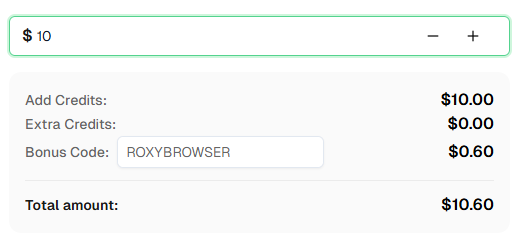
}getTaskResult is limited to 120 polls within 5 minutes.Ready to get started? Sign up for CapSolver and use bonus code ROXYBROWSER for an extra 6% bonus on your first recharge!
Does RoxyBrowser support Selenium, Puppeteer, and Playwright?
Yes. The API is designed for integration with these frameworks.
Where do I get the API token and host?
From API -> API Configuration in RoxyBrowser. The default host is http://127.0.0.1:50000.
What does /browser/open return?
It returns ws, http, and driver fields used by automation tools.
Is headless supported?
No, headless mode is not supported.
What CAPTCHA types does CapSolver support?
How does CapSolver return reCAPTCHA v2 tokens?
Create a task with ReCaptchaV2TaskProxyLess and poll getTaskResult for gRecaptchaResponse.
How does reCAPTCHA v3 differ from v2?
reCAPTCHA v3 runs in the background without user interaction and returns a score (0.0-1.0). It requires the pageAction parameter, which can be found by searching for grecaptcha.execute in the page source.
How do I solve Cloudflare Turnstile?
Use task type AntiTurnstileTaskProxyLess with websiteURL and websiteKey. Optionally include metadata.action and metadata.cdata if present on the widget. Turnstile solves in 1-20 seconds.
Further Reading:
How do I find the Turnstile site key?
Look for the data-sitekey attribute on the .cf-turnstile element. Turnstile site keys start with 0x4.
Do I need a proxy for CapSolver?
No, the *ProxyLess task types use CapSolver's built-in proxy infrastructure. Use the non-ProxyLess variants if you need to use your own proxies.
RoxyBrowser gives you a profile-based browser environment with automation endpoints, and CapSolver provides programmatic CAPTCHA tokens. By opening a Roxy profile, attaching your framework, and injecting CapSolver tokens, you can build reliable CAPTCHA-aware automation flows.
Lucas Mitchell
Automation Engineer
Helping browser automation recover and continue.
ABOUT THE AUTHOR
Learn scalable Rust web scraping architecture with reqwest, scraper, async scraping, headless browser scraping, proxy rotation, and compliant CAPTCHA handling.
Learn the best techniques to scrape job listings without getting blocked. Master Indeed scraping, Google Jobs API, and web scraping API with CapSolver.
