🎉NEWCapSolver for AI agents-MCP, agent tools, and SDK integrations

Lucas Mitchell
Automation Engineer
Published Apr 22, 2026
Updated Apr 22, 2026 · min read
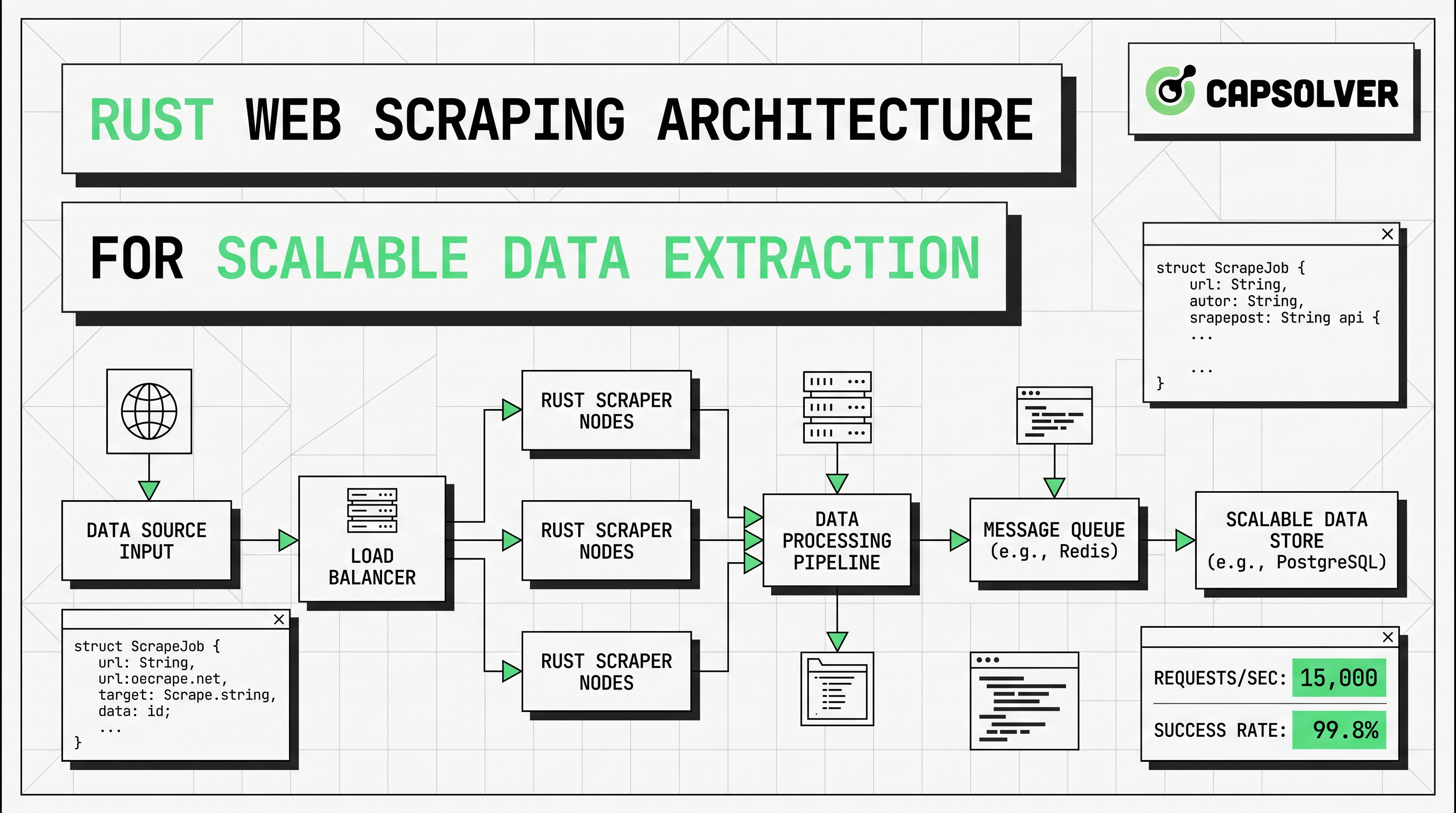
reqwest and scraper cover many static targets with lower resource cost and cleaner maintenance.Rust web scraping is most effective when it is designed as an architecture, not as a single script. This article is for engineers, data teams, and technical operators who need reliable extraction at scale. The main conclusion comes first: the best Rust web scraping systems keep the fast path simple with reqwest and scraper, then add async scraping, headless browser scraping, proxy rotation, and challenge handling only when the target actually requires them. That structure reduces cost, improves stability, and makes long-running pipelines easier to observe.
Rust web scraping is a strong choice for large extraction jobs because it combines memory safety with predictable performance. Those qualities matter when a worker may process thousands of pages, parse unstable markup, and write normalized records for hours at a time.
Most articles in the top search results explain how to fetch one page and parse a selector. That material is useful, but it rarely answers the harder question. What should the full Rust web scraping architecture look like when you need resilience, observability, and room to scale?
A production design usually needs an HTTP fetch layer, a parsing layer, a rendering branch for JavaScript pages, a storage layer, and an operational layer for retries, metrics, and request pacing. The right order is also important. Start with the cheapest path first. Fetch raw HTML. Parse only the fields you need. Escalate to headless browser scraping only when server HTML does not contain the target data. Add proxy rotation only when traffic distribution or regional access is necessary. Add CAPTCHA handling only when a compliant automation flow has a valid reason to continue.
For teams planning those boundaries, web crawling and web scraping helps clarify scope, and how to extract structured data is a useful internal read before field mapping begins.
Rust web scraping usually starts with three building blocks: reqwest, scraper, and Tokio. The official reqwest documentation describes reqwest as a higher-level HTTP client with async support, cookies, redirects, TLS, and proxy support. That makes it a practical transport layer for Rust web scraping.
The official Tokio async tutorial explains why futures and the executor model fit high-concurrency I/O workloads. That matters because Rust web scraping spends most of its time waiting on remote servers rather than burning CPU on local computation.
reqwest should sit in the transport layer. Reuse a single client per worker or worker group. That keeps connection pooling effective and gives you one place to define headers, timeouts, cookies, and proxy policy.
use reqwest::Client;
use scraper::{Html, Selector};

#[tokio::main]
async fn main() -> Result<(), Box<dyn std::error::Error>> {
    let client = Client::builder()
        .user_agent("Mozilla/5.0")
        .build()?;

    let html = client
        .get("https://example.com")
        .send()
        .await?
        .error_for_status()?
        .text()
        .await?;

    let document = Html::parse_document(&html);
    let card = Selector::parse("article")?;

    for node in document.select(&card) {
        println!("{}", node.text().collect::<Vec<_>>().join(" "));
    }

    Ok(())
}
This pattern keeps Rust web scraping efficient on static pages. It also makes error handling easier to standardize. Status checks, retry budgets, and structured logs can all live around the request layer instead of being mixed into parser code.
scraper belongs in a parser layer that stays small and testable. Do not mix selectors with network logic if you expect templates to change. A strong parser accepts raw HTML and returns typed records, partial records, or a clear extraction error.
That separation matters because selector drift is common. Classes change. Text moves into attributes. Decorative nodes appear between target elements. In Rust web scraping, parser isolation makes those breaks visible in tests before the whole pipeline starts writing incomplete data.
Async scraping is one of the main reasons Rust web scraping can scale well on modest infrastructure. The runtime does not make websites respond faster. It makes workers more efficient while many requests are waiting on network or origin response.
A scalable Rust web scraping pipeline often follows the structure below.
| Layer | Role | Rust default | Main risk |
|---|---|---|---|
| Scheduler | Chooses URLs and priority | queue or channels | burst traffic |
| Fetcher | Sends HTTP requests | reqwest::Client |
403, 429, timeout |
| Parser | Extracts fields | scraper selectors |
template drift |
| Renderer | Loads JS pages | headless browser scraping | CPU and memory cost |
| Challenge layer | Handles permitted CAPTCHA events | CapSolver fallback | wrong task type |
| Storage | Writes normalized output | JSON, CSV, DB | schema mismatch |
| Observability | Tracks health and quality | logs, tracing, metrics | silent data loss |
The key design rule is selective escalation. Start every target on the low-cost path. If the returned HTML already contains the data, stay with reqwest and scraper. If the target fields only appear after hydration, client-side rendering, or browser events, route only that page type to headless browser scraping. If bot protection or CAPTCHA checks appear inside an approved workflow, route only those events to a narrow fallback branch.
This is where many systems become wasteful. Teams default to browser automation for every request. That increases cost, lowers concurrency, and makes failures harder to classify. The HTTP Archive State of JavaScript report shows that modern pages remain heavily dependent on JavaScript, with a median desktop JavaScript transfer size of 803.3 KB and 23 external script requests in the selected report view. That explains why some targets need rendering, but it does not justify using browsers for every page.
Headless browser scraping is necessary when the data is created after the initial HTML response. Common signals include empty server HTML, content injected after hydration, infinite scroll lists, or pages that reveal fields only after user interaction.
Rust web scraping should treat browser rendering as a separate branch rather than a universal baseline. Use it for product grids that populate after client requests, dashboards rendered in the browser, or interfaces where key content is hidden behind clicks and scroll logic. Keep the browser pool small, and isolate it from your main async HTTP workers.
A practical decision rule is simple. If the data is present in the raw HTML, stay with reqwest and scraper. If the fields appear only after JavaScript execution, move that route to headless browser scraping. If the same target also applies bot protection controls, then review network policy, browser behavior, and fallback requirements together instead of patching them one by one.
For related internal reading, browser automation for developers and automating CAPTCHA solving in headless browsers fit naturally into this layered model.
Rust web scraping always has limits. Some are technical. Others are legal or operational. The technical side includes IP reputation, session handling, browser fingerprint checks, hidden APIs, and layered bot protection. The operational side includes request pacing, error budgets, and traffic impact on the target site.
That is why compliance must be built into the architecture. The Google Search Central robots.txt guide explains that robots.txt is mainly used to manage crawler traffic and avoid overloading sites. That point matters for Rust web scraping because a well-designed system is not only trying to extract data. It is also trying to control load, reduce unnecessary requests, and keep collection behavior reasonable.
When legitimate automation flows encounter CAPTCHA steps, CapSolver is relevant as a focused fallback service. The safest approach is to follow the official docs rather than inventing custom request formats. The CapSolver createTask documentation shows the standard request body pattern below.
POST https://api.capsolver.com/createTask
Host: api.capsolver.com
Content-Type: application/json

{
    "clientKey":"YOUR_API_KEY",
    "appId": "APP_ID",
    "task": {
        "type":"ImageToTextTask",
        "body":"BASE64 image"
    }
}
The same official flow returns a taskId for asynchronous tasks, which should then be checked through getTaskResult. In a scalable Rust web scraping system, that challenge logic should remain outside the standard fetch-and-parse path so normal requests stay fast and easy to monitor.
Redeem Your CapSolver Bonus Code
Boost your automation budget instantly!
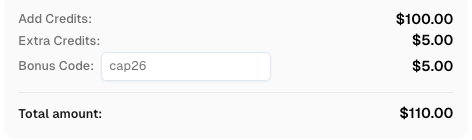
Use bonus code CAP26 when topping up your CapSolver account to get an extra 5% bonus on every recharge — with no limits.
Redeem it now in your CapSolver Dashboard
Scaling Rust web scraping is mostly about control, not code volume. The architecture should enforce per-domain concurrency, retry ceilings, timeout budgets, and output validation. Without those controls, faster workers simply create faster failure.
Proxy rotation belongs in the transport layer rather than the parsing layer. Use it when requests need distribution across IP addresses for rate balance, regional access, or workload isolation. Keep the policy specific. Rotate by domain, endpoint class, or workload type. Avoid random proxy churn that breaks session continuity and adds noise to debugging.
This is also where internal supporting resources become useful. Best proxy services can help evaluate network strategy, while web scraping legal is a useful internal checkpoint before expanding collection volume.
The strongest Rust web scraping systems also measure extraction quality directly. Track success rate, empty-field rate, selector drift, render ratio, median fetch latency, and cost per successful record. These metrics show when a simple HTML path is still enough and when headless browser scraping, proxy rotation, or challenge handling is becoming too expensive.
| Approach | Best use case | Cost profile | Reliability profile | Notes |
|---|---|---|---|---|
reqwest + scraper |
static or lightly dynamic pages | low | high when selectors are stable | best default for Rust web scraping |
| Async scraping with Tokio workers | many I/O-bound URLs | low to medium | high with rate limits | improves throughput, not parser quality |
| Headless browser scraping | JavaScript-rendered pages | high | medium | isolate it in a small pool |
| Proxy rotation | distributed rate control and geo access | medium | medium | useful when traffic identity matters |
| CapSolver fallback | permitted CAPTCHA events in automation flows | event-based | medium to high | keep the implementation aligned with official docs |
Rust web scraping scales when the architecture stays selective. Use reqwest and scraper for the fast path. Add async scraping when you need more throughput on network-bound jobs. Reserve headless browser scraping for pages that truly need rendering. Keep proxy rotation and challenge handling as controlled fallback layers. This design keeps costs lower, improves observability, and makes parser maintenance much easier.
If your current pipeline routes every page through a browser, the cleanest improvement is usually a path split. Move static targets back to simple HTTP. Keep JavaScript pages in a smaller rendering branch. Keep challenge logic isolated. That change alone often improves both reliability and unit economics.
Rust web scraping is often a strong choice when long-running stability, concurrency, and memory safety matter most. Python still has a broader scraping ecosystem, but Rust is attractive when worker efficiency and predictable performance are the main priorities.
reqwest to headless browser scraping?Switch only when server HTML does not contain the fields you need. If the target data appears after hydration, client-side events, or delayed API requests, headless browser scraping becomes justified.
Async scraping helps Rust web scraping handle many waiting requests with fewer wasted resources. It improves throughput for I/O-bound work, but it still requires rate limits, retry logic, and parser tests.
No. Many jobs work well without it. Proxy rotation matters when you need regional access, per-domain traffic distribution, or lower concentration from a single IP range.
Keep CAPTCHA handling narrow, documented, and separate from the normal fetch path. If a legitimate automation workflow requires it, use the official CapSolver task flow and keep the implementation consistent with the published documentation.
Lucas Mitchell
Automation Engineer
Helping browser automation recover and continue.
ABOUT THE AUTHOR
Learn the best techniques to scrape job listings without getting blocked. Master Indeed scraping, Google Jobs API, and web scraping API with CapSolver.
Understand why Chrome blocks websites, from security features like Safe Browsing and SSL checks to common errors like ERR_CONNECTION_REFUSED. Learn how these impact automation and strategies for legitimate access, including CAPTCHA solving with CapSolver.