
🎉NEWCapSolver for AI agents-MCP, agent tools, and SDK integrations

Ethan Collins
AI Agent Workflow Engineer
Published Dec 22, 2025
Updated Dec 23, 2025 · min read
TL;DR: CrewAI workflows often meet Captcha; integrating CapSolver allows automated scripts to solve them efficiently.
When automating tasks with CrewAI, such as web scraping or browsing, CAPTCHAs can easily block your workflow. These challenges are common when accessing protected websites and can interrupt even well-designed automation scripts.
CapSolver offers a reliable way to handle CAPTCHAs, letting CrewAI continue its tasks without manual intervention. By integrating CapSolver, you can streamline automated browsing and data collection while staying compliant with website protections.
CrewAI is a lean, lightning-fast Python framework for building autonomous AI agent systems. Built entirely from scratch—completely independent of LangChain or other agent frameworks—CrewAI offers both high-level ease of use and granular customization capabilities.
CrewAI operates on two complementary paradigms:
| Component | Description |
|---|---|
| Crews | Multi-agent teams that collaborate autonomously, enabling flexible problem-solving with specialized roles |
| Flows | Event-driven workflows offering precise execution control for complex business logic |
CapSolver is a leading CAPTCHA solving service that provides AI-powered solutions for bypassing various CAPTCHA challenges. With support for multiple CAPTCHA types and lightning-fast response times, CapSolver integrates seamlessly into automated workflows.
When building CrewAI agents that interact with websites—whether for data collection, automated testing, or content aggregation—CAPTCHA challenges become a significant obstacle. Here's why the integration matters:
First, install the required packages:
pip install crewai
pip install 'crewai[tools]'
pip install requestsCrewAI allows you to create custom tools that agents can use to accomplish their tasks. Here's how to create a CapSolver tool for handling CAPTCHA challenges:
import requests
import time
from crewai.tools import BaseTool
from typing import Type
from pydantic import BaseModel, Field

CAPSOLVER_API_KEY = "YOUR_CAPSOLVER_API_KEY"

class CaptchaSolverInput(BaseModel):
    """Input schema for CaptchaSolver tool."""
    website_url: str = Field(..., description="The URL of the website with CAPTCHA")
    website_key: str = Field(..., description="The site key of the CAPTCHA")
    captcha_type: str = Field(default="ReCaptchaV2TaskProxyLess", description="Type of CAPTCHA to solve")

class CaptchaSolverTool(BaseTool):
    name: str = "captcha_solver"
    description: str = "Solves CAPTCHA challenges using CapSolver API. Supports reCAPTCHA v2, v3, Turnstile, and more."
    args_schema: Type[BaseModel] = CaptchaSolverInput

    def _run(self, website_url: str, website_key: str, captcha_type: str = "ReCaptchaV2TaskProxyLess") -> str:
        # Create task
        create_task_url = "https://api.capsolver.com/createTask"

        task_payload = {
            "clientKey": CAPSOLVER_API_KEY,
            "task": {
                "type": captcha_type,
                "websiteURL": website_url,
                "websiteKey": website_key
            }
        }

        response = requests.post(create_task_url, json=task_payload)
        result = response.json()

        if result.get("errorId") != 0:
            return f"Error creating task: {result.get('errorDescription')}"

        task_id = result.get("taskId")

        # Poll for result
        get_result_url = "https://api.capsolver.com/getTaskResult"

        for _ in range(60):  # Max 60 attempts
            time.sleep(2)

            result_payload = {
                "clientKey": CAPSOLVER_API_KEY,
                "taskId": task_id
            }

            response = requests.post(get_result_url, json=result_payload)
            result = response.json()

            if result.get("status") == "ready":
                solution = result.get("solution", {})
                return solution.get("gRecaptchaResponse") or solution.get("token")
            elif result.get("status") == "failed":
                return f"Task failed: {result.get('errorDescription')}"

return "Timeout waiting for CAPTCHA solution"import requests
import time
from crewai.tools import BaseTool
from typing import Type
from pydantic import BaseModel, Field
CAPSOLVER_API_KEY = "YOUR_CAPSOLVER_API_KEY"
class ReCaptchaV2Input(BaseModel):
"""Input schema for reCAPTCHA v2 solver."""
website_url: str = Field(..., description="The URL of the website with reCAPTCHA v2")
website_key: str = Field(..., description="The site key of the reCAPTCHA")
class ReCaptchaV2Tool(BaseTool):
name: str = "recaptcha_v2_solver"
description: str = "Solves reCAPTCHA v2 challenges using CapSolver"
args_schema: Type[BaseModel] = ReCaptchaV2Input
def _run(self, website_url: str, website_key: str) -> str:
payload = {
"clientKey": CAPSOLVER_API_KEY,
"task": {
"type": "ReCaptchaV2TaskProxyLess",
"websiteURL": website_url,
"websiteKey": website_key
}
}
return self._solve_captcha(payload)
def _solve_captcha(self, payload: dict) -> str:
# Create task
response = requests.post("https://api.capsolver.com/createTask", json=payload)
result = response.json()
if result.get("errorId") != 0:
return f"Error: {result.get('errorDescription')}"
task_id = result.get("taskId")
# Poll for result
for attempt in range(60):
time.sleep(2)
result = requests.post(
"https://api.capsolver.com/getTaskResult",
json={"clientKey": CAPSOLVER_API_KEY, "taskId": task_id}
).json()
if result.get("status") == "ready":
return result["solution"]["gRecaptchaResponse"]
if result.get("status") == "failed":
return f"Failed: {result.get('errorDescription')}"
return "Timeout waiting for solution"import requests
import time
from crewai.tools import BaseTool
from typing import Type
from pydantic import BaseModel, Field
CAPSOLVER_API_KEY = "YOUR_CAPSOLVER_API_KEY"
class ReCaptchaV3Input(BaseModel):
"""Input schema for reCAPTCHA v3 solver."""
website_url: str = Field(..., description="The URL of the website with reCAPTCHA v3")
website_key: str = Field(..., description="The site key of the reCAPTCHA")
page_action: str = Field(default="submit", description="The action parameter for reCAPTCHA v3")
class ReCaptchaV3Tool(BaseTool):
name: str = "recaptcha_v3_solver"
description: str = "Solves reCAPTCHA v3 challenges with score-based verification"
args_schema: Type[BaseModel] = ReCaptchaV3Input
def _run(
self,
website_url: str,
website_key: str,
page_action: str = "submit"
) -> str:
payload = {
"clientKey": CAPSOLVER_API_KEY,
"task": {
"type": "ReCaptchaV3TaskProxyLess",
"websiteURL": website_url,
"websiteKey": website_key,
"pageAction": page_action
}
}
# Create task
response = requests.post("https://api.capsolver.com/createTask", json=payload)
result = response.json()
if result.get("errorId") != 0:
return f"Error: {result.get('errorDescription')}"
task_id = result.get("taskId")
# Poll for result
for attempt in range(60):
time.sleep(2)
result = requests.post(
"https://api.capsolver.com/getTaskResult",
json={"clientKey": CAPSOLVER_API_KEY, "taskId": task_id}
).json()
if result.get("status") == "ready":
return result["solution"]["gRecaptchaResponse"]
if result.get("status") == "failed":
return f"Failed: {result.get('errorDescription')}"
return "Timeout waiting for solution"import requests
import time
from crewai.tools import BaseTool
from typing import Type
from pydantic import BaseModel, Field
CAPSOLVER_API_KEY = "YOUR_CAPSOLVER_API_KEY"
class TurnstileInput(BaseModel):
"""Input schema for Turnstile solver."""
website_url: str = Field(..., description="The URL of the website with Turnstile")
website_key: str = Field(..., description="The site key of the Turnstile widget")
class TurnstileTool(BaseTool):
name: str = "turnstile_solver"
description: str = "Solves Cloudflare Turnstile challenges"
args_schema: Type[BaseModel] = TurnstileInput
def _run(self, website_url: str, website_key: str) -> str:
payload = {
"clientKey": CAPSOLVER_API_KEY,
"task": {
"type": "AntiTurnstileTaskProxyLess",
"websiteURL": website_url,
"websiteKey": website_key
}
}
# Create task
response = requests.post("https://api.capsolver.com/createTask", json=payload)
result = response.json()
if result.get("errorId") != 0:
return f"Error: {result.get('errorDescription')}"
task_id = result.get("taskId")
# Poll for result
for attempt in range(60):
time.sleep(2)
result = requests.post(
"https://api.capsolver.com/getTaskResult",
json={"clientKey": CAPSOLVER_API_KEY, "taskId": task_id}
).json()
if result.get("status") == "ready":
return result["solution"]["token"]
if result.get("status") == "failed":
return f"Failed: {result.get('errorDescription')}"
return "Timeout waiting for solution"import requests
import time
from crewai.tools import BaseTool
from typing import Type
from pydantic import BaseModel, Field
CAPSOLVER_API_KEY = "YOUR_CAPSOLVER_API_KEY"
class CloudflareChallengeInput(BaseModel):
"""Input schema for Cloudflare Challenge solver."""
website_url: str = Field(..., description="The URL of the protected page")
proxy: str = Field(..., description="Proxy in format: http://user:pass@ip:port")
class CloudflareChallengeTool(BaseTool):
name: str = "cloudflare_challenge_solver"
description: str = "Solves Cloudflare 5-second challenge pages"
args_schema: Type[BaseModel] = CloudflareChallengeInput
def _run(self, website_url: str, proxy: str) -> dict:
payload = {
"clientKey": CAPSOLVER_API_KEY,
"task": {
"type": "AntiCloudflareTask",
"websiteURL": website_url,
"proxy": proxy
}
}
# Create task
response = requests.post("https://api.capsolver.com/createTask", json=payload)
result = response.json()
if result.get("errorId") != 0:
return f"Error: {result.get('errorDescription')}"
task_id = result.get("taskId")
# Poll for result
for attempt in range(60):
time.sleep(3)
result = requests.post(
"https://api.capsolver.com/getTaskResult",
json={"clientKey": CAPSOLVER_API_KEY, "taskId": task_id}
).json()
if result.get("status") == "ready":
return {
"cookies": result["solution"]["cookies"],
"user_agent": result["solution"]["userAgent"]
}
if result.get("status") == "failed":
return f"Failed: {result.get('errorDescription')}"
return "Timeout waiting for solution"Each CAPTCHA type requires a different submission method:
For reCAPTCHA, inject the token into the hidden textarea and submit the form:
from selenium import webdriver
from selenium.webdriver.common.by import By

def submit_recaptcha_token(driver, token: str):
    """Inject reCAPTCHA token and submit"""
    # Make the hidden textarea visible and set the token
    recaptcha_response = driver.find_element(By.ID, "g-recaptcha-response")
    driver.execute_script("arguments[0].style.display = 'block';", recaptcha_response)
    recaptcha_response.clear()
    recaptcha_response.send_keys(token)

    # Submit the form
    form = driver.find_element(By.TAG_NAME, "form")
form.submit()For Turnstile, set the token in the hidden input:
def submit_turnstile_token(driver, token: str):
    """Inject Turnstile token and submit"""
    # Set token in the hidden input
    turnstile_input = driver.find_element(By.NAME, "cf-turnstile-response")
    driver.execute_script("arguments[0].value = arguments[1];", turnstile_input, token)

    # Submit the form
    form = driver.find_element(By.TAG_NAME, "form")
form.submit()For Cloudflare Challenge (5s), CapSolver returns cookies and user-agent instead of a token. Use these in your requests:
import requests

def access_cloudflare_protected_page(url: str, cf_solution: dict):
    """
    Use Cloudflare Challenge solution to access protected page.
    cf_solution contains 'cookies' and 'user_agent' from CapSolver.
    """
    # Create session with the solved cookies
    session = requests.Session()

    # Set the cookies from CapSolver solution
    for cookie in cf_solution["cookies"]:
        session.cookies.set(cookie["name"], cookie["value"])

    # Set the user agent that was used to solve
    headers = {
        "User-Agent": cf_solution["user_agent"]
    }

    # Now you can access the protected page
    response = session.get(url, headers=headers)
return response.textimport requests
import time
from selenium import webdriver
from selenium.webdriver.common.by import By
CAPSOLVER_API_KEY = "YOUR_CAPSOLVER_API_KEY"
def solve_recaptcha(website_url: str, website_key: str) -> str:
"""Get reCAPTCHA token from CapSolver"""
payload = {
"clientKey": CAPSOLVER_API_KEY,
"task": {
"type": "ReCaptchaV2TaskProxyLess",
"websiteURL": website_url,
"websiteKey": website_key
}
}
response = requests.post("https://api.capsolver.com/createTask", json=payload)
result = response.json()
if result.get("errorId") != 0:
raise Exception(f"Error: {result.get('errorDescription')}")
task_id = result.get("taskId")
for _ in range(60):
time.sleep(2)
result = requests.post(
"https://api.capsolver.com/getTaskResult",
json={"clientKey": CAPSOLVER_API_KEY, "taskId": task_id}
).json()
if result.get("status") == "ready":
return result["solution"]["gRecaptchaResponse"]
if result.get("status") == "failed":
raise Exception(f"Failed: {result.get('errorDescription')}")
raise Exception("Timeout")
def scrape_with_recaptcha(target_url: str, site_key: str):
"""Full flow: solve reCAPTCHA → submit → scrape"""
driver = webdriver.Chrome()
driver.get(target_url)
try:
# 1. Solve CAPTCHA
token = solve_recaptcha(target_url, site_key)
# 2. Inject token
recaptcha_response = driver.find_element(By.ID, "g-recaptcha-response")
driver.execute_script("arguments[0].style.display = 'block';", recaptcha_response)
recaptcha_response.clear()
recaptcha_response.send_keys(token)
# 3. Submit form
driver.find_element(By.TAG_NAME, "form").submit()
# 4. Scrape content
time.sleep(3) # Wait for page load
return driver.page_source
finally:
driver.quit()For scenarios requiring browser automation within CrewAI, you can utilize the CapSolver browser extension:
Download the Extension: Get the CapSolver extension from capsolver.com
Configure with Selenium/Playwright: Load the extension in your browser automation tool
Auto-Solve Mode: The extension automatically detects and solves CAPTCHAs
from selenium import webdriver
from selenium.webdriver.chrome.options import Options

# Configure Chrome with CapSolver extension
chrome_options = Options()
chrome_options.add_extension("path/to/capsolver-extension.crx")

driver = webdriver.Chrome(options=chrome_options)

# The extension will automatically handle CAPTCHAs
driver.get("https://example.com/protected-page")def solve_with_retry(self, payload: dict, max_retries: int = 3) -> str:
for attempt in range(max_retries):
try:
result = self._solve_captcha(payload)
if result:
return result
except Exception as e:
if attempt == max_retries - 1:
raise
time.sleep(2 ** attempt) # Exponential backoffdef check_balance() -> float:
response = requests.post(
"https://api.capsolver.com/getBalance",
json={"clientKey": CAPSOLVER_API_KEY}
)
return response.json().get("balance", 0)For repeated access to the same pages, cache CAPTCHA tokens when appropriate:
from functools import lru_cache
from datetime import datetime, timedelta

captcha_cache = {}

def get_cached_token(website_url: str, website_key: str) -> str:
    cache_key = f"{website_url}:{website_key}"

    if cache_key in captcha_cache:
        token, timestamp = captcha_cache[cache_key]
        if datetime.now() - timestamp < timedelta(minutes=2):
            return token

    # Solve new CAPTCHA
    new_token = solve_captcha(website_url, website_key)
    captcha_cache[cache_key] = (new_token, datetime.now())
return new_tokenIntegrating CapSolver with CrewAI unlocks the full potential of autonomous AI agents for web-based tasks. By combining CrewAI's powerful multi-agent orchestration with CapSolver's industry-leading CAPTCHA solving capabilities, developers can build robust automation solutions that handle even the most challenging web protection mechanisms.
Whether you're building data extraction pipelines, automated testing frameworks, or intelligent web agents, the CrewAI + CapSolver combination provides the reliability and scalability needed for production environments.
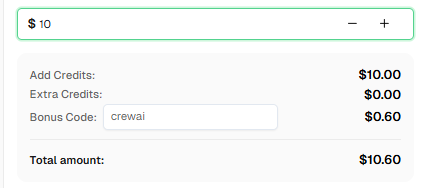
Ready to get started? Sign up for CapSolver and use bonus code CREWAI for an extra 6% bonus on your every recharge!
CrewAI is a lean, lightning-fast Python framework for building autonomous AI agent systems. It enables developers to create crews of AI agents that collaborate to accomplish complex tasks, with support for both autonomous decision-making and precise workflow control.
CapSolver integrates with CrewAI through custom tools. You create a tool that wraps the CapSolver API, allowing your AI agents to automatically solve CAPTCHA challenges when they encounter them during web operations.
CapSolver supports a wide range of CAPTCHA types including reCAPTCHA v2, reCAPTCHA v3,Cloudflare Turnstile, Cloudflare Challenge, AWS WAF, GeeTest and many more.
CapSolver offers competitive pricing based on the type and volume of CAPTCHAs solved. Visit capsolver.com for current pricing details. Use code CREWAI for a 6% bonus on your first recharge.
Yes! CapSolver provides a REST API that can be integrated with any Python framework, including Scrapy, Selenium, Playwright, and more.
Yes, CrewAI is open-source and released under the MIT license. The framework is free to use, though you may incur costs for LLM API calls (like OpenAI) and CAPTCHA solving services like CapSolver.
The site key is typically found in the page's HTML source. Look for:
data-sitekey attribute or grecaptcha.render() calldata-sitekey attributedata-sitekey attribute in the Turnstile widgetEthan Collins
AI Agent Workflow Engineer
Building clearer handoffs between AI agents and tools.
ABOUT THE AUTHOR
Learn scalable Rust web scraping architecture with reqwest, scraper, async scraping, headless browser scraping, proxy rotation, and compliant CAPTCHA handling.

Learn the best techniques to scrape job listings without getting blocked. Master Indeed scraping, Google Jobs API, and web scraping API with CapSolver.