
🎉NEWCapSolver for AI agents-MCP, agent tools, and SDK integrations

Nikolai Smirnov
Software Development Lead
Published Sep 21, 2026
Updated Sep 20, 2026 · min read
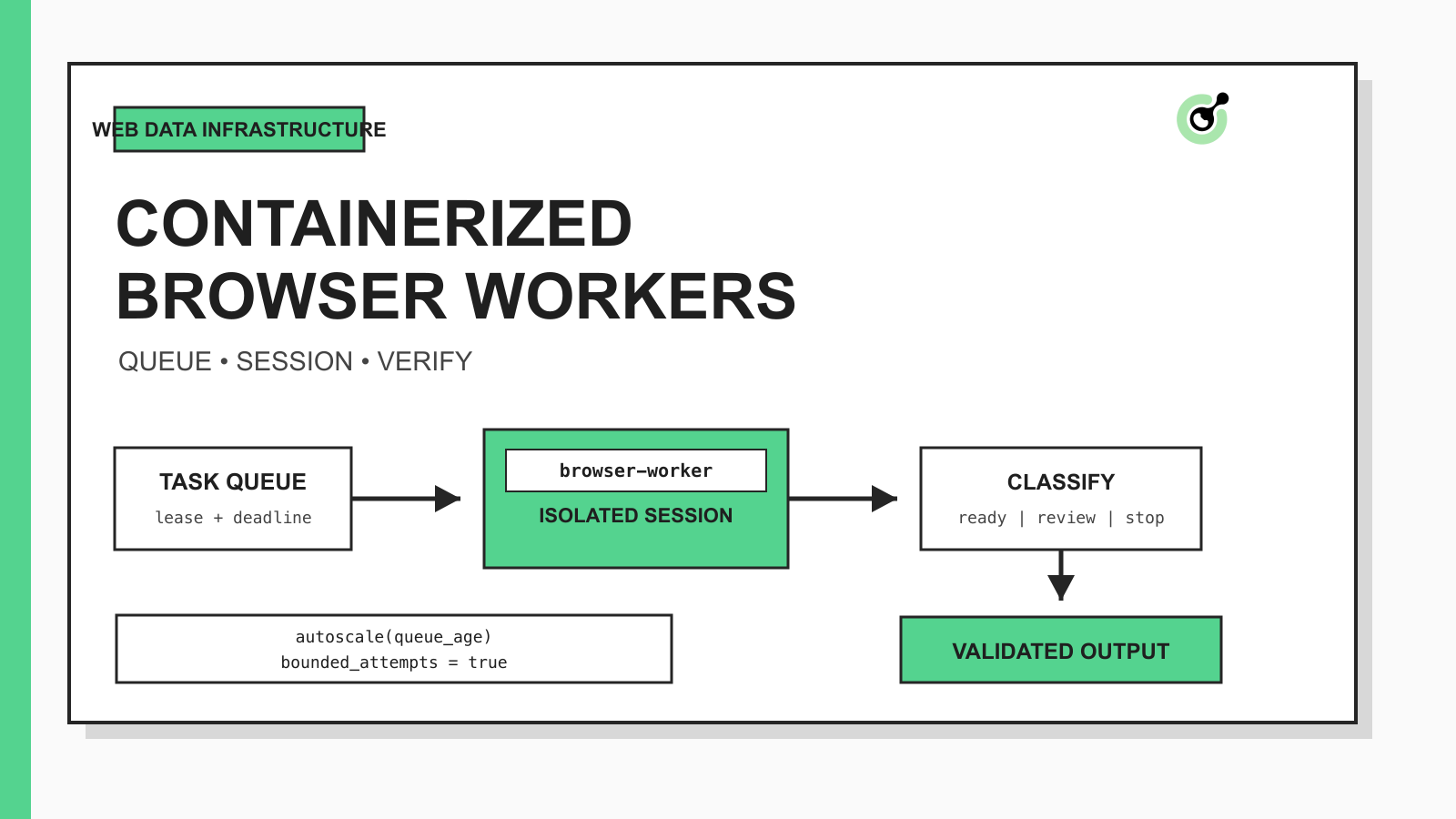
Containers as a Service (CaaS) gives a team a managed way to deploy, run, and scale containerized workers. For web scraping, that usually means packaging a browser or HTTP worker once, feeding it tasks from a queue, and increasing the worker count as demand changes. The runtime becomes repeatable, while the platform handles much of the scheduling, health checking, and lifecycle work.
That definition has an important boundary: CaaS scales execution, not correctness. A hundred healthy containers can still return a hundred challenge pages, duplicate the same submission, or parse an error document as product data. The design therefore needs a stable task contract, a browser-state model, a bounded challenge path, and a validator after extraction.
When an authorized workflow reaches a supported verification step, CapSolver can provide the documented solving task while the worker remains responsible for session continuity, deadlines, result application, and final business-state checks.
A reliable CaaS web scraping pipeline separates orchestration from web access. Each stage has a small responsibility and emits a typed outcome instead of an ambiguous success flag.
| Stage | Input | Operation | Output | Stop condition |
|---|---|---|---|---|
| Scheduler | Authorized URL and policy | Create an idempotent task | Task ID and deadline | Invalid scope or expired deadline |
| Queue | Task record | Lease work to one worker | Lease owner and attempt | Lease cannot be acquired |
| Browser worker | Task plus session reference | Navigate and observe | Page evidence and classification | Navigation or policy budget exhausted |
| Challenge handler | Eligible challenge record | Run a documented task flow | Typed solve outcome | Unsupported type or attempt limit |
| Extractor | Accepted page evidence | Parse required fields | Structured record | Required fields missing |
| Validator | Structured record and evidence | Check schema and business rule | Accepted or rejected record | Validation failure |
This split also makes autoscaling safer. The orchestrator can add workers without giving every worker permission to change scope, create unlimited challenge tasks, or write directly to downstream systems.
A containerized browser worker needs a durable task contract before it needs an autoscaler. At minimum, store the task ID, authorized target, policy version, created time, absolute deadline, session reference, current stage, attempt count, and idempotency key outside the container.
The contract should make three decisions explicit:
Containers are disposable. Cookies, storage-state references, screenshots, traces, and task history are not. Store those artifacts in an approved durable system and pass references through the queue. Playwright documents that browser contexts isolate cookies, local storage, and other state, which makes one context per leased task a useful default. If the workflow intentionally reuses authentication, protect the storage state as a credential and never bake it into the image.
A browser worker should process one leased task at a time and close its browser context before acknowledging the queue message. This keeps session ownership clear and prevents cookies or in-memory state from leaking between unrelated jobs.
The image should contain only the runtime, browser dependencies, worker code, and non-secret defaults. Inject API keys and storage credentials at runtime from the platform's secret manager. Pin the browser and library versions, then rebuild through a controlled release rather than installing arbitrary packages when a task starts.
Use three health signals:
Do not treat a successful health probe as proof that a page task succeeded. Health describes the worker process; task evidence describes the web workflow.
Page classification should run before any parser or downstream write. HTTP status alone is insufficient because a response can return 200 while displaying a login form, challenge page, consent screen, or application error.
Collect a bounded evidence set from the same browser context: final URL, response status, document title, selected DOM markers, screenshot reference, console errors, and required-field presence. Route the task to one of a small set of states such as ready, challenge, authentication_required, retryable_error, terminal_error, or review_required.
The classification layer should not guess how to solve every obstacle. It only identifies the observed state and passes a typed record to the next authorized component. This is the same separation described in CapSolver's guide to the web automation infrastructure stack for AI agents: the browser runtime owns sessions and evidence, while challenge handling is one controlled layer.
CAPTCHA handling should be an optional branch, not a general retry loop. The worker first checks that the target and challenge are within the approved policy, that the task type is supported, that the browser session is still valid, and that time remains before the absolute deadline.
The documented CapSolver flow uses createTask to create a supported task and getTaskResult for asynchronous results. Review the official createTask and result-polling workflow for the current request fields and task-type rules. Keep the returned task ID in durable state so a restarted worker polls the known task instead of creating another one.
Use a budget that survives restarts:
If the challenge type is unsupported, the session changed, the deadline expired, or the application rejects the result, return a terminal or review state. Do not let an autoscaler turn one blocked task into many duplicate solve attempts.
Redeem Your CapSolver Bonus Code
Boost your automation budget instantly!
Use bonus code CAP26 when topping up your CapSolver account to get an extra 5% bonus on every recharge — with no limits.
Redeem it now in your CapSolver Dashboard
Extraction should begin only after page classification returns ready. Parse the smallest schema required by the business task, then validate types, required fields, freshness, uniqueness, and source consistency before writing downstream.
Keep a compact evidence envelope with every record:
{
  "task_id": "task-20260921-0042",
  "final_url": "https://example.test/catalog/42",
  "observed_at": "2026-09-21T02:30:00Z",
  "page_state": "ready",
  "session_ref": "session://browser/task-20260921-0042",
  "required_fields_present": true,
  "artifact_refs": ["screenshot://task-20260921-0042/final"]
}
The envelope is illustrative, but its purpose is concrete: downstream systems can distinguish fresh page evidence from stale cache, parser output from browser observation, and accepted data from a false success. Retention should be short and policy-driven, especially when screenshots or browser state could contain personal or confidential information.
CaaS scaling should respond to work, not merely process utilization. Browser workers often wait on navigation, rendering, queues, or external APIs, so CPU can look low while task latency rises.
Useful scaling inputs include pending task count, age of the oldest ready task, lease wait time, median task duration, and the number of workers in each typed state. Kubernetes documents that the HorizontalPodAutoscaler can use custom metrics, which is a better fit for queue-backed browser work than CPU alone. Kubernetes also provides Jobs for finite tasks that run to completion, although a persistent queue consumer may be more efficient when browser startup is expensive.
Set hard ceilings for worker count, per-domain concurrency, total challenge tasks, and downstream writes. When a target starts returning more challenge or rejection states, reduce or pause work instead of scaling into the failure. A rising queue can be a capacity signal; a rising challenge rate is a diagnosis signal.
The following Python function models the decision layer without contacting a target or solving a CAPTCHA. It accepts an observed page state and the durable task budget, then returns the next action.
from dataclasses import dataclass
from enum import Enum


class NextAction(str, Enum):
    EXTRACT = "extract"
    HANDLE_CHALLENGE = "handle_challenge"
    RETRY = "retry"
    REVIEW = "review"
    STOP = "stop"


@dataclass(frozen=True)
class Budget:
    attempts: int
    max_attempts: int
    seconds_remaining: int
    session_matches: bool
    challenge_allowed: bool


def decide(page_state: str, budget: Budget) -> NextAction:
    if budget.seconds_remaining <= 0:
        return NextAction.STOP
    if page_state == "ready":
        return NextAction.EXTRACT
    if page_state == "challenge":
        if not budget.challenge_allowed or not budget.session_matches:
            return NextAction.REVIEW
        if budget.attempts >= budget.max_attempts:
            return NextAction.STOP
        return NextAction.HANDLE_CHALLENGE
    if page_state == "retryable_error":
        return NextAction.RETRY if budget.attempts < budget.max_attempts else NextAction.STOP
    if page_state in {"authentication_required", "review_required"}:
        return NextAction.REVIEW
    return NextAction.STOP
Local tests cover ready pages, eligible challenges, changed sessions, expired deadlines, retry exhaustion, review states, and unknown input. The decision model is intentionally small so an orchestrator can log and audit every transition.
The most useful metrics connect infrastructure behavior to page outcomes. Track queue age and worker saturation, but also record challenge rate, authentication-required rate, parser rejection rate, duplicate-task rate, deadline expiry, and final business-state acceptance.
Use a correlation ID across the queue message, browser trace, challenge task, extracted record, and downstream write. Logs should mask API keys, cookies, tokens, and personal data. A screenshot is evidence, not a default permanent record; keep only what the authorized use case requires.
Alert on ratios rather than isolated failures. One challenge may be normal. A rapid increase for the same target, route, or browser version can indicate a site change, session defect, expired authentication, policy issue, or release regression. Pause the affected slice while the rest of the queue continues.
Container scale does not expand permission. Use this architecture only for public, authorized, or otherwise lawful data workflows. Respect target terms, rate limits, privacy obligations, jurisdiction, and data-minimization requirements.
Do not send private pages, account data, or sensitive screenshots to external systems unless the workflow is explicitly approved for that data. Separate login and identity workflows from ordinary public-data tasks. Require human review before sensitive submissions, irreversible actions, or scope changes.
Containers as a Service makes browser workers repeatable and scalable, but production reliability comes from the contracts around those workers. Give every task one owner, one isolated session, one durable deadline, one typed state machine, and one validated output. Scale when the queue shows healthy demand; pause when evidence shows repeated rejection or uncertain state.
For authorized workflows with supported verification steps, CapSolver can fit behind the eligibility gate while your application preserves browser context and verifies the final result.
Start with one approved target and one bounded worker. Record page classification, challenge eligibility, elapsed time, final acceptance, and evidence references before increasing concurrency. Use the CapSolver documentation to select the current documented task flow, then review the result in the original browser session.
Q: Does Containers as a Service solve website access problems?
No. CaaS deploys and scales containerized applications, while your access layer still needs browser state, routing, challenge classification, policy controls, and result validation.
Q: Should every URL run in a separate container?
Not necessarily. One isolated browser context per leased task is usually the important boundary; a worker container can process tasks sequentially if it closes each context, clears task memory, and acknowledges only after durable state is written.
Q: Which metric should scale browser workers?
Queue depth and task age are usually stronger primary signals than CPU alone. Combine them with worker limits, target-level concurrency, challenge rate, and deadline expiry so the platform does not scale a failing workflow.
Q: How should a restarted worker handle an existing CAPTCHA task?
The restarted worker should load the durable provider task ID, original deadline, attempt count, and session reference. It should poll the known task only when the session still matches and the remaining budget allows it; otherwise it should stop or request review.
Q: Can this pattern be used for private or restricted data?
Technical capability does not grant permission to collect private, restricted, personal, or sensitive data. Use the pattern only within an approved scope and apply the target's terms, applicable law, data minimization, retention controls, and human review requirements.
Nikolai Smirnov
Software Development Lead
Building dependable software for complex automation.
ABOUT THE AUTHOR
Learn scalable Rust web scraping architecture with reqwest, scraper, async scraping, headless browser scraping, proxy rotation, and compliant CAPTCHA handling.

Learn the best techniques to scrape job listings without getting blocked. Master Indeed scraping, Google Jobs API, and web scraping API with CapSolver.

