
🎉NEWCapSolver for AI agents-MCP, agent tools, and SDK integrations

Lucas Mitchell
Automation Engineer
Published Mar 09, 2026
Updated Mar 18, 2026 · min read
If you've ever tried to automate web interactions, you've almost certainly run into reCAPTCHA — Google's challenge system that blocks bots from accessing websites. Whether you're building scrapers, testing web applications, or automating repetitive tasks, reCAPTCHA can bring your entire workflow to a halt.
What if you could solve reCAPTCHA automatically inside your n8n workflows — whether you're building a reusable solver API, scraping a captcha-protected site, or automating a login form — all without writing a single line of traditional code?
In this guide, you'll learn how to combine n8n (a visual workflow automation tool) with CapSolver (an AI-powered captcha solving service) to solve reCAPTCHA v2, v2 Invisible, and v3 challenges on demand — either as a standalone API endpoint or as a step inside any automation workflow.
What you'll build:
Solver API — a reusable endpoint your other tools can call:
Direct-use workflows — CapSolver embedded as a step inside larger automations:
reCAPTCHA is Google's bot detection system used by millions of websites. There are three main versions you'll encounter:
reCAPTCHA v2 — Checkbox ("I'm not a robot") + image challenges
reCAPTCHA v2 Invisible — No visible checkbox, triggers automatically in the background
reCAPTCHA v3 — Completely invisible, assigns a score (0.0–1.0) based on behavior
Understanding which version a website uses is critical — each one requires slightly different parameters when solving.
Before getting started, make sure you have the following:
Important: Make sure you have sufficient balance in your CapSolver account. reCAPTCHA solving tasks consume credits based on the captcha type.
CapSolver is available as an official integration in n8n — no community node installation required. You can find it directly in the node panel when building your workflows.
Since it's an official integration, you need to create a credential in n8n so that the CapSolver node can authenticate with your account.
Go to your n8n instance and navigate to Settings → Credentials. You'll see all your configured credentials here.

All (default)n8n will automatically test the connection. You should see a green "Connection tested successfully" banner confirming your API key is valid.
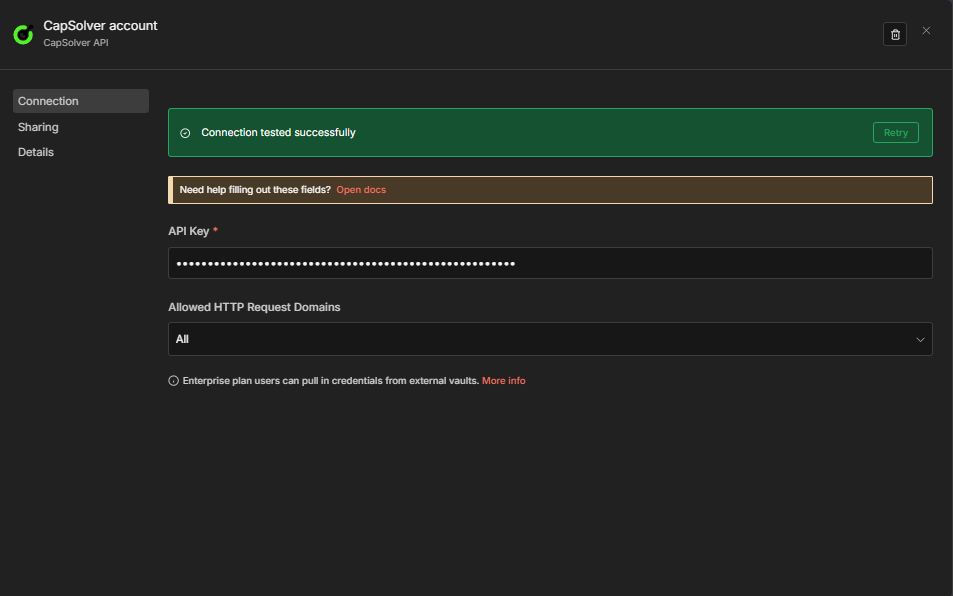
Important: Every CapSolver node in your workflows will reference this credential. You only need to create it once — all your solver workflows will share the same credential.
Now you're ready to build your reCAPTCHA solver workflow!
Before you can solve a reCAPTCHA, you need to know its parameters — specifically the websiteURL and websiteKey (also called the site key). The easiest way to find these is using the CapSolver Browser Extension.
Download and install the CapSolver extension from the Chrome Web Store or Firefox Add-ons.

With the detector panel open, interact with the page to trigger the reCAPTCHA. The extension will automatically detect and display all relevant parameters:
recaptcha.net)
Tip: The extension generates a JSON output showing exactly how to format these parameters for your solving request. This saves you from having to manually inspect the page source.
For a detailed guide on identifying captcha parameters, check out the official CapSolver documentation.
This workflow creates a POST endpoint that accepts reCAPTCHA parameters and returns a solved token. The same 4-node structure works for all reCAPTCHA types — just change the Operation in the CapSolver node.
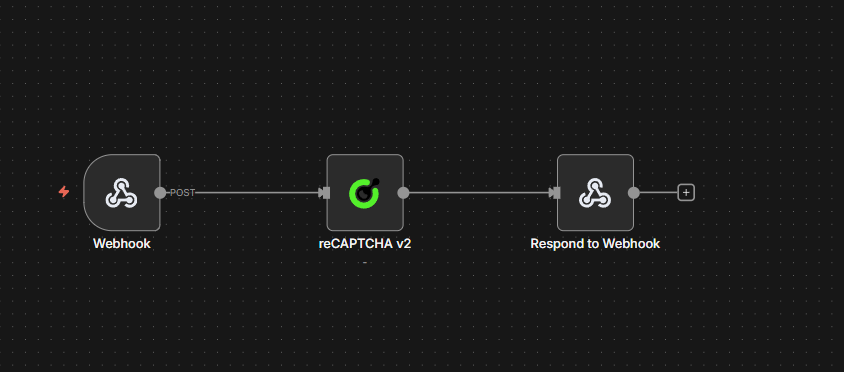
$json.error is not empty){"error": "..."} on failure| Type | Operation to select | Extra parameter |
|---|---|---|
| v2 Standard | reCAPTCHA v2 |
— |
| v2 Invisible | reCAPTCHA v2 |
Set Is Invisible to true in the node |
| v3 | reCAPTCHA v3 |
Add pageAction — must match the target site's configured action (e.g., login, submit) |
The workflow below uses reCAPTCHA v2 as the default. Open the CapSolver node and change the Operation dropdown to switch types. No other structural changes are needed.
| Setting | Value |
|---|---|
| HTTP Method | POST |
| Path | solver-recaptcha |
| Respond | Response Node |
This creates an endpoint at: https://your-n8n-instance.com/webhook/solver-recaptcha
| Parameter | Value | Description |
|---|---|---|
| Operation | reCAPTCHA v2 |
Change this to reCAPTCHA v3 for v3; for v2 Invisible, keep reCAPTCHA v2 and set Is Invisible to true |
| Website URL | ={{ $json.body.websiteURL }} |
The URL of the page with the captcha |
| Website Key | ={{ $json.body.websiteKey }} |
The reCAPTCHA site key |
| Page Action | ={{ $json.body.pageAction || '' }} |
Required for v3 — must match the site's configured action |
| Is Invisible | ={{ $json.body.isInvisible || false }} |
Set to true for v2 Invisible |
| API Domain | ={{ $json.body.apiDomain || '' }} |
Optional — custom API domain (e.g., recaptcha.net) |
| Enterprise Payload | ={{ $json.body.enterprisePayload || '' }} |
Optional — additional payload for reCAPTCHA Enterprise |
| Is Session | ={{ $json.body.isSession || false }} |
Optional — enable session-based solving |
| Task Type | ={{ $json.body.taskType || 'ReCaptchaV2TaskProxyLess' }} |
CapSolver task type — see reference below. Defaults to ReCaptchaV2TaskProxyLess |
| Proxy | ={{ $json.body.proxy || '' }} |
Only used when the selected Task Type requires a proxy (non-ProxyLess types). Leave empty or omit for ProxyLess task types. Format: ip:port:user:pass |
Also select your CapSolver credentials in the node.
reCAPTCHA Task Type Reference:
| Task Type | Proxy Required | Notes |
|---|---|---|
ReCaptchaV2TaskProxyLess |
No | v2 default |
ReCaptchaV2Task |
Yes | v2 with proxy |
ReCaptchaV2EnterpriseTaskProxyLess |
No | Enterprise v2, no proxy |
ReCaptchaV2EnterpriseTask |
Yes | Enterprise v2, requires proxy |
ReCaptchaV3TaskProxyLess |
No | v3 default |
ReCaptchaV3Task |
Yes | v3 with proxy |
ReCaptchaV3EnterpriseTaskProxyLess |
No | Enterprise v3, no proxy |
ReCaptchaV3EnterpriseTask |
Yes | Enterprise v3, requires proxy |
Proxy: Only applicable for non-
ProxyLesstask types (e.g.,ReCaptchaV2Task,ReCaptchaV3EnterpriseTask). When using aProxyLesstask type, the proxy field is ignored — CapSolver uses its own infrastructure. When using a non-ProxyLesstype, you must supply a proxy.
| Setting | Value |
|---|---|
| Condition | ={{ $json.error }} is not empty |
| True branch | Routes to the Error Respond to Webhook node |
| False branch | Routes to the Success Respond to Webhook node |
This makes the error path explicit on the canvas. The CapSolver node continues on error (onError: continueRegularOutput), so failures arrive here as { "error": "..." } rather than crashing the workflow. You can attach additional nodes to the true branch (logging, alerts, retries) without touching the success path.
Success branch (false output of CapSolver Error?):
| Setting | Value |
|---|---|
| Respond With | JSON |
| Response Body | ={{ JSON.stringify($json.data) }} |
Send a POST request to your webhook endpoint:
curl -X POST https://your-n8n-instance.com/webhook/solver-recaptcha \
  -H "Content-Type: application/json" \
  -d '{
    "websiteURL": "https://example.com/login",
    "websiteKey": "6Le-wvkSAAAAAPBMRTvw0Q4Muexq9bi0DJwx_mJ-",
    "taskType": "ReCaptchaV2TaskProxyLess"
  }'
Task type must match the node's Operation. Each deployed workflow is configured for a specific reCAPTCHA version via the Operation field in the CapSolver node (
reCAPTCHA v2orreCAPTCHA v3). Only task types for that version are valid — sending a v3 task type to a v2 workflow (or vice versa) will not work. Note: v2 Invisible uses the samereCAPTCHA v2operation as standard v2 — the difference is theisInvisibleparameter, not the operation.
For reCAPTCHA v3, also add "pageAction": "login" (or whatever action the site uses) to the request body, and use a v3 task type (e.g., "taskType": "ReCaptchaV3TaskProxyLess").
Expected Response:
{
  "taskId": "abc123...",
  "solution": {
    "gRecaptchaResponse": "03AGdBq24PBCb..."
  },
  "status": "ready"
}Copy the JSON below and import it into n8n via Menu → Import from JSON. Then change the Operation in the CapSolver node to your target reCAPTCHA type.
{
  "nodes": [
    {
      "parameters": {
        "content": "## reCAPTCHA Solver API\n\n### How it works\n\n1. A webhook receives the reCAPTCHA solver request.\n2. The request is passed to the solver node to resolve the reCAPTCHA.\n3. The system checks if the solver encountered an error.\n4. If an error occurred, a response is sent indicating the failure.\n5. If successful, a response is sent with the result.\n\n### Setup steps\n\n- [ ] Configure webhook endpoint to receive solver requests.\n- [ ] Set up CapSolver credentials if necessary.\n\n### Customization\n\nAdjust the solver node settings depending on reCAPTCHA type or difficulty.",
        "width": 480,
        "height": 592
      },
      "type": "n8n-nodes-base.stickyNote",
      "typeVersion": 1,
      "position": [
        -800,
        -240
      ],
      "id": "497d295f-4668-48ff-8eaa-97773cfd1c89",
      "name": "Sticky Note"
    },
    {
      "parameters": {
        "content": "## Receive request and solve\n\nHandles incoming requests and solves reCAPTCHA.",
        "width": 496,
        "height": 272,
        "color": 7
      },
      "type": "n8n-nodes-base.stickyNote",
      "typeVersion": 1,
      "position": [
        -240,
        -112
      ],
      "id": "cb4b7a54-ae67-458e-bbef-18e3f6d242bb",
      "name": "Sticky Note1"
    },
    {
      "parameters": {
        "content": "## Evaluate and respond\n\nChecks for errors and sends appropriate webhook responses.",
        "width": 560,
        "height": 432,
        "color": 7
      },
      "type": "n8n-nodes-base.stickyNote",
      "typeVersion": 1,
      "position": [
        464,
        -240
      ],
      "id": "fc9430f0-b899-45ce-b5cf-de9a1b10fbe2",
      "name": "Sticky Note2"
    },
    {
      "parameters": {
        "httpMethod": "POST",
        "path": "solver-recaptcha",
        "responseMode": "responseNode",
        "options": {}
      },
      "id": "rc-api-001",
      "name": "Receive Solver Request",
      "type": "n8n-nodes-base.webhook",
      "typeVersion": 2,
      "position": [
        -192,
        0
      ],
      "webhookId": "solver-recaptcha"
    },
    {
      "parameters": {
        "websiteURL": "={{ $json.body.websiteURL }}",
        "websiteKey": "={{ $json.body.websiteKey }}",
        "optional": {}
      },
      "id": "rc-api-002",
      "name": "Solve reCAPTCHA",
      "type": "n8n-nodes-capsolver.capSolver",
      "typeVersion": 1,
      "position": [
        112,
        0
      ],
      "credentials": {
        "capSolverApi": {
          "id": "BeBFMAsySMsMGeE9",
          "name": "CapSolver account"
        }
      },
      "continueOnFail": true
    },
    {
      "parameters": {
        "conditions": {
          "options": {
            "version": 2,
            "caseSensitive": true,
            "leftValue": "",
            "typeValidation": "strict"
          },
          "combinator": "and",
          "conditions": [
            {
              "id": "1",
              "operator": {
                "type": "string",
                "operation": "isNotEmpty",
                "singleValue": true
              },
              "leftValue": "={{ $json.error }}",
              "rightValue": ""
            }
          ]
        },
        "options": {}
      },
      "id": "rc-api-003",
      "name": "CapSolver Error?",
      "type": "n8n-nodes-base.if",
      "typeVersion": 2.2,
      "position": [
        512,
        -32
      ]
    },
    {
      "parameters": {
        "respondWith": "json",
        "responseBody": "={{ JSON.stringify({ error: $json.error }) }}",
        "options": {}
      },
      "id": "rc-api-004",
      "name": "Respond to Webhook (Error)",
      "type": "n8n-nodes-base.respondToWebhook",
      "typeVersion": 1.1,
      "position": [
        880,
        -128
      ]
    },
    {
      "parameters": {
        "respondWith": "json",
        "responseBody": "={{ JSON.stringify($json.data) }}",
        "options": {}
      },
      "id": "rc-api-005",
      "name": "Respond to Webhook",
      "type": "n8n-nodes-base.respondToWebhook",
      "typeVersion": 1.1,
      "position": [
        880,
        32
      ]
    }
  ],
  "connections": {
    "Receive Solver Request": {
      "main": [
        [
          {
            "node": "Solve reCAPTCHA",
            "type": "main",
            "index": 0
          }
        ]
      ]
    },
    "Solve reCAPTCHA": {
      "main": [
        [
          {
            "node": "CapSolver Error?",
            "type": "main",
            "index": 0
          }
        ]
      ]
    },
    "CapSolver Error?": {
      "main": [
        [
          {
            "node": "Respond to Webhook (Error)",
            "type": "main",
            "index": 0
          }
        ],
        [
          {
            "node": "Respond to Webhook",
            "type": "main",
            "index": 0
          }
        ]
      ]
    }
  },
  "pinData": {},
  "meta": {
    "instanceId": "962ff0267b713be0344b866fa54daae28de8ed2144e2e6867da355dae193ea1f"
  }
}So far, the API workflows above show how to get a solved captcha token. But what do you actually do with it?
In real-world automation, solving the captcha is only half the job. You need to submit the token to the target website — exactly as a browser would — to unlock the data or action behind the captcha.
Here's the general pattern:
gRecaptchaResponse token from CapSolverg-recaptcha-response form field or URL parameter)Example: example.com
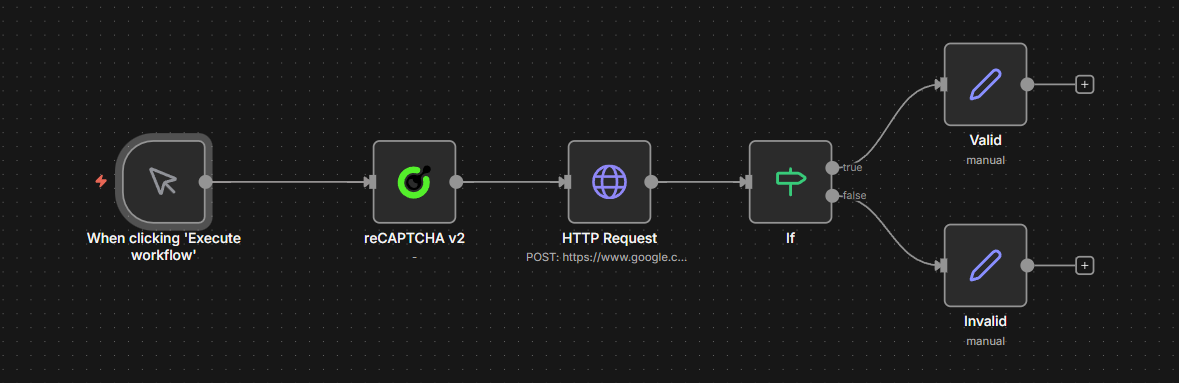
Manual Trigger → CapSolver reCAPTCHA v2 → HTTP POST Request → IF (check success) → Valid / Invalidhttps://example.comYOUR_SITE_KEYg-recaptcha-response form field"recaptcha-success", meaning the captcha was acceptedKey concept: Every website handles token submission differently. In this demo, the token goes in a
g-recaptcha-responseform field via POST — but other sites may expect it as a URL parameter, in a JSON body, or through a completely different endpoint. Always inspect the site's actual form submission (using DevTools Network tab) to see exactly how the token needs to be sent.
{
  "nodes": [
    {
      "parameters": {
        "content": "## reCAPTCHA v2 \u2014 All Triggers\n\n### How it works\n\n1. Receives solver requests through a webhook.\n2. Processes these requests using CapSolver and returns the results.\n3. Regularly triggers checks every hour using a schedule.\n4. Executes the scheduled process and checks the status of tasks.\n5. Allows manual testing of CapSolver through a manual trigger.\n\n### Setup steps\n\n- [ ] Set up webhook credentials for 'Receive Solver Request'.\n- [ ] Configure CapSolver with necessary keys for all CapSolver nodes.\n- [ ] Assign necessary permissions for HTTP request to reCAPTCHA endpoint.\n- [ ] Review and adjust the schedule in 'Schedule Trigger'.\n- [ ] Test manual execution with 'Manual Trigger'.\n",
        "width": 480,
        "height": 896
      },
      "type": "n8n-nodes-base.stickyNote",
      "typeVersion": 1,
      "position": [
        -816,
        -128
      ],
      "id": "68e8c344-ce45-4e9f-859b-ca005db7c73e",
      "name": "Sticky Note"
    },
    {
      "parameters": {
        "content": "## Receive and handle requests\n\nStarts with receiving a solver request via webhook, processes it, and returns the solver result.",
        "width": 800,
        "height": 304,
        "color": 7
      },
      "type": "n8n-nodes-base.stickyNote",
      "typeVersion": 1,
      "position": [
        -256,
        -128
      ],
      "id": "c26741c7-e0e6-4a4e-9fbf-2a623df014c8",
      "name": "Sticky Note1"
    },
    {
      "parameters": {
        "content": "## Scheduled recurrent process\n\nInitiates the process on an hourly schedule, sets target parameters, and sends them to CapSolver.",
        "width": 800,
        "height": 304,
        "color": 7
      },
      "type": "n8n-nodes-base.stickyNote",
      "typeVersion": 1,
      "position": [
        -256,
        224
      ],
      "id": "4b879cbf-e269-4260-9596-740b95df628a",
      "name": "Sticky Note2"
    },
    {
      "parameters": {
        "content": "## Process and validate token\n\nPosts to the reCAPTCHA validation endpoint and checks results, branching into pass or fail paths.",
        "width": 736,
        "height": 464,
        "color": 7
      },
      "type": "n8n-nodes-base.stickyNote",
      "typeVersion": 1,
      "position": [
        656,
        96
      ],
      "id": "7c860b53-f4a7-4d0b-8537-5253eec5a043",
      "name": "Sticky Note3"
    },
    {
      "parameters": {
        "content": "## Manual testing process\n\nAllows manual trigger testing with CapSolver and formats the result for review.",
        "width": 800,
        "height": 272,
        "color": 7
      },
      "type": "n8n-nodes-base.stickyNote",
      "typeVersion": 1,
      "position": [
        -256,
        576
      ],
      "id": "8936a2df-c5b5-4c63-a0d5-afd190553a57",
      "name": "Sticky Note4"
    },
    {
      "parameters": {
        "httpMethod": "POST",
        "path": "solve-recaptcha-v2",
        "responseMode": "responseNode",
        "options": {}
      },
      "type": "n8n-nodes-base.webhook",
      "typeVersion": 2.1,
      "position": [
        -208,
        0
      ],
      "id": "11111111-1111-1111-1111-111111111101",
      "name": "Receive Solver Request",
      "webhookId": "a1b2c3d4-e5f6-7890-abcd-ef1234567801",
      "onError": "continueRegularOutput"
    },
    {
      "parameters": {
        "type": "={{ $json.body.taskType || 'ReCaptchaV2TaskProxyLess' }}",
        "proxy": "={{ $json.body.proxy || '' }}",
        "websiteURL": "={{ $json.body.websiteURL }}",
        "websiteKey": "={{ $json.body.websiteKey }}",
        "optional": {
          "pageAction": "={{ $json.body.pageAction || '' }}",
          "isInvisible": "={{ $json.body.isInvisible || false }}",
          "apiDomain": "={{ $json.body.apiDomain || '' }}",
          "enterprisePayload": "={{ $json.body.enterprisePayload || '' }}",
          "isSession": "={{ $json.body.isSession || false }}"
        }
      },
      "type": "n8n-nodes-capsolver.capSolver",
      "typeVersion": 1,
      "position": [
        112,
        0
      ],
      "id": "11111111-1111-1111-1111-111111111102",
      "name": "CapSolver [Webhook]",
      "credentials": {
        "capSolverApi": {
          "id": "BeBFMAsySMsMGeE9",
          "name": "CapSolver account"
        }
      }
    },
    {
      "parameters": {
        "respondWith": "json",
        "responseBody": "={{ JSON.stringify($json.data) }}",
        "options": {}
      },
      "type": "n8n-nodes-base.respondToWebhook",
      "typeVersion": 1.5,
      "position": [
        400,
        0
      ],
      "id": "11111111-1111-1111-1111-111111111103",
      "name": "Return Solver Result"
    },
    {
      "parameters": {
        "rule": {
          "interval": [
            {
              "field": "hours",
              "hoursInterval": 1
            }
          ]
        }
      },
      "type": "n8n-nodes-base.scheduleTrigger",
      "typeVersion": 1.3,
      "position": [
        -208,
        352
      ],
      "id": "11111111-1111-1111-1111-111111111104",
      "name": "Schedule Trigger (Every 1h)"
    },
    {
      "parameters": {
        "assignments": {
          "assignments": [
            {
              "id": "sa-001",
              "name": "websiteURL",
              "value": "https://www.google.com/recaptcha/api2/demo",
              "type": "string"
            },
            {
              "id": "sa-002",
              "name": "websiteKey",
              "value": "6Le-wvkSAAAAAPBMRTvw0Q4Muexq9bi0DJwx_mJ-",
              "type": "string"
            }
          ]
        },
        "options": {}
      },
      "type": "n8n-nodes-base.set",
      "typeVersion": 3.4,
      "position": [
        112,
        352
      ],
      "id": "11111111-1111-1111-1111-111111111105",
      "name": "Set Target Params"
    },
    {
      "parameters": {
        "websiteURL": "={{ $json.websiteURL }}",
        "websiteKey": "={{ $json.websiteKey }}",
        "optional": {}
      },
      "type": "n8n-nodes-capsolver.capSolver",
      "typeVersion": 1,
      "position": [
        400,
        352
      ],
      "id": "11111111-1111-1111-1111-111111111106",
      "name": "CapSolver [Schedule]",
      "credentials": {
        "capSolverApi": {
          "id": "BeBFMAsySMsMGeE9",
          "name": "CapSolver account"
        }
      }
    },
    {
      "parameters": {
        "method": "POST",
        "url": "https://www.google.com/recaptcha/api2/demo",
        "sendHeaders": true,
        "headerParameters": {
          "parameters": [
            {
              "name": "content-type",
              "value": "application/x-www-form-urlencoded"
            },
            {
              "name": "user-agent",
              "value": "Mozilla/5.0 (Windows NT 10.0; Win64; x64) AppleWebKit/537.36 (KHTML, like Gecko) Chrome/125.0.0.0 Safari/537.36"
            }
          ]
        },
        "sendBody": true,
        "contentType": "form-urlencoded",
        "bodyParameters": {
          "parameters": [
            {
              "name": "g-recaptcha-response",
              "value": "={{ $json.data.solution.gRecaptchaResponse }}"
            }
          ]
        },
        "options": {}
      },
      "type": "n8n-nodes-base.httpRequest",
      "typeVersion": 4.3,
      "position": [
        704,
        352
      ],
      "id": "11111111-1111-1111-1111-111111111107",
      "name": "Submit Token"
    },
    {
      "parameters": {
        "conditions": {
          "options": {
            "caseSensitive": true,
            "leftValue": "",
            "typeValidation": "strict",
            "version": 2
          },
          "conditions": [
            {
              "id": "if-001",
              "leftValue": "={{ $json.data }}",
              "rightValue": "recaptcha-success",
              "operator": {
                "type": "string",
                "operation": "contains"
              }
            }
          ],
          "combinator": "and"
        },
        "options": {}
      },
      "type": "n8n-nodes-base.if",
      "typeVersion": 2.3,
      "position": [
        1008,
        352
      ],
      "id": "11111111-1111-1111-1111-111111111108",
      "name": "Check Result"
    },
    {
      "parameters": {
        "assignments": {
          "assignments": [
            {
              "id": "sp-001",
              "name": "status",
              "value": "passed",
              "type": "string"
            },
            {
              "id": "sp-002",
              "name": "message",
              "value": "reCAPTCHA v2 monitor passed successfully",
              "type": "string"
            },
            {
              "id": "sp-003",
              "name": "timestamp",
              "value": "={{ new Date().toISOString() }}",
              "type": "string"
            }
          ]
        },
        "options": {}
      },
      "type": "n8n-nodes-base.set",
      "typeVersion": 3.4,
      "position": [
        1248,
        224
      ],
      "id": "11111111-1111-1111-1111-111111111109",
      "name": "Monitor Passed"
    },
    {
      "parameters": {
        "assignments": {
          "assignments": [
            {
              "id": "sf-001",
              "name": "status",
              "value": "failed",
              "type": "string"
            },
            {
              "id": "sf-002",
              "name": "message",
              "value": "reCAPTCHA v2 monitor FAILED \u2014 token rejected",
              "type": "string"
            },
            {
              "id": "sf-003",
              "name": "timestamp",
              "value": "={{ new Date().toISOString() }}",
              "type": "string"
            }
          ]
        },
        "options": {}
      },
      "type": "n8n-nodes-base.set",
      "typeVersion": 3.4,
      "position": [
        1248,
        384
      ],
      "id": "11111111-1111-1111-1111-111111111110",
      "name": "Monitor Failed"
    },
    {
      "parameters": {},
      "type": "n8n-nodes-base.manualTrigger",
      "typeVersion": 1,
      "position": [
        -208,
        688
      ],
      "id": "11111111-1111-1111-1111-111111111111",
      "name": "Manual Trigger (Test)"
    },
    {
      "parameters": {
        "websiteURL": "https://www.google.com/recaptcha/api2/demo",
        "websiteKey": "6Le-wvkSAAAAAPBMRTvw0Q4Muexq9bi0DJwx_mJ-",
        "optional": {}
      },
      "type": "n8n-nodes-capsolver.capSolver",
      "typeVersion": 1,
      "position": [
        112,
        688
      ],
      "id": "11111111-1111-1111-1111-111111111112",
      "name": "CapSolver [Manual]",
      "credentials": {
        "capSolverApi": {
          "id": "BeBFMAsySMsMGeE9",
          "name": "CapSolver account"
        }
      }
    },
    {
      "parameters": {
        "assignments": {
          "assignments": [
            {
              "id": "mr-001",
              "name": "token",
              "value": "={{ $json.data.solution.gRecaptchaResponse }}",
              "type": "string"
            },
            {
              "id": "mr-002",
              "name": "taskId",
              "value": "={{ $json.data.taskId }}",
              "type": "string"
            },
            {
              "id": "mr-003",
              "name": "status",
              "value": "solved",
              "type": "string"
            },
            {
              "id": "mr-004",
              "name": "solvedAt",
              "value": "={{ new Date().toISOString() }}",
              "type": "string"
            }
          ]
        },
        "options": {}
      },
      "type": "n8n-nodes-base.set",
      "typeVersion": 3.4,
      "position": [
        400,
        688
      ],
      "id": "11111111-1111-1111-1111-111111111113",
      "name": "Format Result"
    }
  ],
  "connections": {
    "Receive Solver Request": {
      "main": [
        [
          {
            "node": "CapSolver [Webhook]",
            "type": "main",
            "index": 0
          }
        ]
      ]
    },
    "CapSolver [Webhook]": {
      "main": [
        [
          {
            "node": "Return Solver Result",
            "type": "main",
            "index": 0
          }
        ]
      ]
    },
    "Schedule Trigger (Every 1h)": {
      "main": [
        [
          {
            "node": "Set Target Params",
            "type": "main",
            "index": 0
          }
        ]
      ]
    },
    "Set Target Params": {
      "main": [
        [
          {
            "node": "CapSolver [Schedule]",
            "type": "main",
            "index": 0
          }
        ]
      ]
    },
    "CapSolver [Schedule]": {
      "main": [
        [
          {
            "node": "Submit Token",
            "type": "main",
            "index": 0
          }
        ]
      ]
    },
    "Submit Token": {
      "main": [
        [
          {
            "node": "Check Result",
            "type": "main",
            "index": 0
          }
        ]
      ]
    },
    "Check Result": {
      "main": [
        [
          {
            "node": "Monitor Passed",
            "type": "main",
            "index": 0
          }
        ],
        [
          {
            "node": "Monitor Failed",
            "type": "main",
            "index": 0
          }
        ]
      ]
    },
    "Manual Trigger (Test)": {
      "main": [
        [
          {
            "node": "CapSolver [Manual]",
            "type": "main",
            "index": 0
          }
        ]
      ]
    },
    "CapSolver [Manual]": {
      "main": [
        [
          {
            "node": "Format Result",
            "type": "main",
            "index": 0
          }
        ]
      ]
    }
  },
  "pinData": {},
  "meta": {
    "instanceId": "962ff0267b713be0344b866fa54daae28de8ed2144e2e6867da355dae193ea1f"
  }
}
Adapting for other reCAPTCHA types: This same pattern works for v2 Invisible and v3. For v2 Invisible, set
isInvisible: truein the CapSolver node. For v3, change the Operation toreCAPTCHA v3and add thepageActionparameter. The HTTP Request submission step will differ per site — always inspect the actual form submission in DevTools.
The solver API and scraping examples above show the core pattern: solve the captcha, submit the token, process the result. The following workflows extend this pattern to production-ready use cases — each with dual triggers (schedule + webhook), persistent state tracking, and structured output.
| Workflow | Purpose |
|---|---|
reCAPTCHA Scraping — Price & Product Details — CapSolver + Schedule + Webhook |
Scrapes price and product name every 6 hours, compares against previous values stored in staticData, alerts on changes |
reCAPTCHA Account Login — CapSolver + Schedule + Webhook |
Logs into your own account on a captcha-protected site by solving first, then POSTing credentials with the token |
This workflow scrapes a product page every 6 hours (schedule) or on demand (webhook), extracts the price using the HTML node, and compares it against the previously stored value.
Schedule path:
Every 6 Hours → Solve reCAPTCHA v3 → Fetch Product Page → Extract Data
  → Compare Data → Data Changed? → Build Alert / No Change
Error handling: If CapSolver fails, the execution stops and is marked as failed in n8n. Check Executions to see the error, or configure n8n's Error Workflow to get notified automatically.
Key behaviors:
pageAction parameter (configurable)x-recaptcha-token header (adapt to your site's expected format).product-price, h1)$workflow.staticData.lastPrice persists the previous price across executionsdeal) and increases (severity: info)ReCaptchaV3TaskProxyLess (hardcoded) — edit the Solve reCAPTCHA v3 node directly to change the task type or proxy{
"nodes": [
{
"parameters": {
"content": "## reCAPTCHA Scraping \u2014 Price & Product Monitor\n\n### How it works\n\n1. Triggers the workflow every 6 hours or via webhook.\n2. Configures target website URL and key for scraping.\n3. Solves reCAPTCHA to access the webpage.\n4. Fetches and extracts product data from the webpage.\n5. Compares current data with previous data to check for changes.\n6. Builds alert or updates status based on data changes.\n\n### Setup steps\n\n- [ ] Configure the 'Every 6 Hours' trigger to set the appropriate time schedule.\n- [ ] Set up the target website URL and key parameters in the 'Set Target Config [Schedule]' node.\n- [ ] Ensure the 'Solve reCAPTCHA' and 'Solve reCAPTCHA [Webhook]' nodes are configured with the correct CAPTCHA services.\n- [ ] Set up webhook endpoint in the 'Webhook Trigger' node.\n- [ ] Configure the 'Respond to Webhook' node for handling webhook responses.\n\n### Customization\n\nAdjust the 'Compare Data' and 'Compare Data [Webhook]' code to fit specific data comparison logic or data formats.",
"height": 896,
"width": 480
},
"type": "n8n-nodes-base.stickyNote",
"typeVersion": 1,
"position": [
-1312,
-352
],
"id": "871c5a60-20b4-4cc0-a357-d5cecb8a322a",
"name": "Sticky Note"
},
{
"parameters": {
"content": "## Scheduled trigger setup\n\nTriggers every 6 hours and sets the target config for scraping.",
"height": 304,
"width": 496,
"color": 7
},
"type": "n8n-nodes-base.stickyNote",
"typeVersion": 1,
"position": [
-752,
-128
],
"id": "43acb039-cfcd-47c3-892e-e13da011b721",
"name": "Sticky Note1"
},
{
"parameters": {
"content": "## Scheduled CAPTCHA solving and page fetch\n\nSolves the CAPTCHA and fetches the product page based on schedule.",
"height": 304,
"width": 496,
"color": 7
},
"type": "n8n-nodes-base.stickyNote",
"typeVersion": 1,
"position": [
-144,
-128
],
"id": "68fc53a6-181e-4ca8-bf7d-f3f8e9b12f9d",
"name": "Sticky Note2"
},
{
"parameters": {
"content": "## Scheduled data extraction and comparison\n\nExtracts and compares data from the fetched page.",
"height": 272,
"width": 784,
"color": 7
},
"type": "n8n-nodes-base.stickyNote",
"typeVersion": 1,
"position": [
464,
-112
],
"id": "155fc92b-721a-40bf-80e6-6dd2082b126a",
"name": "Sticky Note3"
},
{
"parameters": {
"content": "## Scheduled alert or status update\n\nHandles response based on data comparison for scheduled runs.",
"height": 560,
"color": 7
},
"type": "n8n-nodes-base.stickyNote",
"typeVersion": 1,
"position": [
1296,
-352
],
"id": "ee2c8c8e-d21d-42aa-b261-49a6fffb3d11",
"name": "Sticky Note4"
},
{
"parameters": {
"content": "## Webhook trigger setup\n\nInitiates the workflow via a webhook request.",
"height": 368,
"color": 7
},
"type": "n8n-nodes-base.stickyNote",
"typeVersion": 1,
"position": [
-752,
304
],
"id": "6957473e-81a0-4afd-a0ea-e6f61c3be715",
"name": "Sticky Note5"
},
{
"parameters": {
"content": "## Webhook CAPTCHA solving and page fetch\n\nSolves the CAPTCHA and fetches the product page via webhook.",
"height": 304,
"width": 496,
"color": 7
},
"type": "n8n-nodes-base.stickyNote",
"typeVersion": 1,
"position": [
-144,
304
],
"id": "48990176-a5b5-48db-ac09-bcc207318f0a",
"name": "Sticky Note6"
},
{
"parameters": {
"content": "## Webhook data extraction and comparison\n\nProcesses data fetched from the page and checks for changes via webhook.",
"height": 272,
"width": 784,
"color": 7
},
"type": "n8n-nodes-base.stickyNote",
"typeVersion": 1,
"position": [
464,
320
],
"id": "844166d1-75f7-4192-8bfb-3a1381fb6235",
"name": "Sticky Note7"
},
{
"parameters": {
"content": "## Webhook alert or status update\n\nResponds to webhook trigger with alert or status update.",
"height": 544,
"width": 384,
"color": 7
},
"type": "n8n-nodes-base.stickyNote",
"typeVersion": 1,
"position": [
1328,
240
],
"id": "c1926a60-dfb3-4520-a530-82aa40c6341c",
"name": "Sticky Note8"
},
{
"parameters": {
"rule": {
"interval": [
{
"field": "hours",
"hoursInterval": 6
}
]
}
},
"type": "n8n-nodes-base.scheduleTrigger",
"typeVersion": 1.3,
"position": [
-704,
0
],
"id": "rc-s-901",
"name": "Every 6 Hours"
},
{
"parameters": {
"assignments": {
"assignments": [
{
"id": "cfg-001",
"name": "websiteURL",
"value": "https://YOUR-TARGET-SITE.com/product-page",
"type": "string"
},
{
"id": "cfg-002",
"name": "websiteKey",
"value": "YOUR_SITE_KEY_HERE",
"type": "string"
}
]
},
"options": {}
},
"type": "n8n-nodes-base.set",
"typeVersion": 3.4,
"position": [
-400,
0
],
"id": "rc-s-900",
"name": "Set Target Config [Schedule]"
},
{
"parameters": {
"websiteURL": "={{ $json.websiteURL }}",
"websiteKey": "={{ $json.websiteKey }}",
"optional": {}
},
"type": "n8n-nodes-capsolver.capSolver",
"typeVersion": 1,
"position": [
-96,
0
],
"id": "rc-s-902",
"name": "Solve reCAPTCHA",
"credentials": {
"capSolverApi": {
"id": "BeBFMAsySMsMGeE9",
"name": "CapSolver account"
}
}
},
{
"parameters": {
"method": "POST",
"url": "={{ $('Set Target Config [Schedule]').first().json.websiteURL }}",
"sendHeaders": true,
"headerParameters": {
"parameters": [
{
"name": "user-agent",
"value": "Mozilla/5.0 (Windows NT 10.0; Win64; x64) AppleWebKit/537.36 (KHTML, like Gecko) Chrome/125.0.0.0 Safari/537.36"
}
]
},
"sendBody": true,
"contentType": "form-urlencoded",
"bodyParameters": {
"parameters": [
{
"name": "g-recaptcha-response",
"value": "={{ $json.data.solution.gRecaptchaResponse }}"
}
]
},
"options": {
"response": {
"response": {}
}
}
},
"type": "n8n-nodes-base.httpRequest",
"typeVersion": 4.3,
"position": [
208,
0
],
"id": "rc-s-903",
"name": "Fetch Product Page"
},
{
"parameters": {
"operation": "extractHtmlContent",
"extractionValues": {
"values": [
{
"key": "price",
"cssSelector": ".product-price, [data-price], .price"
},
{
"key": "productName",
"cssSelector": "h1, .product-title"
}
]
},
"options": {}
},
"type": "n8n-nodes-base.html",
"typeVersion": 1.2,
"position": [
512,
0
],
"id": "rc-s-904",
"name": "Extract Data"
},
{
"parameters": {
"jsCode": "const staticData = $workflow.staticData;\nconst currentPrice = $input.first().json.price;\nconst previousPrice = staticData.lastPrice;\nconst productName = $input.first().json.productName || 'Product';\nconst parsePrice = (str) => { if (!str) return null; const match = str.match(/[\\d]+\\.?\\d*/); return match ? parseFloat(match[0].replace(',', '')) : null; };\nconst currentNum = parsePrice(currentPrice);\nconst previousNum = parsePrice(previousPrice);\nstaticData.lastPrice = currentPrice;\nstaticData.lastChecked = new Date().toISOString();\nconst changed = previousNum !== null && currentNum !== null && currentNum !== previousNum;\nconst direction = changed ? (currentNum < previousNum ? 'dropped' : 'increased') : 'unchanged';\nconst diff = changed ? Math.abs(currentNum - previousNum).toFixed(2) : '0';\nreturn [{ json: { productName, currentPrice, previousPrice: previousPrice || 'first check', changed, direction, diff: changed ? `$${diff}` : null, checkedAt: new Date().toISOString() } }];"
},
"type": "n8n-nodes-base.code",
"typeVersion": 2,
"position": [
800,
0
],
"id": "rc-s-905",
"name": "Compare Data"
},
{
"parameters": {
"conditions": {
"options": {
"caseSensitive": true,
"leftValue": "",
"typeValidation": "strict",
"version": 2
},
"conditions": [
{
"id": "if-1",
"leftValue": "={{ $json.changed }}",
"operator": {
"type": "boolean",
"operation": "true",
"singleValue": true
}
}
],
"combinator": "and"
},
"options": {}
},
"type": "n8n-nodes-base.if",
"typeVersion": 2.2,
"position": [
1104,
0
],
"id": "rc-s-906",
"name": "Data Changed?"
},
{
"parameters": {
"assignments": {
"assignments": [
{
"id": "a1",
"name": "alert",
"value": "=Price {{ $json.direction }} for {{ $json.productName }}: {{ $json.previousPrice }} \u2192 {{ $json.currentPrice }}",
"type": "string"
},
{
"id": "a2",
"name": "severity",
"value": "={{ $json.direction === 'dropped' ? 'deal' : 'info' }}",
"type": "string"
},
{
"id": "a3",
"name": "checkedAt",
"value": "={{ $json.checkedAt }}",
"type": "string"
}
]
},
"options": {}
},
"type": "n8n-nodes-base.set",
"typeVersion": 3.4,
"position": [
1344,
-160
],
"id": "rc-s-907",
"name": "Build Alert"
},
{
"parameters": {
"assignments": {
"assignments": [
{
"id": "n1",
"name": "status",
"value": "no_change",
"type": "string"
},
{
"id": "n2",
"name": "currentPrice",
"value": "={{ $json.currentPrice }}",
"type": "string"
},
{
"id": "n3",
"name": "checkedAt",
"value": "={{ $json.checkedAt }}",
"type": "string"
}
]
},
"options": {}
},
"type": "n8n-nodes-base.set",
"typeVersion": 3.4,
"position": [
1344,
48
],
"id": "rc-s-908",
"name": "No Change"
},
{
"parameters": {
"httpMethod": "POST",
"path": "price-monitor-recaptcha",
"responseMode": "responseNode",
"options": {}
},
"type": "n8n-nodes-base.webhook",
"typeVersion": 2.1,
"position": [
-704,
480
],
"id": "rc-s-909",
"name": "Webhook Trigger",
"webhookId": "rc-s-909-webhook",
"onError": "continueRegularOutput"
},
{
"parameters": {
"websiteURL": "={{ $json.body.websiteURL }}",
"websiteKey": "={{ $json.body.websiteKey }}",
"optional": {}
},
"type": "n8n-nodes-capsolver.capSolver",
"typeVersion": 1,
"position": [
-96,
432
],
"id": "rc-s-910",
"name": "Solve reCAPTCHA [Webhook]",
"credentials": {
"capSolverApi": {
"id": "BeBFMAsySMsMGeE9",
"name": "CapSolver account"
}
}
},
{
"parameters": {
"method": "POST",
"url": "={{ $('Webhook Trigger').item.json.body.websiteURL }}",
"sendHeaders": true,
"headerParameters": {
"parameters": [
{
"name": "user-agent",
"value": "Mozilla/5.0 (Windows NT 10.0; Win64; x64) AppleWebKit/537.36 (KHTML, like Gecko) Chrome/125.0.0.0 Safari/537.36"
}
]
},
"sendBody": true,
"contentType": "form-urlencoded",
"bodyParameters": {
"parameters": [
{
"name": "g-recaptcha-response",
"value": "={{ $json.data.solution.gRecaptchaResponse }}"
}
]
},
"options": {
"response": {
"response": {}
}
}
},
"type": "n8n-nodes-base.httpRequest",
"typeVersion": 4.3,
"position": [
208,
432
],
"id": "rc-s-911",
"name": "Fetch Product Page [Webhook]"
},
{
"parameters": {
"operation": "extractHtmlContent",
"extractionValues": {
"values": [
{
"key": "price",
"cssSelector": ".product-price, [data-price], .price"
},
{
"key": "productName",
"cssSelector": "h1, .product-title"
}
]
},
"options": {}
},
"type": "n8n-nodes-base.html",
"typeVersion": 1.2,
"position": [
512,
432
],
"id": "rc-s-912",
"name": "Extract Data [Webhook]"
},
{
"parameters": {
"jsCode": "const staticData = $workflow.staticData;\nconst currentPrice = $input.first().json.price;\nconst previousPrice = staticData.lastPrice;\nconst productName = $input.first().json.productName || 'Product';\nconst parsePrice = (str) => { if (!str) return null; const match = str.match(/[\\d]+\\.?\\d*/); return match ? parseFloat(match[0].replace(',', '')) : null; };\nconst currentNum = parsePrice(currentPrice);\nconst previousNum = parsePrice(previousPrice);\nstaticData.lastPrice = currentPrice;\nstaticData.lastChecked = new Date().toISOString();\nconst changed = previousNum !== null && currentNum !== null && currentNum !== previousNum;\nconst direction = changed ? (currentNum < previousNum ? 'dropped' : 'increased') : 'unchanged';\nconst diff = changed ? Math.abs(currentNum - previousNum).toFixed(2) : '0';\nreturn [{ json: { productName, currentPrice, previousPrice: previousPrice || 'first check', changed, direction, diff: changed ? `$${diff}` : null, checkedAt: new Date().toISOString() } }];"
},
"type": "n8n-nodes-base.code",
"typeVersion": 2,
"position": [
800,
432
],
"id": "rc-s-913",
"name": "Compare Data [Webhook]"
},
{
"parameters": {
"conditions": {
"options": {
"caseSensitive": true,
"leftValue": "",
"typeValidation": "strict",
"version": 2
},
"conditions": [
{
"id": "if-2",
"leftValue": "={{ $json.changed }}",
"operator": {
"type": "boolean",
"operation": "true",
"singleValue": true
}
}
],
"combinator": "and"
},
"options": {}
},
"type": "n8n-nodes-base.if",
"typeVersion": 2.2,
"position": [
1104,
432
],
"id": "rc-s-914",
"name": "Data Changed? [Webhook]"
},
{
"parameters": {
"assignments": {
"assignments": [
{
"id": "a4",
"name": "alert",
"value": "=Price {{ $json.direction }} for {{ $json.productName }}: {{ $json.previousPrice }} \u2192 {{ $json.currentPrice }}",
"type": "string"
},
{
"id": "a5",
"name": "severity",
"value": "={{ $json.direction === 'dropped' ? 'deal' : 'info' }}",
"type": "string"
},
{
"id": "a6",
"name": "checkedAt",
"value": "={{ $json.checkedAt }}",
"type": "string"
}
]
},
"options": {}
},
"type": "n8n-nodes-base.set",
"typeVersion": 3.4,
"position": [
1376,
368
],
"id": "rc-s-915",
"name": "Build Alert [Webhook]"
},
{
"parameters": {
"assignments": {
"assignments": [
{
"id": "n4",
"name": "status",
"value": "no_change",
"type": "string"
},
{
"id": "n5",
"name": "currentPrice",
"value": "={{ $json.currentPrice }}",
"type": "string"
},
{
"id": "n6",
"name": "checkedAt",
"value": "={{ $json.checkedAt }}",
"type": "string"
}
]
},
"options": {}
},
"type": "n8n-nodes-base.set",
"typeVersion": 3.4,
"position": [
1392,
608
],
"id": "rc-s-916",
"name": "No Change [Webhook]"
},
{
"parameters": {
"respondWith": "json",
"responseBody": "={{ JSON.stringify($json) }}",
"options": {}
},
"type": "n8n-nodes-base.respondToWebhook",
"typeVersion": 1.5,
"position": [
1568,
512
],
"id": "rc-s-917",
"name": "Respond to Webhook"
}
],
"connections": {
"Every 6 Hours": {
"main": [
[
{
"node": "Set Target Config [Schedule]",
"type": "main",
"index": 0
}
]
]
},
"Set Target Config [Schedule]": {
"main": [
[
{
"node": "Solve reCAPTCHA",
"type": "main",
"index": 0
}
]
]
},
"Solve reCAPTCHA": {
"main": [
[
{
"node": "Fetch Product Page",
"type": "main",
"index": 0
}
]
]
},
"Fetch Product Page": {
"main": [
[
{
"node": "Extract Data",
"type": "main",
"index": 0
}
]
]
},
"Extract Data": {
"main": [
[
{
"node": "Compare Data",
"type": "main",
"index": 0
}
]
]
},
"Compare Data": {
"main": [
[
{
"node": "Data Changed?",
"type": "main",
"index": 0
}
]
]
},
"Data Changed?": {
"main": [
[
{
"node": "Build Alert",
"type": "main",
"index": 0
}
],
[
{
"node": "No Change",
"type": "main",
"index": 0
}
]
]
},
"Webhook Trigger": {
"main": [
[
{
"node": "Solve reCAPTCHA [Webhook]",
"type": "main",
"index": 0
}
]
]
},
"Solve reCAPTCHA [Webhook]": {
"main": [
[
{
"node": "Fetch Product Page [Webhook]",
"type": "main",
"index": 0
}
]
]
},
"Fetch Product Page [Webhook]": {
"main": [
[
{
"node": "Extract Data [Webhook]",
"type": "main",
"index": 0
}
]
]
},
"Extract Data [Webhook]": {
"main": [
[
{
"node": "Compare Data [Webhook]",
"type": "main",
"index": 0
}
]
]
},
"Compare Data [Webhook]": {
"main": [
[
{
"node": "Data Changed? [Webhook]",
"type": "main",
"index": 0
}
]
]
},
"Data Changed? [Webhook]": {
"main": [
[
{
"node": "Build Alert [Webhook]",
"type": "main",
"index": 0
}
],
[
{
"node": "No Change [Webhook]",
"type": "main",
"index": 0
}
]
]
},
"Build Alert [Webhook]": {
"main": [
[
{
"node": "Respond to Webhook",
"type": "main",
"index": 0
}
]
]
},
"No Change [Webhook]": {
"main": [
[
{
"node": "Respond to Webhook",
"type": "main",
"index": 0
}
]
]
}
},
"pinData": {},
"meta": {
"instanceId": "962ff0267b713be0344b866fa54daae28de8ed2144e2e6867da355dae193ea1f"
}
}This workflow automates login to a captcha-protected site. A Set Login Config node centralizes all parameters — [Schedule] for the schedule path and [Webhook] for the on-demand webhook path. Edit the appropriate config node to configure each path.
Schedule path:
Every 24 Hours → Set Login Config → Solve Captcha → Submit Login
  → Login Successful? → Mark Login Success / Mark Login Failed
Error handling: If CapSolver fails, the execution stops and is marked as failed in n8n. Check Executions to see the error, or configure n8n's Error Workflow to get notified automatically.
Key behaviors:
ReCaptchaV2TaskProxyLess) — change taskType in Set Login Config [Schedule] or Set Login Config [Webhook] for the respective path; change the Operation in the Solve Captcha node if switching between v2 and v3email, password, and g-recaptcha-response — edit the Submit Login node directly to match your target site's field namesstatusCode < 400 and the presence of a configurable successMarker in the response body{
"nodes": [
{
"parameters": {
"content": "## reCAPTCHA Account Login\n\n### How it works\n\n1. The workflow triggers every 24 hours to initiate a login process.\n2. It solves reCAPTCHA challenges for login attempts.\n3. Submits login credentials via HTTP requests.\n4. Checks if login is successful and records the outcome.\n5. A webhook can trigger the login process manually.\n6. Responds to webhook calls with login status.\n\n### Setup steps\n\n- [ ] Configure the schedule trigger for desired intervals.\n- [ ] Set up the webhook URL for manual login attempts.\n- [ ] Ensure that credentials for solving reCAPTCHA are valid.\n- [ ] Configure the HTTP request nodes with the correct login endpoint.\n- [ ] Confirm that response nodes are set with the correct output format.\n\n### Customization\n\nCustomizable time intervals for automated login attempts and custom webhook endpoints can be configured.",
"width": 480,
"height": 896
},
"type": "n8n-nodes-base.stickyNote",
"typeVersion": 1,
"position": [
-1248,
-352
],
"id": "b76c0299-05e6-4d65-ba90-63a8148242af",
"name": "Sticky Note"
},
{
"parameters": {
"content": "## Scheduled login initialization\n\nTriggers login attempts every 24 hours and configures necessary parameters.",
"width": 1408,
"height": 272,
"color": 7
},
"type": "n8n-nodes-base.stickyNote",
"typeVersion": 1,
"position": [
-688,
-112
],
"id": "0610b8c8-fce5-4efd-b3d2-1eeeb6eba648",
"name": "Sticky Note1"
},
{
"parameters": {
"content": "## Scheduled login results\n\nDetermines and marks the results of scheduled login attempts.",
"width": 240,
"height": 528,
"color": 7
},
"type": "n8n-nodes-base.stickyNote",
"typeVersion": 1,
"position": [
816,
-352
],
"id": "73eec9f0-dbe8-43a5-bff7-2308b4cac998",
"name": "Sticky Note2"
},
{
"parameters": {
"content": "## Webhook login initialization\n\nManual login attempts triggered by webhook, solving reCAPTCHA.",
"width": 1408,
"height": 272,
"color": 7
},
"type": "n8n-nodes-base.stickyNote",
"typeVersion": 1,
"position": [
-688,
320
],
"id": "0680f603-0a47-429f-81cb-69ff7741a9bd",
"name": "Sticky Note3"
},
{
"parameters": {
"content": "## Webhook login results and response\n\nRecords results of webhook login attempts and sends response.",
"width": 512,
"height": 496,
"color": 7
},
"type": "n8n-nodes-base.stickyNote",
"typeVersion": 1,
"position": [
816,
208
],
"id": "4f244d27-03e3-4670-8e6f-67ed6264ac8d",
"name": "Sticky Note4"
},
{
"parameters": {
"rule": {
"interval": [
{
"field": "hours",
"hoursInterval": 24
}
]
}
},
"type": "n8n-nodes-base.scheduleTrigger",
"typeVersion": 1.3,
"position": [
-640,
0
],
"id": "rc-l-921",
"name": "Every 24 Hours"
},
{
"parameters": {
"assignments": {
"assignments": [
{
"id": "l1",
"name": "websiteURL",
"value": "https://YOUR-LOGIN-PAGE.com",
"type": "string"
},
{
"id": "l2",
"name": "websiteKey",
"value": "YOUR_SITE_KEY_HERE",
"type": "string"
},
{
"id": "l3",
"name": "successMarker",
"value": "account-dashboard",
"type": "string"
},
{
"id": "l4",
"name": "userAgent",
"value": "Mozilla/5.0 (Windows NT 10.0; Win64; x64) AppleWebKit/537.36 (KHTML, like Gecko) Chrome/125.0.0.0 Safari/537.36",
"type": "string"
}
]
},
"options": {}
},
"type": "n8n-nodes-base.set",
"typeVersion": 3.4,
"position": [
-336,
0
],
"id": "rc-l-922",
"name": "Set Login Config [Schedule]"
},
{
"parameters": {
"websiteURL": "={{ $json.websiteURL }}",
"websiteKey": "={{ $json.websiteKey }}",
"optional": {}
},
"type": "n8n-nodes-capsolver.capSolver",
"typeVersion": 1,
"position": [
-32,
0
],
"id": "rc-l-923",
"name": "Solve Captcha [Schedule]",
"credentials": {
"capSolverApi": {
"id": "BeBFMAsySMsMGeE9",
"name": "CapSolver account"
}
}
},
{
"parameters": {
"method": "POST",
"url": "={{ $('Set Login Config [Schedule]').item.json.websiteURL }}/login",
"sendHeaders": true,
"headerParameters": {
"parameters": [
{
"name": "content-type",
"value": "application/x-www-form-urlencoded"
},
{
"name": "user-agent",
"value": "={{ $('Set Login Config [Schedule]').item.json.userAgent }}"
}
]
},
"sendBody": true,
"contentType": "form-urlencoded",
"bodyParameters": {
"parameters": [
{
"name": "email",
"value": "your-email@example.com"
},
{
"name": "password",
"value": "YOUR_ACCOUNT_PASSWORD"
},
{
"name": "g-recaptcha-response",
"value": "={{ $json.data.solution.gRecaptchaResponse }}"
}
]
},
"options": {
"response": {
"response": {
"fullResponse": true,
"neverError": true
}
}
}
},
"type": "n8n-nodes-base.httpRequest",
"typeVersion": 4.3,
"position": [
272,
0
],
"id": "rc-l-924",
"name": "Submit Login [Schedule]"
},
{
"parameters": {
"conditions": {
"options": {
"caseSensitive": false,
"leftValue": "",
"typeValidation": "strict",
"version": 2
},
"conditions": [
{
"id": "lif1",
"leftValue": "={{ $json.statusCode < 400 && String($json.body || $json.data || '').includes($('Set Login Config [Schedule]').item.json.successMarker) }}",
"operator": {
"type": "boolean",
"operation": "true",
"singleValue": true
}
}
],
"combinator": "and"
},
"options": {}
},
"type": "n8n-nodes-base.if",
"typeVersion": 2.2,
"position": [
576,
0
],
"id": "rc-l-925",
"name": "Login Successful? [Schedule]"
},
{
"parameters": {
"assignments": {
"assignments": [
{
"id": "s1",
"name": "action",
"value": "account_login",
"type": "string"
},
{
"id": "s2",
"name": "status",
"value": "success",
"type": "string"
},
{
"id": "s3",
"name": "message",
"value": "Configured account login flow succeeded",
"type": "string"
},
{
"id": "s4",
"name": "checkedAt",
"value": "={{ new Date().toISOString() }}",
"type": "string"
}
]
},
"options": {}
},
"type": "n8n-nodes-base.set",
"typeVersion": 3.4,
"position": [
864,
-192
],
"id": "rc-l-926",
"name": "Mark Login Success [Schedule]"
},
{
"parameters": {
"assignments": {
"assignments": [
{
"id": "f1",
"name": "action",
"value": "account_login",
"type": "string"
},
{
"id": "f2",
"name": "status",
"value": "failed",
"type": "string"
},
{
"id": "f3",
"name": "statusCode",
"value": "={{ $json.statusCode }}",
"type": "number"
},
{
"id": "f4",
"name": "message",
"value": "Login response did not match the configured success marker",
"type": "string"
},
{
"id": "f5",
"name": "checkedAt",
"value": "={{ new Date().toISOString() }}",
"type": "string"
}
]
},
"options": {}
},
"type": "n8n-nodes-base.set",
"typeVersion": 3.4,
"position": [
864,
16
],
"id": "rc-l-927",
"name": "Mark Login Failed [Schedule]"
},
{
"parameters": {
"httpMethod": "POST",
"path": "account-login-recaptcha",
"responseMode": "responseNode",
"options": {}
},
"type": "n8n-nodes-base.webhook",
"typeVersion": 2.1,
"position": [
-640,
432
],
"id": "rc-l-928",
"name": "Webhook Trigger",
"webhookId": "rc-l-928-webhook",
"onError": "continueRegularOutput"
},
{
"parameters": {
"websiteURL": "={{ $json.body.websiteURL }}",
"websiteKey": "={{ $json.body.websiteKey }}",
"optional": {}
},
"type": "n8n-nodes-capsolver.capSolver",
"typeVersion": 1,
"position": [
-32,
432
],
"id": "rc-l-929",
"name": "Solve Captcha [Webhook]",
"credentials": {
"capSolverApi": {
"id": "BeBFMAsySMsMGeE9",
"name": "CapSolver account"
}
}
},
{
"parameters": {
"method": "POST",
"url": "={{ $('Webhook Trigger').item.json.body.loginActionURL }}",
"sendHeaders": true,
"headerParameters": {
"parameters": [
{
"name": "content-type",
"value": "application/x-www-form-urlencoded"
},
{
"name": "user-agent",
"value": "={{ $('Webhook Trigger').item.json.body.userAgent || 'Mozilla/5.0 (Windows NT 10.0; Win64; x64) AppleWebKit/537.36 (KHTML, like Gecko) Chrome/125.0.0.0 Safari/537.36' }}"
}
]
},
"sendBody": true,
"contentType": "form-urlencoded",
"bodyParameters": {
"parameters": [
{
"name": "={{ $('Webhook Trigger').item.json.body.usernameField || 'email' }}",
"value": "={{ $('Webhook Trigger').item.json.body.usernameValue }}"
},
{
"name": "={{ $('Webhook Trigger').item.json.body.passwordField || 'password' }}",
"value": "={{ $('Webhook Trigger').item.json.body.passwordValue }}"
},
{
"name": "g-recaptcha-response",
"value": "={{ $json.data.solution.gRecaptchaResponse }}"
}
]
},
"options": {
"response": {
"response": {
"fullResponse": true,
"neverError": true
}
}
}
},
"type": "n8n-nodes-base.httpRequest",
"typeVersion": 4.3,
"position": [
272,
432
],
"id": "rc-l-930",
"name": "Submit Login [Webhook]"
},
{
"parameters": {
"conditions": {
"options": {
"caseSensitive": false,
"leftValue": "",
"typeValidation": "strict",
"version": 2
},
"conditions": [
{
"id": "lif2",
"leftValue": "={{ $json.statusCode < 400 && String($json.body || $json.data || '').includes($('Webhook Trigger').item.json.body.successMarker) }}",
"operator": {
"type": "boolean",
"operation": "true",
"singleValue": true
}
}
],
"combinator": "and"
},
"options": {}
},
"type": "n8n-nodes-base.if",
"typeVersion": 2.2,
"position": [
576,
432
],
"id": "rc-l-931",
"name": "Login Successful? [Webhook]"
},
{
"parameters": {
"assignments": {
"assignments": [
{
"id": "ws1",
"name": "action",
"value": "account_login",
"type": "string"
},
{
"id": "ws2",
"name": "status",
"value": "success",
"type": "string"
},
{
"id": "ws3",
"name": "message",
"value": "Configured account login flow succeeded",
"type": "string"
},
{
"id": "ws4",
"name": "checkedAt",
"value": "={{ new Date().toISOString() }}",
"type": "string"
}
]
},
"options": {}
},
"type": "n8n-nodes-base.set",
"typeVersion": 3.4,
"position": [
864,
336
],
"id": "rc-l-932",
"name": "Mark Login Success [Webhook]"
},
{
"parameters": {
"assignments": {
"assignments": [
{
"id": "wf1",
"name": "action",
"value": "account_login",
"type": "string"
},
{
"id": "wf2",
"name": "status",
"value": "failed",
"type": "string"
},
{
"id": "wf3",
"name": "statusCode",
"value": "={{ $json.statusCode }}",
"type": "number"
},
{
"id": "wf4",
"name": "message",
"value": "Login response did not match the configured success marker",
"type": "string"
},
{
"id": "wf5",
"name": "checkedAt",
"value": "={{ new Date().toISOString() }}",
"type": "string"
}
]
},
"options": {}
},
"type": "n8n-nodes-base.set",
"typeVersion": 3.4,
"position": [
880,
528
],
"id": "rc-l-933",
"name": "Mark Login Failed [Webhook]"
},
{
"parameters": {
"respondWith": "json",
"responseBody": "={{ JSON.stringify($json) }}",
"options": {}
},
"type": "n8n-nodes-base.respondToWebhook",
"typeVersion": 1.5,
"position": [
1184,
496
],
"id": "rc-l-934",
"name": "Respond to Webhook"
}
],
"connections": {
"Every 24 Hours": {
"main": [
[
{
"node": "Set Login Config [Schedule]",
"type": "main",
"index": 0
}
]
]
},
"Set Login Config [Schedule]": {
"main": [
[
{
"node": "Solve Captcha [Schedule]",
"type": "main",
"index": 0
}
]
]
},
"Solve Captcha [Schedule]": {
"main": [
[
{
"node": "Submit Login [Schedule]",
"type": "main",
"index": 0
}
]
]
},
"Submit Login [Schedule]": {
"main": [
[
{
"node": "Login Successful? [Schedule]",
"type": "main",
"index": 0
}
]
]
},
"Login Successful? [Schedule]": {
"main": [
[
{
"node": "Mark Login Success [Schedule]",
"type": "main",
"index": 0
}
],
[
{
"node": "Mark Login Failed [Schedule]",
"type": "main",
"index": 0
}
]
]
},
"Webhook Trigger": {
"main": [
[
{
"node": "Solve Captcha [Webhook]",
"type": "main",
"index": 0
}
]
]
},
"Solve Captcha [Webhook]": {
"main": [
[
{
"node": "Submit Login [Webhook]",
"type": "main",
"index": 0
}
]
]
},
"Submit Login [Webhook]": {
"main": [
[
{
"node": "Login Successful? [Webhook]",
"type": "main",
"index": 0
}
]
]
},
"Login Successful? [Webhook]": {
"main": [
[
{
"node": "Mark Login Success [Webhook]",
"type": "main",
"index": 0
}
],
[
{
"node": "Mark Login Failed [Webhook]",
"type": "main",
"index": 0
}
]
]
},
"Mark Login Success [Webhook]": {
"main": [
[
{
"node": "Respond to Webhook",
"type": "main",
"index": 0
}
]
]
},
"Mark Login Failed [Webhook]": {
"main": [
[
{
"node": "Respond to Webhook",
"type": "main",
"index": 0
}
]
]
}
},
"pinData": {},
"meta": {
"instanceId": "962ff0267b713be0344b866fa54daae28de8ed2144e2e6867da355dae193ea1f"
}
}You've learned how to build reCAPTCHA-solving APIs and production-ready scraping workflows using n8n and CapSolver — no traditional coding required.
In this guide, we covered:
The key takeaway: solving the captcha is only half the job — you also need to submit the token to the target website to unlock the protected data.
Tip: These workflows use Schedule + Webhook triggers, but you can swap the trigger node to any n8n trigger — manual, app event, form submission, etc. After fetching data, use n8n's built-in nodes to save results to Google Sheets, databases, cloud storage, or send alerts via Telegram/Slack/Email.
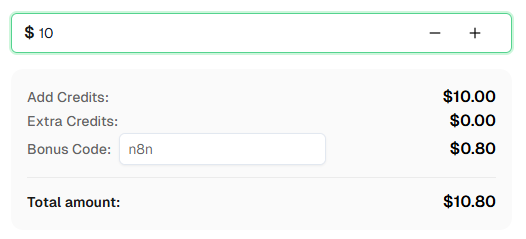
Ready to get started? Sign up for CapSolver and use bonus code n8n for an extra 8% bonus on your first recharge!
Pricing varies by captcha type. reCAPTCHA v2 typically costs around $1-3 per 1,000 solves. Check the CapSolver pricing page for current rates.
Most reCAPTCHA v2 challenges are solved in 5-20 seconds. reCAPTCHA v3 is typically faster since there's no image challenge involved.
Yes! These workflows work with both self-hosted n8n and n8n Cloud. The CapSolver node is already available as an official integration — just add your API credentials.
The easiest method is using the CapSolver browser extension — open DevTools, go to the "CapSolver Captcha Detector" tab, and trigger the captcha. The extension will display all parameters automatically. Alternatively, you can search the page source for data-sitekey or render= in the reCAPTCHA script URL.
Both use the same underlying technology, but v2 shows a visible checkbox ("I'm not a robot") while v2 Invisible runs in the background without any visible widget. When solving, the only difference is setting isInvisible: true.
Several things can cause this. First, tokens expire quickly — make sure you're submitting the token immediately. Second, verify you're sending the token to the right place: inspect the actual network request the browser makes when you submit the form (DevTools → Network tab) and confirm the field name, request method, and endpoint all match what you've configured in n8n. Third, some sites require additional parameters like enterprisePayload or specific cookies and headers — use the CapSolver extension to check if any of these apply. If the token is still rejected, contact CapSolver support for site-specific help.
Lucas Mitchell
Automation Engineer
Helping browser automation recover and continue.
ABOUT THE AUTHOR
Learn how to use the CapSolver n8n template to monitor AWS WAF-protected product pages, solve challenges, extract prices, compare changes, and trigger alerts automatically.

Learn how to build web scrapers in n8n for captcha-protected sites using CapSolver. This step-by-step guide covers solving reCAPTCHA, submitting tokens correctly, extracting product data, and automating workflows with schedule and webhook triggers.