
🎉NEWCapSolver for AI agents-MCP, agent tools, and SDK integrations

Lucas Mitchell
Automation Engineer
Published Feb 22, 2024
Updated Oct 16, 2025 · min read
In the modern digital landscape, CAPTCHA challenges have become an integral part of online security, aimed at distinguishing humans from automated bots. However, manually solving CAPTCHAs can be time-consuming and tedious. Fortunately, advancements in technology have led to the development of efficient auto CAPTCHA solvers, such as CapSolver for Chrome. In this article, we will explore the features and benefits of CapSolver , an auto captcha solver extension specifically designed for Chrome. We will delve into how CapSolver simplifies the process of solving captchas, its auto recognition capabilities, and how it provides a seamless captcha solution.
Streamlined Captcha Solver:
CapSolver for Chrome is an indispensable tool that streamlines the process of solving CAPTCHAs. By automating the solving process, it saves users valuable time and effort.
Designed for Chrome:
CapSolver is specifically developed as a chrome extension, ensuring smooth integration with the Chrome browser. Users can easily add the extension to their browser and take advantage of its powerful features.
Auto Recognition and Solving:
CapSolver employs advanced recognition algorithms to automatically identify and solve CAPTCHA puzzles. With its image processing and machine learning techniques, it ensures accurate and efficient captcha solving.
High Success Rate:
CapSolver boasts a high success rate in solving captchas, including complex and distorted ones. Its adaptive algorithms adapt to evolving CAPTCHA techniques, making it a reliable solution across various websites and platforms.
User-Friendly Captcha Extension:
CapSolver provides a user-friendly interface, catering to users of all experience levels. The extension is designed to be intuitive and customizable, allowing users to adjust settings according to their preferences.
To benefit from CapSolver's powerful capabilities, start by installing the extension directly from the Chrome Web Store. The installation process is quick and straightforward, ensuring hassle-free access to its features. Downloading the Extension from Chrome, Firefox, or GitHub:
Sign up for a CapSolver account on our website. Once installed, enable CapSolver by clicking on its icon in the Chrome toolbar. This activation allows the extension to automatically detect and handle CAPTCHA challenges.
Whenever encountered with a CAPTCHA challenge while browsing, CapSolver springs into action. It quickly recognizes the captcha, solves it automatically, and provides the necessary verification to proceed seamlessly.
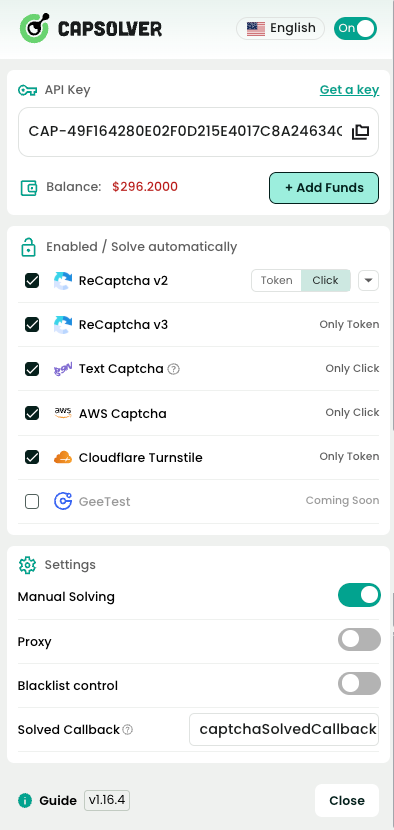
CapSolver's advanced recognition algorithms ensure accurate captcha recognition and solving. Whether it's a text-based or image-based captcha, CapSolver excels in providing reliable solutions.
With CapSolver, users can enjoy an enhanced online experience by eliminating the frustration of manual captcha solving. The extension streamlines the verification process, allowing users to navigate websites smoothly.
CapSolver for Chrome is an exceptional auto CAPTCHA solver extension that simplifies the process of solving CAPTCHAs. With its auto recognition capabilities, seamless integration with Chrome, and user-friendly interface, CapSolver provides users with an effortless captcha solution. By installing and enabling CapSolver, users can save time and effort while seamlessly navigating through captcha challenges. Embrace the power of CapSolver, the ultimate auto CAPTCHA solver for Chrome, and unlock a hassle-free online experience.
Lucas Mitchell
Automation Engineer
Helping browser automation recover and continue.
ABOUT THE AUTHOR
Learn how to set up a browser extension for automatic CAPTCHA solving. Boost your web automation efficiency with step-by-step instructions and code examples.

Discover the best CAPTCHA solver Chrome extension in 2026. Compare top tools like CapSolver and AZcaptcha for speed, accuracy, and AI-powered bypass of reCAPTCHA and Cloudflare.

