
🎉NEWCapSolver for AI agents-MCP, agent tools, and SDK integrations

Ethan Collins
AI Agent Workflow Engineer
Published Jul 09, 2024
Updated Jul 09, 2024 · min read

Picture this: You're deep into your latest project, meticulously extracting data from a multitude of websites. Suddenly, you're hit with a CAPTCHA challenge—those seemingly simple puzzles designed to separate humans from bots. Each time you solve one, another appears, and your progress grinds to a halt. If only there were a way to automate this tedious process! That's where CapSolver, the best Chrome extension for automating CAPTCHA challenges, comes to the rescue.
CAPTCHAs play a critical role in maintaining the security and integrity of websites by preventing automated bots from abusing online services. However, for developers, data scientists, and anyone involved in web automation, these challenges can become significant roadblocks. Here’s why automating CAPTCHA solving is essential:
Using a Chrome extension for automating CAPTCHA solving, offers several distinct advantages over traditional methods. It eliminates the need to write complex scripts or integrate APIs, providing a plug-and-play solution that simplifies the process. Setting up and using the extension is much quicker than coding a custom solution, allowing you to start automating tasks almost immediately. With an intuitive, user-friendly interface, CapSolver is accessible even for non-developers and integrates seamlessly with your browser, ensuring effortless operation without requiring extensive configuration.
CapSolver is a highly efficient CAPTCHA-solving extension designed to handle various CAPTCHA types. It automates the process of solving CAPTCHAs, making it a valuable tool for users who frequently encounter CAPTCHA challenges during web browsing or data crawling activities. This extension is particularly useful for data crawling, where automated scripts often face CAPTCHAs as a barrier to accessing web content.
Create a CapSolver Account
Install the Extension
Ready your API Key
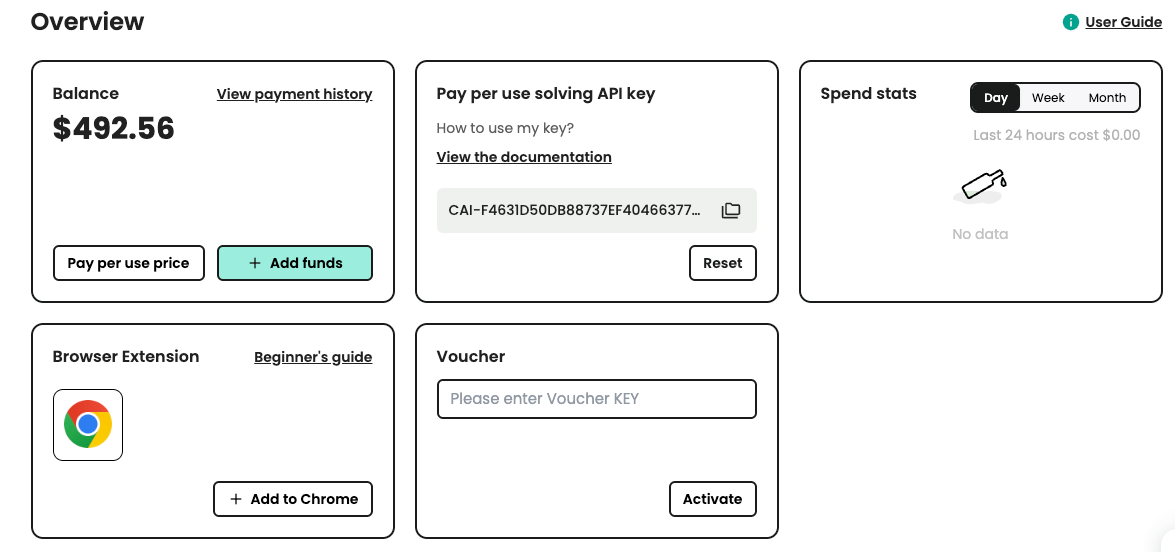
Input to Extension

Automating CAPTCHA challenges is a game-changer for anyone involved in web scraping, data extraction, or any task that involves navigating the web. With CapSolver, the best Chrome extension for automating these tedious tasks, you can streamline your workflow, enhance productivity, and tackle large-scale projects with ease.
Ready to automate your CAPTCHA challenges? Install the CapSolver extension today and experience the difference it can make in your web automation journey. For more information and detailed guides, visit the CapSolver documentation and take the first step towards a more efficient and productive workflow.
Ethan Collins
AI Agent Workflow Engineer
Building clearer handoffs between AI agents and tools.
ABOUT THE AUTHOR
Learn how to set up a browser extension for automatic CAPTCHA solving. Boost your web automation efficiency with step-by-step instructions and code examples.

Discover the best CAPTCHA solver Chrome extension in 2026. Compare top tools like CapSolver and AZcaptcha for speed, accuracy, and AI-powered bypass of reCAPTCHA and Cloudflare.

