
🎉NEWCapSolver for AI agents-MCP, agent tools, and SDK integrations

Lucas Mitchell
Automation Engineer
Published Feb 02, 2024
Updated Oct 20, 2025 · min read

The need for an efficient CAPTCHA (Completely Automated Public Turing Test for Distinguishing Computers from Humans) solution is becoming increasingly important today. Manual CAPTCHA decoding is both time-consuming and tedious, hence the emergence of automated CAPTCHA decoders. In this article, we will explore the benefits of using browser extensions to decode CAPTCHAs and introduce the best CAPTCHA decoder extension of the year: CapSolver, and more importantly, how to install it.
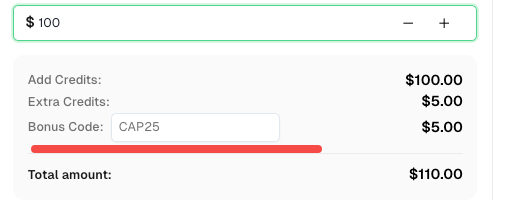
Speaking of which, here’s a bonus code for CapSolver: CAP25. After redeeming it, you will get an extra 5% bonus after each recharge.
Browser extensions offer a plethora of advantages for CAPTCHA solving:
User-Friendly Experience: CAPTCHA solver extensions provide an intuitive interface, enabling users to configure settings and control the solver's behavior effortlessly. With a few clicks, users can enable or disable the solver, adjust preferences, and access additional features.
Real-Time Detection: CAPTCHA solver extensions actively monitor webpages, promptly identifying CAPTCHA challenges as they arise. This real-time detection ensures minimal delays or disruptions during users' browsing sessions.
Seamless Integration: CAPTCHA solver extensions seamlessly integrate with web browsers, allowing users to solve CAPTCHAs without navigating to external websites or interfaces. This integration enhances convenience and streamlines the CAPTCHA solving process.
CapSolver emerges as the preeminent CAPTCHA solver extension, offering unparalleled features and performance. Here's why:
Advanced Technology: CapSolver harnesses cutting-edge AI algorithms and machine learning techniques for precise CAPTCHA analysis and solving. CapSolver Extension supports the recognition of various popular CAPTCHA services
Browser Integration: CapSolver is a browser extension specifically tailored for the Chrome and FireFox browser. Its seamless integration ensures effortless usage and compatibility with the browser's features and functionalities.
Intuitive User Interface: CapSolver provides a user-friendly interface, empowering users to effortlessly configure settings, monitor CAPTCHA-solving activities, and access additional features. The extension guarantees a seamless and user-centric experience.
If you want to manually install the CapSolver plugin, follow the instructions in the tutorial above: How to Modify the Configuration File and Install
/assets/config.js.config.js and modify the settings as needed, such as adding an API key.const puppeteer = require('puppeteer');
(async () => {
const path = 'C:/capSolver_extension'; // Folder where the plugin is extracted
const browser = await puppeteer.launch({
headless: false,
args: [
`--disable-extensions-except=${path}`,
`--load-extension=${path}`,
],
});
const page = await browser.newPage();
await page.goto("https://google.com/");
})();from selenium import webdriver
chrome_options = webdriver.ChromeOptions()
chrome_options.add_extension("./capSolver_extension.zip") # Path to the zip file of the plugin
driver = webdriver.Chrome(options=chrome_options)
driver.get("https://google.com/")CAPTCHAs are essential for online security, but they often slow down legitimate automation and testing tasks. CapSolver offers an AI-powered, browser-based solution that automates CAPTCHA solving securely and efficiently. With seamless integration in Chrome, Firefox, and frameworks like Puppeteer or Selenium, it helps developers and teams stay productive without interruptions.
Q1: What types of CAPTCHAs does CapSolver support?
CapSolver supports all major CAPTCHA types, including reCAPTCHA v2, reCAPTCHA v3, Cloudflare Turnstile, AWS WAF and other popular image and text-based challenges and more.
Q2: Is CapSolver safe to use?
Yes. CapSolver is designed to work securely within your browser or automation environment. It does not collect or store personal browsing data, ensuring your privacy is protected.
Q3: Can I use CapSolver with Puppeteer or Selenium?
Absolutely. CapSolver provides full support for automation frameworks like Puppeteer, Playwright, and Selenium through simple configuration or direct code integration.
More Guides
Q4: What browsers does the CapSolver extension support?
Currently, CapSolver supports Google Chrome and Mozilla Firefox. Both can be installed directly from their official extension stores.
Q5: How can I get additional credits or bonuses?
You can use the promo code CAP25 when recharging your CapSolver account to receive a 5% extra bonus after each payment.
Lucas Mitchell
Automation Engineer
Helping browser automation recover and continue.
ABOUT THE AUTHOR
Learn how to set up a browser extension for automatic CAPTCHA solving. Boost your web automation efficiency with step-by-step instructions and code examples.

Discover the best CAPTCHA solver Chrome extension in 2026. Compare top tools like CapSolver and AZcaptcha for speed, accuracy, and AI-powered bypass of reCAPTCHA and Cloudflare.

