
🎉NEWCapSolver for AI agents-MCP, agent tools, and SDK integrations

Lucas Mitchell
Automation Engineer
Published Jan 25, 2024
Updated Oct 18, 2025 · min read
Captcha, a security measure implemented by websites, often poses challenges for users. However, with the advancement of technology, captcha solvers have emerged to simplify the process. In this article, we will explore the benefits of an auto captcha solver specifically designed for Google Chrome users – the CapSolver Auto Solver Extension. We will discuss its features, the ease of solving captchas, and how to download this captcha solver extension.
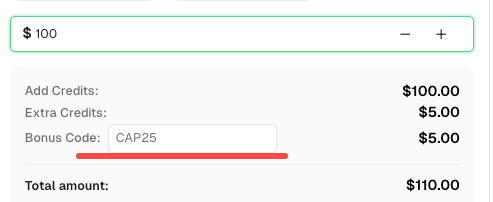
Captcha serves as a defense against automated bots and ensures the authenticity of human users. However, the complex and time-consuming nature of captcha solving can be frustrating. This is where the CapSolver Auto Solver Extension comes to the rescue. Here's a perk, a bonus code for CapSolver Dashboard: CAP25. After redeeming it, you will get an extra 5% bonus after each recharge.
CapSolver extension is a revolutionary solution for effortlessly solving captchas in your browser. With its advanced AI-based technology, CapSolver offers unparalleled speed and accuracy in captcha recognition. Whether you use Chrome or Firefox, integrating CapSolver into your browser is a breeze, requiring no coding skills. This user-friendly approach makes it accessible to individuals of all technical backgrounds, providing a convenient way to overcome captcha challenges. Additionally, CapSolver extensions can be a valuable tool for assisting individuals with disabilities, automating the recognition and clicking of captcha verification. Say goodbye to frustrating captchas and experience the power of CapSolver Auto Solver Extension today.
The CapSolver Auto Solver Extension for Google Chrome is an essential tool for anyone tired of being slowed down by CAPTCHAs. Its combination of AI-powered accuracy, simple installation, and seamless browser integration makes it the most reliable and user-friendly CAPTCHA solver available.
Whether you’re a casual web user, a developer, or a data automation expert, CapSolver helps you reclaim your time and productivity — no more manual CAPTCHA solving, no more interruptions.
👉 Install the CapSolver Extension Now
and experience automated verification at its finest.
1. What types of CAPTCHAs does CapSolver support?
CapSolver supports reCAPTCHA v2, v3, Cloudflare Turnstile, AWS WAF and more. It can handle both visible and invisible CAPTCHAs
2. Do I need to code or configure anything manually?
No coding is required. Simply install the extension, log into your CapSolver account, and the extension will automatically detect and solve CAPTCHAs.
3. Does it work on Firefox or only on Chrome?
Yes, the CapSolver extension supports both Chrome and Firefox, with similar functionality and interface.
4. Can I use it with Puppeteer or Selenium?
Absolutely. CapSolver can be manually or automatically integrated into Puppeteer and Selenium for full automation environments. Configuration examples are available in our documentation.
5. Is my privacy protected when using the extension?
Yes. CapSolver only processes CAPTCHA-related data and does not store your browsing history or personal information.
Lucas Mitchell
Automation Engineer
Helping browser automation recover and continue.
ABOUT THE AUTHOR
Learn how to set up a browser extension for automatic CAPTCHA solving. Boost your web automation efficiency with step-by-step instructions and code examples.

Discover the best CAPTCHA solver Chrome extension in 2026. Compare top tools like CapSolver and AZcaptcha for speed, accuracy, and AI-powered bypass of reCAPTCHA and Cloudflare.

