🎉NEWCapSolver for AI agents-MCP, agent tools, and SDK integrations

Sora Fujimoto
AI Solutions Architect
Published Jan 05, 2024
Updated Oct 22, 2025 · min read
reCAPTCHA, a widely used security measure, aims to differentiate between humans and automated bots. However, advancements in technology have led to the development of automated recognition and solving methods for ReCAPTCHA challenges. In this article, we will explore the concept of automated ReCAPTCHA recognition and solving techniques, and how CapSolver, an innovative solution, enhances efficiency and accuracy in overcoming ReCAPTCHA challenges.
Learning to identify the different types of reCAPTCHA is an essential skill, not only for web developers and cybersecurity professionals but also for everyday users navigating the internet. Each reCAPTCHA version has its distinct characteristics, user interaction patterns, and code snippets. This section will guide you through recognizing these distinctive features to accurately identify the type of reCAPTCHA used on a website.
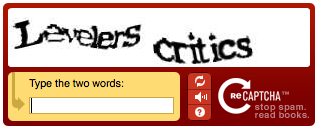
This is the original version of reCAPTCHA. Users were presented with two distorted words and were required to type them into a text box. One of the words was a known word used to verify if the user was human, and the other was an unknown word used to help digitize text from books and other sources. If you see this style of CAPTCHA on a website, it's a clear indication that reCAPTCHA v1 is being used.
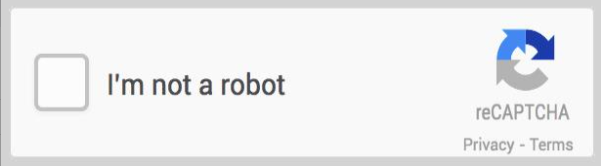
This version introduced the famous "I'm not a robot" checkbox. Once a user checks this box, reCAPTCHA assesses the user's behavior to determine if they're human. If reCAPTCHA suspects the user might be a bot, it presents a secondary challenge, usually image-based, to further verify if the user is human.
The invisible variant of reCAPTCHA v2 offers the same level of security as the standard version but with a more seamless user experience. Rather than asking users to check a box, invisible reCAPTCHA v2 triggers a CAPTCHA challenge only when it detects suspicious activity.
This is a more advanced version of reCAPTCHA v2. It offers more sophisticated defenses against bots and provides detailed risk analysis.
This version operates in the background, assessing user interactions with the website and assigning a score that indicates the likelihood of the user being a bot. reCAPTCHA v3 doesn't interrupt the user's experience with a challenge.
The enterprise version of reCAPTCHA v3 provides more granular insights into website traffic and allows for more nuanced responses to suspicious activities.
Similar to reCAPTCHA v2 Enterprise, you can identify reCAPTCHA v3 Enterprise by checking the source code for the 'recaptcha/enterprise.js' script tag.
Automated recognition and solving methods employ sophisticated algorithms and artificial intelligence to analyze and interpret ReCAPTCHA challenges. These methods emulate human-like behavior and decision-making processes to successfully solve ReCAPTCHA puzzles without manual intervention. By automating the process, users can save time and effort while maintaining high accuracy rates.Several third-party services offer ReCAPTCHA solving capabilities. These services combine OCR, machine learning, and human-solving methods to provide efficient and reliable solutions. CapSolver is one such service that specializes in automating ReCAPTCHA recognition and solving.
Redeem Your CapSolver Bonus Code
Don’t miss the chance to further optimize your operations! Use the bonus code CAP25 when topping up your CapSolver account and receive an extra 5% bonus on each recharge, with no limits. Visit the CapSolver Dashboard to redeem your bonus now!
CapSolver is an state-of-the-art solution designed to automatically identify and solve ReCAPTCHA challenges.
Capsolver's key features include:
For solve any version of reCAPTCHA Enterprise v2, v2 invisible, v3, v3 enterprise 0.9 score, you can follow this blog.
Automated recognition and solving methods for ReCAPTCHA challenges have revolutionized the efficiency and effectiveness of web scraping. With techniques such as OCR, machine learning, and reverse engineering, developers and researchers have made significant progress in automating reCAPTCHA solving. CapSolver, with its advanced algorithms and scalable infrastructure, provides a reliable solution for automating ReCAPTCHA recognition and solving
1. What is the difference between reCAPTCHA v2 and v3?
reCAPTCHA v2 requires user interaction, such as clicking the “I’m not a robot” checkbox or selecting images.
reCAPTCHA v3, on the other hand, runs invisibly in the background and assigns a trust score to each user interaction without interrupting the experience.
2. Can reCAPTCHA be solved automatically?
Yes. With advanced AI and automation tools like CapSolver, it’s possible to automatically recognize and solve reCAPTCHA challenges, saving time and improving workflow efficiency for developers and data engineers.
3. How accurate is CapSolver’s reCAPTCHA solver?
CapSolver uses machine learning and OCR-based recognition to maintain high accuracy rates across all reCAPTCHA versions, including v2, invisible v2, and v3 enterprise variants.
4. Is automated reCAPTCHA solving safe to use?
When implemented responsibly, automated solving tools like CapSolver comply with security standards and are designed for legitimate use cases such as testing, research, and data automation.
5. How can I integrate CapSolver into my automation project?
CapSolver provides an easy-to-use API that supports popular programming languages and automation frameworks. You can find full documentation and API examples in the CapSolver Dashboard
Sora Fujimoto
AI Solutions Architect
Connecting agents, browsers, and APIs into one workflow.
ABOUT THE AUTHOR
Understand reCAPTCHA v3 score range (0.0 to 1.0), its meaning, and how to improve your score. Learn how to handle low scores and optimize user experience.

Facing "reCAPTCHA Invalid Site Key" or "invalid reCAPTCHA token" errors? Discover common causes, step-by-step fixes, and troubleshooting tips to resolve reCAPTCHA verification failed issues. Learn how to fix reCAPTCHA verification failed please try again.