
🎉NEWCapSolver for AI agents-MCP, agent tools, and SDK integrations

Lucas Mitchell
Automation Engineer
Published Feb 02, 2024
Updated Oct 15, 2025 · min read
Just as we all know, solving CAPTCHA has turned out to be an essential part of us in the web. However, solving CAPTCHA issues manually is time-consuming and frustrating. To address this problem, CAPTCHA resolution services have emerged to provide automated solutions to speed up the process. In this article, we will explore the advanced reCAPTCHA v2 decoder Capsolver and its features, and why it can be the ultimate solution.
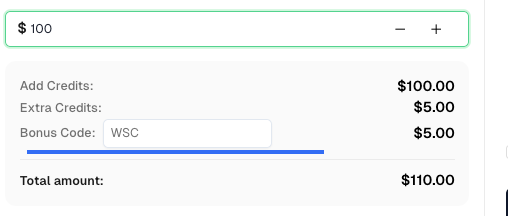
Before we start, here’s a bonus code for CapSolver: WSC. After redeeming it, you will get an extra 5% bonus after each recharge.
There are several versions of reCAPTCHA:
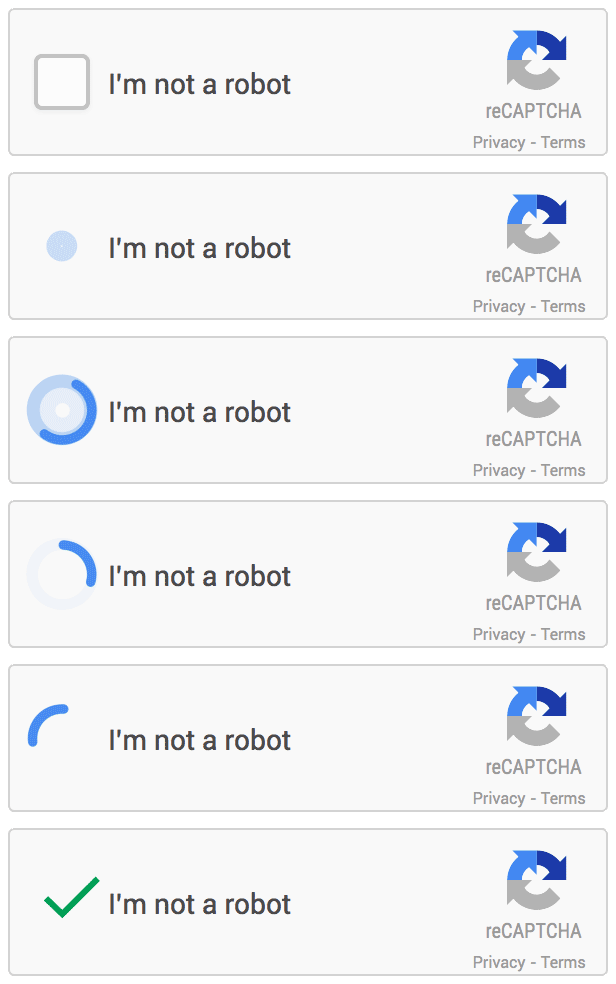
In this blog, we will focus on solving reCAPTCHA v2 and looks like:
Capsolver, an advanced auto captcha solver, offers a powerful solution for tackling reCAPTCHA v2 challenges.There are several captcha-solving services on the market right now. Here are some of the most well-known captcha-solving services and how CapSolver.com services may be superior to those of most of its rivals. One of the best captcha solutions available today is probably Capsolver. It employs artificial intelligence and get around captchas and offers an API that supports a broad variety of computer languages. Both reCAPTCHA v2 and v3 are supported, and processing often takes less than 12 seconds with good accuracy. Every customer has access to focused support. Additionally, the prices are reasonable and there is a money-back guarantee.
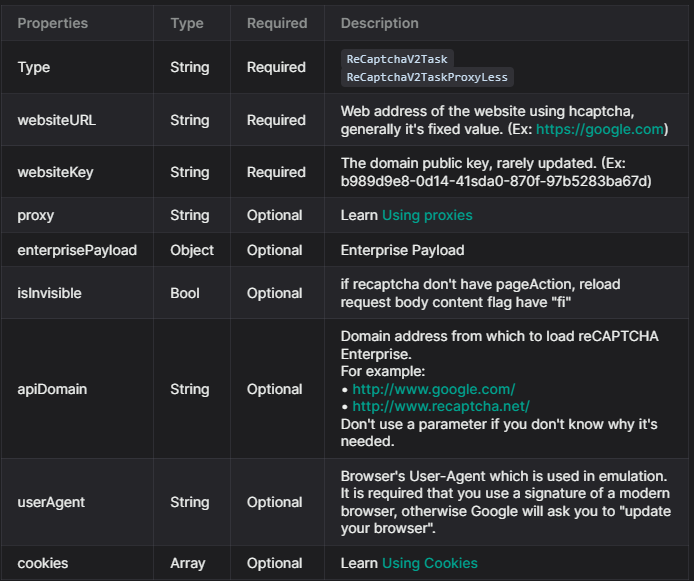
To solve reCAPTCHA v2, follow our documentation. Some parameters are required and some are optional. For this example, we will only use the required parameters. The task types for reCAPTCHA v2 are:
ReCaptchaV2Task: This task type requires your own proxies.ReCaptchaV2TaskProxyLess: This task type uses the server's built-in proxy.ReCaptchaV2EnterpriseTask: This task type requires your own proxies.ReCaptchaV2EnterpriseTaskProxyLess: This task type uses the server's built-in proxy.For this example, we will use ReCaptchaV2TaskProxyLess as the site uses standard reCAPTCHA v2. If the site uses Recaptcha Enterprise, you will need to send the correct task type (ReCaptchaV2EnterpriseTaskProxyLess or ReCaptchaV2EnterpriseTask) and ensure all required parameters are included.
If any parameters are missing, you will likely encounter issues with the token not being accepted by the website. You can find all the parameters in this picture:
For get the captcha solved, first you need to submit all the information needed, for this we use the method createTask:
POST https://api.capsolver.com/createTask

{
  "clientKey": "YOUR_API_KEY",
  "task": {
    "type": "ReCaptchaV2TaskProxyless",
    "websiteURL": "site url",
    "websiteKey": "site key"
  }
}To verify the results, you'll need to continuously poll the getTaskResult API endpoint until the captcha is resolved.
Here's an example request:
POST https://api.capsolver.com/getTaskResult
Host: api.capsolver.com
Content-Type: application/json

{
    "clientKey":"YOUR_API_KEY",
    "taskId": "TASKID_OF_CREATETASK" //ID created by the createTask method
}
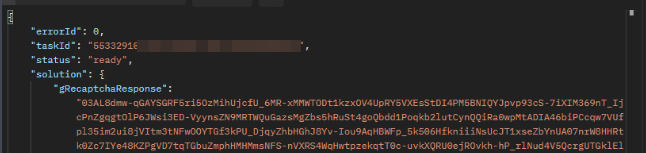
Once the captcha is successfully resolved, you'll receive a response similar to the one depicted in the following image:
Here’s a quick example using Python to integrate CapSolver for reCAPTCHA v2 solving:
import requests
import time

API_KEY = "YOUR_API_KEY"

# Step 1: Create the task
create_task_payload = {
    "clientKey": API_KEY,
    "task": {
        "type": "ReCaptchaV2TaskProxyLess",
        "websiteURL": "https://example.com/",
        "websiteKey": "SITE_KEY"
    }
}

create_task_response = requests.post("https://api.capsolver.com/createTask", json=create_task_payload).json()
task_id = create_task_response.get("taskId")

# Step 2: Get the task result
while True:
    result_payload = {"clientKey": API_KEY, "taskId": task_id}
    result = requests.post("https://api.capsolver.com/getTaskResult", json=result_payload).json()

    if result.get("status") == "ready":
        print("Captcha Solved:", result["solution"]["gRecaptchaResponse"])
        break
    time.sleep(3)
With this setup, you can easily automate the solving process and integrate it directly into your scraping, testing, or automation pipeline.
If your token is not being accepted by the website, double-check the following:
ReCaptchaV2EnterpriseTask or ReCaptchaV2EnterpriseTaskProxyLess.enterprisePayload may lead to invalid responses.For more troubleshooting steps, see our reCAPTCHA v2 guide
CAPTCHA solving is an inevitable step in modern web automation, data scraping, and QA testing. Instead of wasting time handling challenges manually, using an automated and intelligent solution like CapSolver can dramatically improve your workflow efficiency. Try it today CapSolver
Don’t forget your bonus code WSC — get an extra 5% balance after each recharge!
1. How long does it take to solve a reCAPTCHA v2 challenge with CapSolver?
On average, it takes 8–12 seconds depending on server load and task complexity. Enterprise sites or custom configurations may take slightly longer.
2. Do I need to use proxies when solving reCAPTCHA v2?
Not always. CapSolver offers both proxy and proxyless task types.
3. What’s the difference between ReCaptchaV2Task and ReCaptchaV2EnterpriseTask?
ReCaptchaV2Task is used for standard reCAPTCHA v2 sites.ReCaptchaV2EnterpriseTask is designed for Enterprise reCAPTCHA, which uses additional verification parameters and stricter checks.4. Can CapSolver handle image-based challenges (click or select images)?
Yes. CapSolver’s AI automatically detects and handles image-based reCAPTCHA v2 challenges, including “click all bicycles” or “select traffic lights” puzzles.
Lucas Mitchell
Automation Engineer
Helping browser automation recover and continue.
ABOUT THE AUTHOR
Understand reCAPTCHA v3 score range (0.0 to 1.0), its meaning, and how to improve your score. Learn how to handle low scores and optimize user experience.

Facing "reCAPTCHA Invalid Site Key" or "invalid reCAPTCHA token" errors? Discover common causes, step-by-step fixes, and troubleshooting tips to resolve reCAPTCHA verification failed issues. Learn how to fix reCAPTCHA verification failed please try again.


