How to Identify the Version of reCaptcha

Lucas Mitchell
Automation Engineer
Method #1 (BEST METHOD): Use Capsolver Extension
Method #2: Identify the patterns
Identifying reCaptcha V2 🍁
Key Points:
- A challenge box will always be present, requiring you to click on images to solve it.
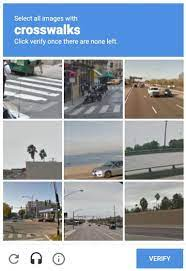
- The captcha is loaded from the domain
google.comorrecaptcha.net.
Identifying reCaptcha V2 Enterprise 🌻
Key Points:
- A challenge box will always be present, requiring you to click on images to solve it.
- The captcha can include an extra data parameter named
's'. More details on this can be found in the reCaptcha V2 Enterprise Documentation. - The captcha is loaded from the domain
google.comorrecaptcha.net. - The URL used to load the reCaptcha will contain
/enterprise/.
Example URL:https://www.google.com/recaptcha/enterprise/anchor
Other Versions: reCaptcha V2 Invisible, reCaptcha V3, and reCaptcha V3 Enterprise 🤩
For these versions, the most effective method for identification involves using Charles Proxy. We'll explain what to check both with and without using Charles.
If you want to use Charles method, do the setup of Charles. If you don't want, just ignore this part.
Setting Up Charles 🛠
-
Download and install Charles Proxy.
-
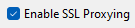
Open Charles and navigate to
Proxy > SSL Proxyingto enable SSL Proxying.
-
Add the following hosts and ports in the
Includepanel:- Host:
www.recaptcha.net, Port:443 - Host:
google.com, Port:443
- Host:
Identifying reCaptcha V2 Invisible 🌟
Key Points:
- A challenge box will not always appear and is triggered only by suspicious activity.
- The captcha is loaded from the domain
google.comorrecaptcha.net. - The "I'm not a robot" button is absent. Instead, an icon will be displayed in the corner.
Using Charles for Detection
- If you have already Charles configured, open charles and go to the site with reCaptcha.
- A request from google.com or recaptcha.net will appear, click and search for recaptcha. After you find, click the reload request.
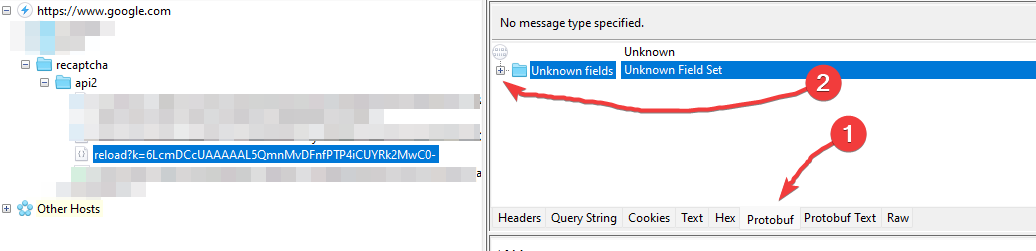
In Charles, inspect protobuf position 6 for a value labeled'fi'. There must be a number 6 and also in this number the value fi to be v2 invisible. This is the most efficient way to confirm reCaptcha V2 Invisible.

Identifying reCaptcha V3 and V3 Enterprise 🍀
Key Points:
- The challenge box will not appear.
- The captcha is loaded from the domain
google.comorrecaptcha.net. - An icon appears in the corner instead of the "I'm not a robot" button.
Using Charles for Detection
- If you have already Charles configured, open charles and go to the site with reCaptcha.
- A request from google.com or recaptcha.net will appear, click and search for recaptcha. After you find, click the reload request.
Inspect protobuf position 8 for a value indicating thepageAction. There must be a number 8 and also with a string value that will be the pageAction that we need to submit to capsolver. This is the most efficient way to confirm it's reCaptcha V3 or V3 Enterprise.

Additional Resources 👀
More
reCAPTCHAApr 16, 2026
reCAPTCHA Score Explained: Range, Meaning, and How to Improve It
Understand reCAPTCHA v3 score range (0.0 to 1.0), its meaning, and how to improve your score. Learn how to handle low scores and optimize user experience.

reCAPTCHAApr 16, 2026
reCAPTCHA Invalid Site Key or Token? Causes & Fix Guide
Facing "reCAPTCHA Invalid Site Key" or "invalid reCAPTCHA token" errors? Discover common causes, step-by-step fixes, and troubleshooting tips to resolve reCAPTCHA verification failed issues. Learn how to fix reCAPTCHA verification failed please try again.


