🎉NEWCapSolver for AI agents-MCP, agent tools, and SDK integrations

Ethan Collins
AI Agent Workflow Engineer
Published Oct 20, 2025
Updated Oct 20, 2025 · min read
reCAPTCHA v3, Google's advanced, invisible CAPTCHA, operates silently in the background, analyzing user behavior to assign a score indicating the likelihood of bot activity. Unlike its predecessor, reCAPTCHA v2, it doesn't typically present interactive challenges to users. While this improves user experience, it introduces new complexities for web automation and data scraping, as traditional token injection methods are often insufficient or easily overwritten.
This article provides an in-depth guide to integrating Crawl4AI, a powerful web crawler, with CapSolver, a leading CAPTCHA solving service, specifically for solving reCAPTCHA v3. We will explore sophisticated techniques, including API-based solutions with JavaScript fetch hooking and browser extension integration, to ensure seamless and reliable web data extraction even from sites protected by reCAPTCHA v3.
reCAPTCHA v3 works by returning a score (between 0.0 and 1.0) for each request without user interaction. A score of 0.0 indicates a high likelihood of bot activity, while 1.0 suggests a human user. Websites then use this score to decide whether to allow the action, present a challenge, or block the request. The invisible nature of reCAPTCHA v3 means:
fetch or XMLHttpRequest requests.CapSolver's advanced AI capabilities are crucial for obtaining valid reCAPTCHA v3 tokens with high scores. When combined with Crawl4AI's robust browser control, it enables developers to overcome these challenges and maintain uninterrupted data streams.
💡 Exclusive Bonus for Crawl4AI Integration Users:
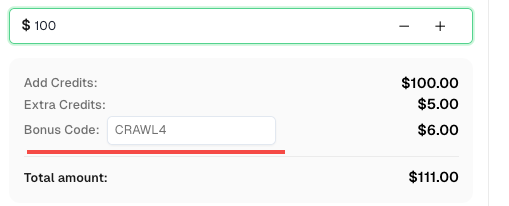
To celebrate this integration, we’re offering an exclusive 6% bonus code —CRAWL4for all CapSolver users who register through this tutorial.
Simply enter the code during recharge in Dashboard to receive an extra 6% credit instantly.
Bypassing reCAPTCHA v3 via API integration requires a more advanced approach than v2, primarily due to its invisible nature and dynamic token verification. The key strategy involves obtaining the reCAPTCHA v3 token from CapSolver and then
hooking the window.fetch method in the browser to replace the original reCAPTCHA v3 token with the CapSolver-provided token at the precise moment of verification.
gRecaptchaResponse token and potentially a higher score.js_code in CrawlerRunConfig) that overrides the window.fetch method.fetch requests. When a request targeting the reCAPTCHA v3 verification endpoint (e.g., /recaptcha-v3-verify.php) is detected, the JavaScript modifies the request to include the CapSolver-provided token instead of any token generated by the page itself.The following Python code demonstrates this advanced technique for integrating CapSolver's API with Crawl4AI to solve reCAPTCHA v3. This example uses the reCAPTCHA v3 demo page.
import asyncio
import capsolver
from crawl4ai import *


# TODO: set your config
# Docs: https://docs.capsolver.com/guide/captcha/ReCaptchaV3/
api_key = "CAP-xxxxxxxxxxxxxxxxxxxxx"                                            # your api key of capsolver
site_key = "6LdKlZEpAAAAAAOQjzC2v_d36tWxCl6dWsozdSy9"                            # site key of your target site
site_url = "https://recaptcha-demo.appspot.com/recaptcha-v3-request-scores.php"  # page url of your target site
page_action = "examples/v3scores"                                                # page action of your target site
captcha_type = "ReCaptchaV3TaskProxyLess"                                        # type of your target captcha
capsolver.api_key = api_key


async def main():
    browser_config = BrowserConfig(
        verbose=True,
        headless=False,
        use_persistent_context=True,
    )

    # get recaptcha token using capsolver sdk
    solution = capsolver.solve({
        "type": captcha_type,
        "websiteURL": site_url,
        "websiteKey": site_key,
        "pageAction": page_action,
    })
    token = solution["gRecaptchaResponse"]
    print("recaptcha token:", token)

    async with AsyncWebCrawler(config=browser_config) as crawler:
        await crawler.arun(
            url=site_url,
            cache_mode=CacheMode.BYPASS,
            session_id="session_captcha_test"
        )

        js_code = """
            const originalFetch = window.fetch;

            window.fetch = function(...args) {
              if (typeof args[0] === 'string' && args[0].includes('/recaptcha-v3-verify.php')) {
                const url = new URL(args[0], window.location.origin);
                url.searchParams.set('action', '""" + token + """');
                args[0] = url.toString();
                document.querySelector('.token').innerHTML = "fetch('/recaptcha-v3-verify.php?action=examples/v3scores&token=""" + token + """')";
                console.log('Fetch URL hooked:', args[0]);
              }
              return originalFetch.apply(this, args);
            };
        """

        wait_condition = """() => {
            return document.querySelector('.step3:not(.hidden)');
        }"""

        run_config = CrawlerRunConfig(
            cache_mode=CacheMode.BYPASS,
            session_id="session_captcha_test",
            js_code=js_code,
            js_only=True,
            wait_for=f"js:{wait_condition}"
        )

        result_next = await crawler.arun(
            url=site_url,
            config=run_config,
        )
        print(result_next.markdown)


if __name__ == "__main__":
    asyncio.run(main())
Code Analysis:
solve call: The capsolver.solve method is called with ReCaptchaV3TaskProxyLess type, websiteURL, websiteKey, and importantly, pageAction. The pageAction parameter is crucial for reCAPTCHA v3 as it helps CapSolver understand the context of the reCAPTCHA on the page and generate a more accurate token.fetch Hook: The js_code is the core of this solution. It redefines window.fetch. When a fetch request is made to /recaptcha-v3-verify.php, the script intercepts it, modifies the URL to include the CapSolver-provided token in the action parameter, and then allows the original fetch to proceed. This ensures that the server receives the high-scoring token from CapSolver.wait_for Condition: The wait_condition ensures Crawl4AI waits for a specific element (.step3:not(.hidden)) to become visible, indicating that the reCAPTCHA v3 verification process has completed successfully and the page has advanced.For reCAPTCHA v3, using the CapSolver browser extension can simplify the integration process, especially when the goal is to leverage the extension's automatic solving capabilities. The extension is designed to detect and solve reCAPTCHA v3 in the background, often triggered upon visiting the website.
user_data_dir to launch a browser instance that maintains the installed CapSolver extension.manualSolving should be false (or default).This example demonstrates how to configure Crawl4AI to use a browser profile with the CapSolver extension for automatic reCAPTCHA v3 solving. The key is to ensure the extension is properly set up in the user_data_dir.
import asyncio
import time

from crawl4ai import *


# TODO: set your config
user_data_dir = "/browser-profile/Default1" # Ensure this path is correctly set and contains your configured extension

browser_config = BrowserConfig(
    verbose=True,
    headless=False,
    user_data_dir=user_data_dir,
    use_persistent_context=True,
    proxy="http://127.0.0.1:13120", # Optional: configure proxy if needed
)

async def main():
    async with AsyncWebCrawler(config=browser_config) as crawler:
        result_initial = await crawler.arun(
            url="https://recaptcha-demo.appspot.com/recaptcha-v3-request-scores.php", # Use the reCAPTCHA v3 demo URL
            cache_mode=CacheMode.BYPASS,
            session_id="session_captcha_test"
        )

        # reCAPTCHA v3 is typically solved automatically by the extension upon page load.
        # You might need to add a wait condition or time.sleep for the CAPTCHA to be solved
        # before proceeding with further actions that depend on the token.
        time.sleep(30) # Example wait, adjust as necessary for the extension to operate

        # Continue with other Crawl4AI operations after CAPTCHA is solved
        # For instance, check for elements or content that appear after successful verification
        # print(result_initial.markdown) # You can inspect the page content after the wait


if __name__ == "__main__":
    asyncio.run(main())
Code Analysis:
user_data_dir: Similar to reCAPTCHA v2 extension integration, this parameter is critical for Crawl4AI to use a browser profile with a pre-installed and configured CapSolver extension. The extension will then handle the reCAPTCHA v3 resolution automatically.time.sleep is included as a general placeholder to allow the extension to complete its background operations. For more robust solutions, consider using Crawl4AI's wait_for functionality to check for specific page changes that indicate successful reCAPTCHA v3 resolution.Solving reCAPTCHA v3 in web scraping requires a sophisticated approach, given its invisible nature and dynamic verification mechanisms. The integration of Crawl4AI with CapSolver provides powerful tools to overcome these challenges. Whether through the precise control of API integration with JavaScript fetch hooking or the streamlined automation offered by the browser extension, developers can ensure their web scraping operations remain efficient and uninterrupted.
By leveraging CapSolver's high-accuracy reCAPTCHA v3 solving capabilities and Crawl4AI's advanced browser control, you can maintain high success rates in data extraction from websites protected by this advanced CAPTCHA. This synergy empowers developers to build more robust and reliable automated web data collection systems.
Ethan Collins
AI Agent Workflow Engineer
Building clearer handoffs between AI agents and tools.
ABOUT THE AUTHOR
Understand reCAPTCHA v3 score range (0.0 to 1.0), its meaning, and how to improve your score. Learn how to handle low scores and optimize user experience.

Facing "reCAPTCHA Invalid Site Key" or "invalid reCAPTCHA token" errors? Discover common causes, step-by-step fixes, and troubleshooting tips to resolve reCAPTCHA verification failed issues. Learn how to fix reCAPTCHA verification failed please try again.