🎉NEWCapSolver for AI agents-MCP, agent tools, and SDK integrations

Ethan Collins
AI Agent Workflow Engineer
Published Oct 20, 2025
Updated Oct 20, 2025 · min read
"I'm not a robot" checkbox, serves as a crucial defense mechanism against bot traffic and automated abuse on websites. While essential for security, it often poses a significant challenge for legitimate web scraping and data extraction operations. The need for efficient, automated CAPTCHA solving solutions has become paramount for developers and businesses relying on web automation.
This article delves into the robust integration of Crawl4AI , an advanced web crawler, with CapSolver, a leading CAPTCHA solving service, specifically focusing on solving reCAPTCHA v2. We will explore both API-based and browser extension-based integration methods, providing detailed code examples and explanations to help you achieve seamless, uninterrupted web data collection.
reCAPTCHA v2 requires users to click a checkbox, and sometimes complete image challenges, to prove they are human. For automated systems like web crawlers, this interactive element halts the scraping process, demanding manual intervention or sophisticated bypass techniques. Without an effective solution, data collection becomes inefficient, unstable, and costly.
CapSolver offers a high-accuracy, fast-response solution for reCAPTCHA v2 by leveraging advanced AI algorithms. When integrated with Crawl4AI, it transforms a significant hurdle into a streamlined, automated step, ensuring your web automation tasks remain fluid and productive.
💡 Exclusive Bonus for Crawl4AI Integration Users:
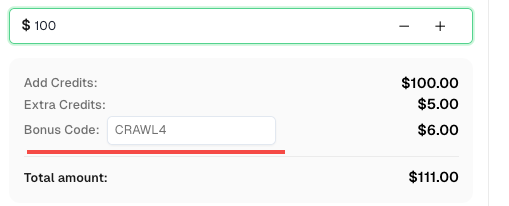
To celebrate this integration, we’re offering an exclusive 6% bonus code —CRAWL4for all CapSolver users who register through this tutorial.
Simply enter the code during recharge in Dashboard to receive an extra 6% credit instantly.
The API integration method provides fine-grained control and is generally recommended for its flexibility and precision. It involves using Crawl4AI's js_code functionality to inject the CAPTCHA token obtained from CapSolver directly into the target webpage.
siteKey and websiteURL to receive the gRecaptchaResponse token.js_code parameter within CrawlerRunConfig to inject the obtained token into the g-recaptcha-response textarea element on the page.The following Python code demonstrates how to integrate CapSolver's API with Crawl4AI to solve reCAPTCHA v2. This example targets the reCAPTCHA v2 checkbox demo page.
import asyncio
import capsolver
from crawl4ai import *


# TODO: set your config
# Docs: https://docs.capsolver.com/guide/captcha/ReCaptchaV2/
api_key = "CAP-xxxxxxxxxxxxxxxxxxxxx"                                      # your api key of capsolver
site_key = "6LfW6wATAAAAAHLqO2pb8bDBahxlMxNdo9g947u9"                      # site key of your target site
site_url = "https://recaptcha-demo.appspot.com/recaptcha-v2-checkbox.php"  # page url of your target site
captcha_type = "ReCaptchaV2TaskProxyLess"                                  # type of your target captcha
capsolver.api_key = api_key


async def main():
    browser_config = BrowserConfig(
        verbose=True,
        headless=False,
        use_persistent_context=True,
    )

    async with AsyncWebCrawler(config=browser_config) as crawler:
        await crawler.arun(
            url=site_url,
            cache_mode=CacheMode.BYPASS,
            session_id="session_captcha_test"
        )

        # get recaptcha token using capsolver sdk
        solution = capsolver.solve({
            "type": captcha_type,
            "websiteURL": site_url,
            "websiteKey": site_key,
        })
        token = solution["gRecaptchaResponse"]
        print("recaptcha token:", token)

        js_code = """
            const textarea = document.getElementById(\'g-recaptcha-response\');
            if (textarea) {
                textarea.value = \"""" + token + """\";
                document.querySelector(\'button.form-field[type="submit"]\').click();
            }
        """

        wait_condition = """() => {
            const items = document.querySelectorAll(\'h2\');
            return items.length > 1;
        }"""

        run_config = CrawlerRunConfig(
            cache_mode=CacheMode.BYPASS,
            session_id="session_captcha_test",
            js_code=js_code,
            js_only=True,
            wait_for=f"js:{wait_condition}"
        )

        result_next = await crawler.arun(
            url=site_url,
            config=run_config,
        )
        print(result_next.markdown)


if __name__ == "__main__":
    asyncio.run(main())
Code Analysis:
capsolver.solve method is invoked with ReCaptchaV2TaskProxyLess type, websiteURL, and websiteKey to retrieve the gRecaptchaResponse token. This token is the solution provided by CapSolver.js_code): The js_code string contains JavaScript that locates the g-recaptcha-response textarea element on the page and assigns the obtained token to its value property. Subsequently, it simulates a click on the submit button, ensuring the form is submitted with the valid CAPTCHA token.wait_for Condition: A wait_condition is defined to ensure Crawl4AI waits for a specific element to appear on the page, indicating that the submission was successful and the page has loaded new content.For scenarios where direct API injection might be complex or less desirable, CapSolver's browser extension offers an alternative. This method leverages the extension's ability to automatically detect and solve CAPTCHAs within the browser context managed by Crawl4AI.
user_data_dir: Configure Crawl4AI to launch a browser instance with a specified user_data_dir to maintain persistent context.apiKey and manualSolving parameters in the extension's config.js file.manualSolving configuration, the CAPTCHA will either be solved automatically upon detection, or you can trigger it manually via injected JavaScript.This example shows how Crawl4AI can be configured to use a browser profile with the CapSolver extension for automatic reCAPTCHA v2 solving.
import asyncio
import time

from crawl4ai import *


# TODO: set your config
user_data_dir = "/browser-profile/Default1" # Ensure this path is correctly set and contains your configured extension

browser_config = BrowserConfig(
    verbose=True,
    headless=False,
    user_data_dir=user_data_dir,
    use_persistent_context=True,
    proxy="http://127.0.0.1:13120", # Optional: configure proxy if needed
)

async def main():
    async with AsyncWebCrawler(config=browser_config) as crawler:
        result_initial = await crawler.arun(
            url="https://recaptcha-demo.appspot.com/recaptcha-v2-checkbox.php",
            cache_mode=CacheMode.BYPASS,
            session_id="session_captcha_test"
        )

        # The extension will automatically solve the CAPTCHA upon page load.
        # You might need to add a wait condition or time.sleep for the CAPTCHA to be solved
        # before proceeding with further actions.
        time.sleep(30) # Example wait, adjust as necessary

        # Continue with other Crawl4AI operations after CAPTCHA is solved
        # For instance, check for elements that appear after successful submission
        # print(result_initial.markdown) # You can inspect the page content after the wait


if __name__ == "__main__":
    asyncio.run(main())
Code Analysis:
user_data_dir: This parameter is crucial for Crawl4AI to launch a browser instance that retains the installed CapSolver extension and its configurations. Ensure the path points to a valid browser profile directory where the extension is installed.manualSolving set to false (or default) in the extension's configuration, the extension will automatically detect and solve the reCAPTCHA v2 upon page load. A time.sleep is included as a placeholder to allow the extension sufficient time to solve the CAPTCHA before any subsequent actions are attempted.If you prefer to trigger the CAPTCHA solving manually at a specific point in your scraping logic, you can configure the extension's manualSolving parameter to true and then use js_code to click the solver button provided by the extension.
import asyncio
import time

from crawl4ai import *


# TODO: set your config
user_data_dir = "/browser-profile/Default1" # Ensure this path is correctly set and contains your configured extension

browser_config = BrowserConfig(
    verbose=True,
    headless=False,
    user_data_dir=user_data_dir,
    use_persistent_context=True,
    proxy="http://127.0.0.1:13120", # Optional: configure proxy if needed
)

async def main():
    async with AsyncWebCrawler(config=browser_config) as crawler:
        result_initial = await crawler.arun(
            url="https://recaptcha-demo.appspot.com/recaptcha-v2-checkbox.php",
            cache_mode=CacheMode.BYPASS,
            session_id="session_captcha_test"
        )

        # Wait for a moment for the page to load and the extension to be ready
        time.sleep(6)

        # Use js_code to trigger the manual solve button provided by the CapSolver extension
        js_code = """
            let solverButton = document.querySelector(\'#capsolver-solver-tip-button\');
            if (solverButton) {
                const clickEvent = new MouseEvent(\'click\', {
                    bubbles: true,
                    cancelable: true,
                    view: window
                });
                solverButton.dispatchEvent(clickEvent);
            }
        """
        print(js_code)
        run_config = CrawlerRunConfig(
            cache_mode=CacheMode.BYPASS,
            session_id="session_captcha_test",
            js_code=js_code,
            js_only=True,
        )
        result_next = await crawler.arun(
            url="https://recaptcha-demo.appspot.com/recaptcha-v2-checkbox.php",
            config=run_config
        )
        print("JS Execution results:", result_next.js_execution_result)

        # Allow time for the CAPTCHA to be solved after manual trigger
        time.sleep(30) # Example wait, adjust as necessary

        # Continue with other Crawl4AI operations


if __name__ == "__main__":
    asyncio.run(main())
Code Analysis:
manualSolving: Before running this code, ensure the CapSolver extension's config.js has manualSolving set to true.js_code simulates a click event on the #capsolver-solver-tip-button, which is the button provided by the CapSolver extension for manual solving. This gives you precise control over when the CAPTCHA resolution process is initiated.The integration of Crawl4AI with CapSolver provides powerful and flexible solutions for bypassing reCAPTCHA v2, significantly enhancing the efficiency and reliability of web scraping operations. Whether you opt for the precise control of API integration or the simplified setup of browser extension integration, both methods ensure that reCAPTCHA v2 no longer stands as a barrier to your data collection goals.
By automating CAPTCHA resolution, developers can focus on extracting valuable data, confident that their crawlers will navigate protected websites seamlessly. This synergy between Crawl4AI's advanced crawling capabilities and CapSolver's robust CAPTCHA solving technology marks a significant step forward in automated web data extraction.
Ethan Collins
AI Agent Workflow Engineer
Building clearer handoffs between AI agents and tools.
ABOUT THE AUTHOR
Understand reCAPTCHA v3 score range (0.0 to 1.0), its meaning, and how to improve your score. Learn how to handle low scores and optimize user experience.

Facing "reCAPTCHA Invalid Site Key" or "invalid reCAPTCHA token" errors? Discover common causes, step-by-step fixes, and troubleshooting tips to resolve reCAPTCHA verification failed issues. Learn how to fix reCAPTCHA verification failed please try again.