
🎉NEWCapSolver for AI agents-MCP, agent tools, and SDK integrations

Ethan Collins
AI Agent Workflow Engineer
Published Jul 24, 2024
Updated Jul 24, 2024 · min read
Scrapy and Selenium are two popular tools for web scraping, each suited to different use cases. Scrapy is a fast, lightweight, and scalable Python framework ideal for large-scale scraping of static websites. Selenium, on the other hand, automates real browsers and excels at scraping dynamic, JavaScript-heavy pages that require user interaction. The right choice depends on your project’s complexity, performance requirements, and interaction needs, and both tools may encounter CAPTCHA challenges that can be addressed with services like CapSolver.
Web scraping is an essential technique for collecting data from the internet, and it has become increasingly popular among developers, researchers, and businesses. Two of the most commonly used tools for web scraping are Scrapy and Selenium. Each has its strengths and weaknesses, making them suitable for different types of projects. In this article, we'll compare Scrapy and Selenium to help you determine which tool is best for your web scraping needs.
Scrapy is a powerful and fast open-source web crawling framework written in Python. It is designed to scrape web pages and extract structured data from them. Scrapy is highly efficient, scalable, and customizable, making it an excellent choice for large-scale web scraping projects.
Struggling with the repeated failure to completely solve the irritating captcha? Discover seamless automatic captcha solving with CapSolver AI-powered Auto Web Unblock technology!
Boost your automation budget instantly!
Use bonus code CAPN when topping up your CapSolver account to get an extra 5% bonus on every recharge — with no limits.
Redeem it now in your CapSolver Dashboard
.
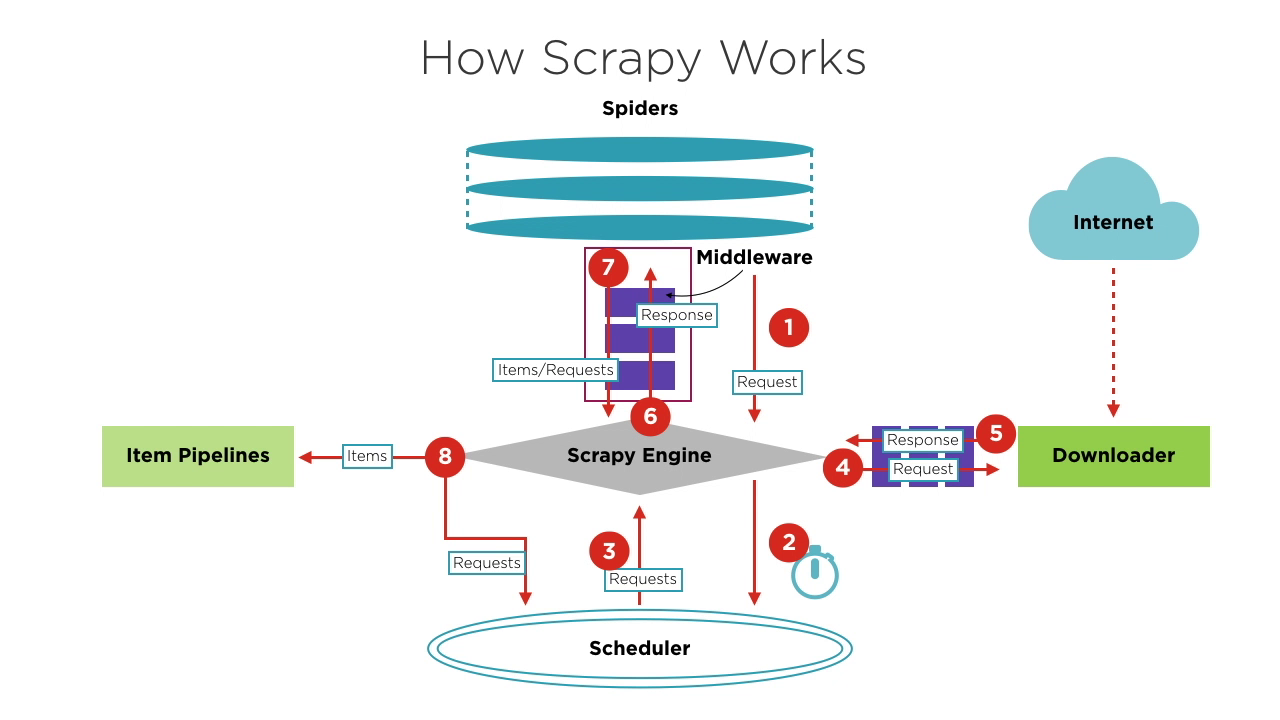
When starting a crawling project, the Engine finds the Spider that handles the target site based on the site to be crawled. The Spider generates one or more initial Requests corresponding to the pages that need to be crawled and sends them to the Engine.
The Engine obtains these Requests from the Spider and then passes them to the Scheduler to await scheduling.
The Engine asks the Scheduler for the next Request to be processed. At this point, the Scheduler selects an appropriate Request based on its scheduling logic and sends it to the Engine.
The Engine forwards the Request from the Scheduler to the Downloader for download execution. The process of sending the Request to the Downloader goes through the processing of many predefined Downloader Middlewares.
The Downloader sends the Request to the target server, receives the corresponding Response, and then returns it to the Engine. The process of returning the Response to the Engine also goes through the processing of many predefined Downloader Middlewares.
The Response received by the Engine from the Downloader contains the content of the target site. The Engine will send this Response to the corresponding Spider for processing. The process of sending the Response to the Spider goes through the processing of predefined Spider Middlewares.
The Spider processes the Response, parsing its content. At this point, the Spider will produce one or more crawled result Items or one or more Requests corresponding to subsequent target pages to be crawled. It then sends these Items or Requests back to the Engine for processing. The process of sending Items or Requests to the Engine goes through the processing of predefined Spider Middlewares.
The Engine forwards one or more Items sent back by the Spider to the predefined Item Pipelines for a series of data processing or storage operations. It forwards one or more Requests sent back by the Spider to the Scheduler to await the next scheduling.
Steps 2 to 8 are repeated until there are no more Requests in the Scheduler. At this point, the Engine will close the Spider, and the entire crawling process ends.
From an overall perspective, each component focuses only on one function, the coupling between components is very low, and it's very easy to extend. The Engine then combines the various components, allowing each component to perform its duty, cooperate with each other, and jointly complete the crawling work. In addition, with Scrapy's support for asynchronous processing, it can maximize the use of network bandwidth and improve the efficiency of data crawling and processing.
Selenium is an open-source web automation tool that allows you to control web browsers programmatically. While it is primarily used for testing web applications, Selenium is also popular for web scraping because it can interact with JavaScript-heavy websites that are difficult to scrape using traditional methods. It's important to note that Selenium can only test web applications. We cannot use Selenium to test any desktop (software) applications or mobile applications.
The core of Selenium is Selenium WebDriver, which provides a programming interface that allows developers to write code to control browser behavior and interactions. This tool is very popular in web development and testing because it supports multiple browsers and can run on different operating systems. Selenium WebDriver allows developers to simulate user actions in the browser, such as clicking buttons, filling out forms, and navigating pages.
Selenium WebDriver offers rich functionality, making it an ideal choice for web automation testing.
Browser Control: Selenium WebDriver supports multiple mainstream browsers, including Chrome, Firefox, Safari, Edge, and Internet Explorer. It can launch and control these browsers, performing operations such as opening web pages, clicking elements, inputting text, and taking screenshots.
Cross-platform Compatibility: Selenium WebDriver can run on different operating systems, including Windows, macOS, and Linux. This makes it very useful in multi-platform testing, allowing developers to ensure their applications perform consistently across various environments.
Programming Language Support: Selenium WebDriver supports multiple programming languages, including Java, Python, C#, Ruby, and JavaScript. Developers can choose the language they are familiar with to write automated test scripts, thereby improving development and testing efficiency.
Web Element Interaction: Selenium WebDriver provides a rich API for locating and manipulating web page elements. It supports locating elements through various methods such as ID, class name, tag name, CSS selector, XPath, etc. Developers can use these APIs to implement operations like clicking, inputting, selecting, and dragging and dropping.
| Feature | Scrapy | Selenium |
|---|---|---|
| Purpose | Web scraping only | Web scraping and web testing |
| Language Support | Python only | Java, Python, C#, Ruby, JavaScript, etc. |
| Execution Speed | Fast | Slower |
| Extensibility | High | Limited |
| Asynchronous Support | Yes | No |
| Dynamic Rendering | No | Yes |
| Browser Interaction | No | Yes |
| Memory Resource Consumption | Low | High |
Choose Scrapy if:
Choose Selenium if:
Whether to use Scrapy or Selenium depends on the specific application scenario, compare the advantages and disadvantages of various choose the most suitable for you, of course, if your programming skills are great enough, you can even combine Scrapy and Selenium at the same time.
Whether using Scrapy or Selenium, you may encounter the same problem: bot challenges. Bot challenges are widely used to distinguish between computers and humans, prevent malicious bot access to websites, and protect data from being scraped. Common bot challenges include captcha, reCaptcha, captcha, captcha, Cloudflare Turnstile, captcha, captcha WAF, and others. They use complex images and hard-to-read JavaScript challenges to determine if you're a bot. Some challenges are even difficult for humans to pass.
As the saying goes, "To each their own expertise." The emergence of CapSolver has made this problem simpler. CapSolver uses AI-based automatic web unlocking technology that can help you solve various bot challenges in seconds. No matter what kind of image or question challenge you encounter, you can confidently leave it to CapSolver. If it's not successful, you won't be charged.
CapSolver provides a browser extension that can automatically solve CAPTCHA challenges during your Selenium-based data scraping process. It also offers an API method to solve CAPTCHAs and obtain tokens, allowing you to easily handle various challenges in Scrapy as well. All of this work can be completed in just a few seconds. Refer to the CapSolver documentation for more information.
Choosing between Scrapy and Selenium depends on your project's needs. Scrapy is ideal for efficiently scraping static sites, while Selenium excels with dynamic, JavaScript-heavy pages. Consider the specific requirements, such as speed, resource use, and interaction level. For overcoming challenges like CAPTCHAs, tools like CapSolver offer efficient solutions, making the scraping process smoother. Ultimately, the right choice ensures a successful and efficient scraping project.
Yes. A common approach is to use Selenium to handle JavaScript rendering or complex interactions (such as login flows), then pass the rendered HTML or extracted URLs to Scrapy for high-speed, large-scale crawling and data extraction. This hybrid model combines Selenium’s flexibility with Scrapy’s performance.
By default, Scrapy does not execute JavaScript, which makes it unsuitable for sites that rely heavily on client-side rendering. However, it can be extended using tools like Playwright, Splash, or Selenium to handle JavaScript content when necessary.
Scrapy is significantly more resource-efficient than Selenium. It uses asynchronous networking and does not require launching a browser, making it better suited for high-volume, large-scale scraping tasks. Selenium consumes more CPU and memory because it controls a real browser, which limits scalability.
Ethan Collins
AI Agent Workflow Engineer
Building clearer handoffs between AI agents and tools.
ABOUT THE AUTHOR
Explore how AI detects and solves CAPTCHA challenges, from image recognition to behavioral analysis. Understand the technology behind AI CAPTCHA solvers and how CapSolver aids automated workflows. Learn about the evolving battle between AI and human verification.

Compare top CAPTCHA solving APIs by speed, accuracy, uptime, and pricing. See how CapSolver, 2Captcha, CapMonster Cloud, and others stack up in our detailed performance comparison.

