🎉NEWCapSolver for AI agents-MCP, agent tools, and SDK integrations

Ethan Collins
AI Agent Workflow Engineer
Published Mar 26, 2024
Updated Mar 26, 2024 · min read
CAPTCHA was developed to differentiate between human users and automated computer programs, serving as a protective barrier for web services. It prevents harmful activities like creating multiple accounts, automated brute force attacks, data scraping, and spamming. CAPTCHA presents a challenge-response test that is easy for humans but challenging for automated algorithms. This article explores various CAPTCHA types and demonstrates the use of CapSolver to solve these challenges.
CAPTCHA challenges nowadays come in many different forms and variations, of which the following are a few of the very common ones you'll encounter:
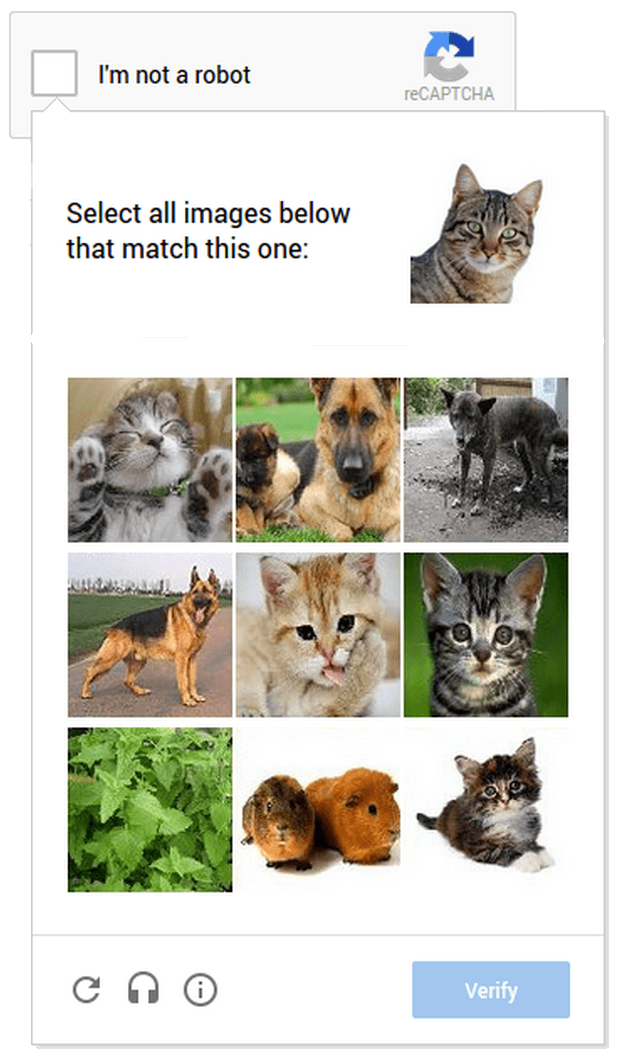
ReCaptcha V2&v3: ReCaptcha is a widely used captcha system developed by Google. It includes various types, such as selecting images that match a given description or solving puzzles.
Text-based CAPTCHA,Text-based CAPTCHAs are also a very common form of CAPTCHA, requiring the user to correctly identify and enter a series of characters displayed in a distorted or creative font. The accuracy of the response is then used to decide whether to allow access to the website or not
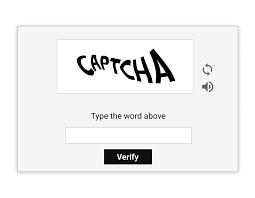
Image-based CAPTCHA, in image-based CAPTCHAs, the user must recognise and correctly interact with the image to be granted access. These image challenges are visually compelling and proving challenging for automated scripts, as a result of the complex image recognition capabilities they require, which are often outside the capabilities of automated scripts
As web scraping scenarios become more prevalent, today's CAPTCHA solutions leverage machine learning and artificial intelligence to identify and effectively bypass CAPTCHA challenges, and CapSolver is currently the most effective and affordable solution on the market!
To solve CAPTCHA problems with CapSolver, sign up for a free trial. And here's how to use CapSolver to solve the different types of CAPTCHAs we've summarised above.
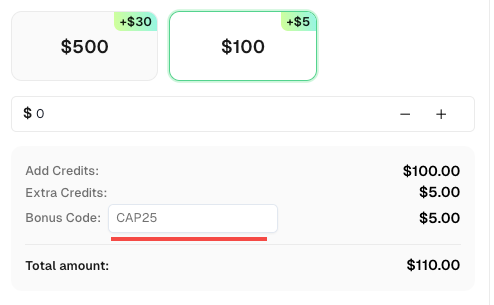
Claim Your CapSolver Bonus
Boost your automation performance with a quick bonus! Use the promo code CAP25 when adding funds to your CapSolver account to get an extra 5% credit on every recharge — with no limit. Start optimizing your CAPTCHA-solving workflow today!
Take Recaptcha V2 as example
To solve reCaptcha v2, follow our documentation. Some parameters are required and some are optional. For this example, we will only use the required parameters. The task types for reCAPTCHA v2 are:
ReCaptchaV2Task: This task type requires your own proxies.ReCaptchaV2TaskProxyLess: This task type uses the server's built-in proxy.ReCaptchaV2EnterpriseTask: This task type requires your own proxies.ReCaptchaV2EnterpriseTaskProxyLess: This task type uses the server's built-in proxy.For this example, we will use ReCaptchaV2TaskProxyLess as the site uses standard reCAPTCHA v2. If the site uses Recaptcha Enterprise, you will need to send the correct task type (ReCaptchaV2EnterpriseTaskProxyLess or ReCaptchaV2EnterpriseTask) and ensure all required parameters are included.
If any parameters are missing, you will likely encounter issues with the token not being accepted by the website. You can find all the parameters in this picture:
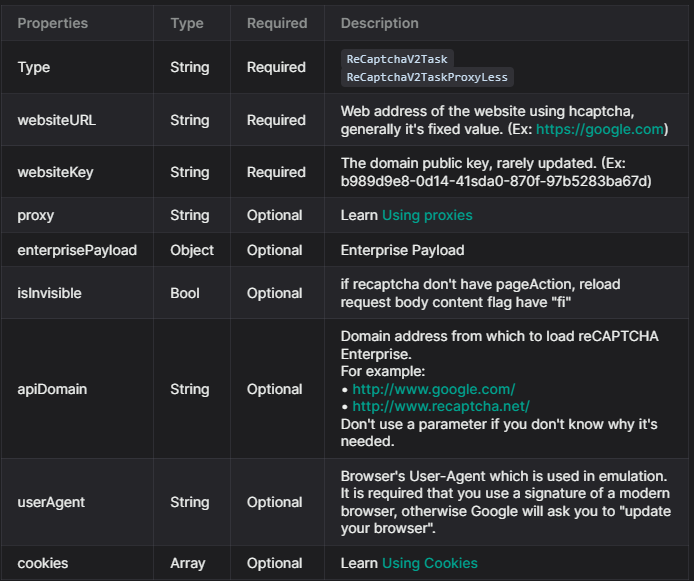
For get the captcha solved, first you need to submit all the information needed, for this we use the method createTask:
POST https://api.capsolver.com/createTask

{
  "clientKey": "YOUR_API_KEY",
  "task": {
    "type": "ReCaptchaV2TaskProxyless",
    "websiteURL": "site url",
    "websiteKey": "site key"
  }
}To verify the results, you'll need to continuously poll the getTaskResult API endpoint until the captcha is resolved.
Here's an example request:
POST https://api.capsolver.com/getTaskResult
Host: api.capsolver.com
Content-Type: application/json

{
    "clientKey":"YOUR_API_KEY",
    "taskId": "TASKID_OF_CREATETASK" //ID created by the createTask method
}
Once the captcha is successfully resolved, you'll receive a response similar to the one depicted in the following image:
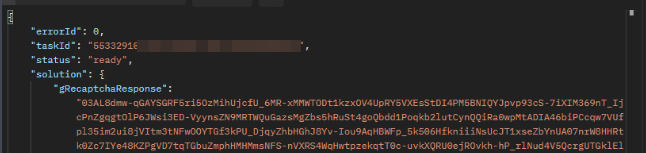
To solve captcha, the first step involves creating a task with the createTask method. This requires you to provide certain details like the type of task, the URL of the website using captcha, the public domain key, and more. Here's an overview of the task object structure:
{
  "type": "captchaTask",
  "websiteURL": "URL of the website using captcha",
  "websitePublicKey": "Public domain key",
  "captchaApiJSSubdomain": "A special subdomain of captcha.com",
  "data": "Additional parameter that may be required by captcha",
  "proxy": "Proxy details",
  "userAgent": "Browser's User-Agent used in emulation"
}
You can send a POST request to create a task using the CapSolver API like this:
{
  "clientKey":"YOUR_API_KEY",
  "task":
  {
    "type": "captchaTask",
    "websiteURL":"https://captcha.com/",
    "websitePublicKey":"00000000-0000-0000-0000-000000000000"
    "proxy":"Your_own_proxy"
  }
}
Once you've submitted the task, you should receive a 'Task ID' in the response if it's successful
After you've created the task, you can retrieve the result using the getTaskResult method. Depending on the system load, the results can be obtained within an interval of 1 to 20 seconds.
Here's an example of a POST request to get the task result:
POST https://api.capsolver.com/getTaskResult
Host: api.capsolver.com
Content-Type: application/json

{
  "clientKey": "YOUR_API_KEY",
  "taskId": "Task ID received from the createTask method"
}
Once the task status is ready, you should receive the result of the captcha challenge in the response
To solve captcha, the first step involves creating a task with the createTask method. This requires you to provide certain details like the type of task, the URL of the website using captcha, the public domain key, and more. Here's an overview of the task object structure:
{
  "type": "captchaTask",
  "websiteURL": "URL of the website using captcha",
  "websiteKey": "Public domain key",
  "isInvisible": "Boolean value indicating if it's an invisible captcha",
  "proxy": "Proxy details",
  "enableIPV6": "Boolean value indicating if your proxy is ipv6",
  "userAgent": "Browser's User-Agent used in emulation"
}
You can send a POST request to create a task using the Capsolver API like this:
{
 "clientKey":"YOUR_API_KEY",
    "task":
        {
             "type": "captchaTask",
            "websiteURL":"",
            "websiteKey":""
          "proxy":"Your_own_proxy"
        }


}
Once you've submitted the task, you should receive a 'Task ID' in the response if it's successful
After you've created the task, you can retrieve the result using the getTaskResult method. Depending on the system load, the results can be obtained within an interval of 1 to 10 seconds.
Here's an example of a POST request to get the task result:
POST https://api.capsolver.com/getTaskResult
Host: api.capsolver.com
Content-Type: application/json

{
  "clientKey": "YOUR_API_KEY",
  "taskId": "Task ID received from the createTask method"
}
Once the task status is ready, you should receive the result of the captcha challenge in the response.
The advent of CapSolver has redefined automated data access and collection. In this article, a number of different CAPTCHAs including recaptcha, etc. are presented along with steps on how CapSolver can circumvent these captchas. Whilst CapSolver can potentially provide a way to automate CAPTCHA resolution, it is critical to be aware of the ethnic and legislative implications of its use and to ensure that it is used in a responsible and non-malicious manner.
CapSolver supports almost every major CAPTCHA type — including reCAPTCHA v2/v3/Enterprise, AWS WAF, Cloudflare Turnstile/Challenge, ImageToText, and more. It’s designed to handle both browser-based and API-level CAPTCHA challenges efficiently. Product Page
Not always. CapSolver offers both proxy and proxyless task types.
ReCaptchaV2TaskProxyLess) for fast and easy integration.CapSolver’s average solve time is between 1–10 seconds, depending on CAPTCHA complexity and server load. Image-based or enterprise-level CAPTCHAs may take slightly longer, but most requests resolve almost instantly.
Ethan Collins
AI Agent Workflow Engineer
Building clearer handoffs between AI agents and tools.
ABOUT THE AUTHOR
Explore how AI detects and solves CAPTCHA challenges, from image recognition to behavioral analysis. Understand the technology behind AI CAPTCHA solvers and how CapSolver aids automated workflows. Learn about the evolving battle between AI and human verification.

Compare top CAPTCHA solving APIs by speed, accuracy, uptime, and pricing. See how CapSolver, 2Captcha, CapMonster Cloud, and others stack up in our detailed performance comparison.