🎉NEWCapSolver for AI agents-MCP, agent tools, and SDK integrations

Sora Fujimoto
AI Solutions Architect
Published Feb 27, 2026
Updated Feb 27, 2026 · min read
TL;DR
Extracting job market data is essential for recruiters, analysts, and businesses aiming to understand employment trends. However, a significant technical hurdle stands in the way: the CAPTCHA challenge. Job aggregation sites and professional networking platforms deploy sophisticated security measures to protect their data. This article explores the specific CAPTCHA challenges inherent in job data scraping and provides a clear, effective solution for developers and data professionals. We will examine why these challenges arise, the different types of CAPTCHAs you'll encounter, and how to integrate an automated service to ensure your data pipelines remain uninterrupted. This guide focuses on providing a durable strategy for handling a CAPTCHA challenge during scraping operations.
Job portals are high-value targets for data extraction. The information they hold—salary details, company information, and contact details—is valuable. Consequently, these platforms invest heavily in security measures to prevent automated access. A CAPTCHA challenge is the most common mechanism they use.
Unlike general web scraping, scraping job boards triggers security protocols more quickly. Actions such as rapid pagination through job listings, frequent searches from a single IP, or attempting to view hundreds of profiles in a short period are red flags. These behaviors mimic bot activity, leading to the deployment of a CAPTCHA challenge to verify the user. Understanding these triggers is the first step in building a resilient scraper. For a deeper dive into common scraping errors and how to resolve them, consider reading our guide on How to Fix Common Web Scraping Errors in 2026.
When performing job data scraping, you will encounter several types of CAPTCHA challenges. Each presents a unique problem for automated scripts.
These security measures are effective at stopping basic scrapers. Relying on simple IP rotation is often not enough to overcome a persistent CAPTCHA challenge. For more information on how IP bans work and how to manage them, our article on IP Bans in 2026 offers valuable insights.
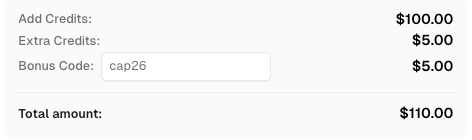
Use code
CAP26when signing up at CapSolver to receive bonus credits!
There are several approaches to handling a CAPTCHA challenge, each with its own trade-offs. For serious job data scraping operations, the choice of method directly impacts scalability and data quality.
| Method | Reliability | Scalability | Cost | Maintenance | Best For |
|---|---|---|---|---|---|
| Manual Solving | High | Very Low | High (Time) | N/A | Small, one-off tasks |
| Proxy Rotation | Low | Medium | Medium | High | Basic sites with no CAPTCHA |
| Headless Browsers | Medium | Low | Medium | High | Sites with simple JavaScript challenges |
| CAPTCHA Solving Service | Very High | High | Low (Per Task) | Low | Large-scale, reliable data scraping |
As the table shows, for any significant job data scraping project, a dedicated CAPTCHA solving service is the most practical and efficient solution. It removes the maintenance burden and provides the reliability needed for continuous data extraction. These services are designed to handle a CAPTCHA challenge at scale.
Integrating a service like CapSolver is the most direct way to handle a CAPTCHA challenge. It allows your scraper to offload the task of solving the challenge to a specialized API, which returns a solution token. This token can then be submitted to the website to proceed.
Here is a Python code example demonstrating how to use the CapSolver API to solve a reCAPTCHA v2 challenge. This script sends the website's site key and URL to the CapSolver service and retrieves the solution token.
import requests
import time

# Configure your CapSolver API key and the target site details
api_key = "YOUR_API_KEY"
site_key = "6Le-wvkSAAAAAPBMRTvw0Q4Muexq9bi0DJwx_mJ-" # Example site key from Google's demo
site_url = "https://www.google.com/recaptcha/api2/demo"

def solve_recaptcha_v2():
    """Creates a task on CapSolver and retrieves the solution for a reCAPTCHA v2 challenge."""

    # Step 1: Create the CAPTCHA task
    create_task_payload = {
        "clientKey": api_key,
        "task": {
            "type": 'ReCaptchaV2TaskProxyLess',
            "websiteKey": site_key,
            "websiteURL": site_url
        }
    }

    try:
        response = requests.post("https://api.capsolver.com/createTask", json=create_task_payload)
        response.raise_for_status() # Raise an exception for bad status codes
        resp_json = response.json()
        task_id = resp_json.get("taskId")

        if not task_id:
            print(f"Failed to create task. Response: {response.text}")
            return None

        print(f"Successfully created task with ID: {task_id}")

        # Step 2: Poll for the task result
        get_result_payload = {"clientKey": api_key, "taskId": task_id}
        while True:
            time.sleep(2) # Wait before polling
            result_response = requests.post("https://api.capsolver.com/getTaskResult", json=get_result_payload)
            result_response.raise_for_status()
            result_json = result_response.json()
            status = result_json.get("status")

            if status == "ready":
                print("CAPTCHA solved successfully!")
                return result_json.get("solution", {}).get('gRecaptchaResponse')
            elif status == "failed" or result_json.get("errorId"):
                print(f"Solve failed. Response: {result_response.text}")
                return None

    except requests.exceptions.RequestException as e:
        print(f"An error occurred: {e}")
        return None

# Main execution
if __name__ == "__main__":
    token = solve_recaptcha_v2()
    if token:
        print(f"Received solution token: {token[:30]}...")
        # Here, you would submit this token with your form/request
This approach abstracts away the complexity of dealing with the CAPTCHA challenge. For a more detailed guide on building your own scraping tools, check out our article on What Is A Scraping Bot and How to Build One.
To minimize the frequency of encountering a CAPTCHA challenge, it is important to make your scraper appear more human-like. Here are some best practices recommended by experts at ScrapingBee and Bright Data:
Even with these measures, a CAPTCHA challenge is often unavoidable in large-scale job data scraping. This is where a service like CapSolver becomes an indispensable part of your toolkit, as noted by sources like Oxylabs.
Successfully scraping job data requires a sophisticated approach to handling the inevitable CAPTCHA challenge. While basic techniques like proxy rotation can help, they are not sufficient for the advanced security on major job platforms. Integrating a dedicated CAPTCHA solving service like CapSolver provides a scalable, reliable, and cost-effective solution. By automating the solving process, you can ensure your data pipelines remain robust and efficient, allowing you to focus on extracting valuable insights from the job market. To learn more about extracting structured information, see our guide on How to Extract Structured Data From Popular Websites.
1. What is the most common CAPTCHA challenge on job scraping websites?
The most common are reCAPTCHA v2 and the invisible reCAPTCHA v3. Many large job portals like LinkedIn use their own sophisticated, often invisible, CAPTCHA challenge systems to detect and block automated scraping activity with high precision.
2. Can rotating proxies alone solve the CAPTCHA challenge?
While rotating high-quality residential proxies is a crucial step to avoid IP-based blocking, it is generally not sufficient to handle a CAPTCHA challenge on its own. Advanced CAPTCHA systems analyze behavioral patterns, not just IP addresses. A CAPTCHA challenge will still be triggered if bot-like behavior is detected.
3. How does a CAPTCHA solving service work?
A CAPTCHA solving service, like CapSolver, uses an API to receive CAPTCHA tasks from your script. It employs a combination of human solvers and advanced algorithms to solve the challenge and returns a solution token. Your script then submits this token to the website to proceed, automating the entire process.
4. Is it expensive to use a service for every CAPTCHA challenge?
The cost is minimal when compared to the cost of development and maintenance of an in-house solution or the financial impact of data pipeline downtime. Services like CapSolver charge on a per-solve basis, making it a highly cost-effective and scalable solution for handling a CAPTCHA challenge.
5. How quickly can a service like CapSolver solve a CAPTCHA challenge?
Most common CAPTCHA types, such as reCAPTCHA v2, are typically solved in under 10 seconds. This speed is essential for maintaining the efficiency of high-volume job data scraping operations where delays can be costly.
Sora Fujimoto
AI Solutions Architect
Connecting agents, browsers, and APIs into one workflow.
ABOUT THE AUTHOR
Explore how AI detects and solves CAPTCHA challenges, from image recognition to behavioral analysis. Understand the technology behind AI CAPTCHA solvers and how CapSolver aids automated workflows. Learn about the evolving battle between AI and human verification.
Compare top CAPTCHA solving APIs by speed, accuracy, uptime, and pricing. See how CapSolver, 2Captcha, CapMonster Cloud, and others stack up in our detailed performance comparison.