How to Solve Cloudflare Turnstile in Crawl4AI with CapSolver Integration

Lucas Mitchell
Automation Engineer

Introduction
Cloudflare Turnstile is a smart CAPTCHA alternative designed to verify legitimate users without intrusive challenges. It operates by running a series of non-interactive JavaScript challenges in the background, aiming to distinguish human visitors from bots seamlessly. While providing a better user experience, its invisible nature and dynamic verification process can pose significant hurdles for automated web scraping and data extraction tools.
This article provides a detailed guide on integrating Crawl4AI, an advanced web crawler, with CapSolver, a leading CAPTCHA and anti-bot solution service, to effectively bypass Cloudflare Turnstile protections. We will cover both API-based and browser extension-based integration methods, offering practical code examples and explanations to ensure your web automation tasks can proceed smoothly and without interruption.
Understanding Cloudflare Turnstile and its Challenges for Web Scraping
Cloudflare Turnstile works by assessing visitor behavior and browser characteristics to issue a token, which is then sent to the server for verification. It aims to be privacy-preserving and user-friendly, but for web crawlers, this means:
- Invisible Verification: No explicit user interaction (like clicking checkboxes or solving puzzles) is required, making it harder for bots to detect and respond to.
- Dynamic JavaScript Execution: The verification process relies heavily on JavaScript execution within the browser, which headless browsers used by crawlers must handle correctly.
- Token Injection: A valid token must be injected into a specific input field (usually
cf-turnstile-response) before form submission or proceeding to the next step.
CapSolver offers a high-accuracy, fast-response solution for Cloudflare Turnstile by leveraging advanced AI algorithms. When integrated with Crawl4AI, it transforms this sophisticated anti-bot mechanism into a manageable step, ensuring your web automation tasks remain fluid and productive.
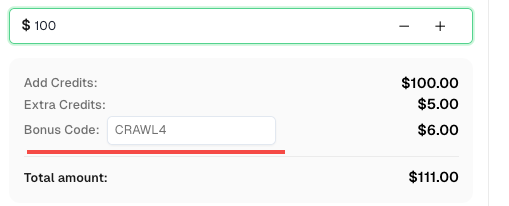
💡 Exclusive Bonus for Crawl4AI Integration Users:
To celebrate this integration, we’re offering an exclusive 6% bonus code —CRAWL4for all CapSolver users who register through this tutorial.
Simply enter the code during recharge in Dashboard to receive an extra 6% credit instantly.
Integration Method 1: CapSolver API Integration with Crawl4AI
The API integration method provides precise control and is often preferred for its flexibility. It involves using CapSolver to obtain the Turnstile token and then injecting this token into the appropriate input element on the target webpage using Crawl4AI's js_code functionality.
How it Works:
- Initial Navigation: Crawl4AI accesses the target web page containing the Cloudflare Turnstile.
- Obtain Turnstile Token: In your Python script, call CapSolver's API using their SDK, specifying the
AntiTurnstileTaskProxyLesstype along with thewebsiteURLandwebsiteKey. CapSolver will return the necessary Turnstile token. - Inject Token and Submit: Utilize Crawl4AI's
js_codeparameter withinCrawlerRunConfigto inject the obtained token into theinputelement namedcf-turnstile-response. After injection, simulate a click on the submit button or trigger the next action that relies on the token. - Continue Operations: With the valid Turnstile token correctly placed, Crawl4AI can proceed with subsequent actions, effectively bypassing the Cloudflare Turnstile.
Example Code: API Integration for Cloudflare Turnstile
The following Python code demonstrates how to integrate CapSolver's API with Crawl4AI to solve Cloudflare Turnstile. This example targets the Cloudflare Turnstile demo page.
python
import asyncio
import capsolver
from crawl4ai import *


# TODO: set your config
# Docs: https://docs.capsolver.com/guide/captcha/cloudflare_turnstile/
api_key = "CAP-xxxxxxxxxxxxxxxxxxxxx"                       # your api key of capsolver
site_key = "0x4AAAAAAAGlwMzq_9z6S9Mh"                       # site key of your target site
site_url = "https://clifford.io/demo/cloudflare-turnstile"  # page url of your target site
captcha_type = "AntiTurnstileTaskProxyLess"                 # type of your target captcha
capsolver.api_key = api_key


async def main():
    browser_config = BrowserConfig(
        verbose=True,
        headless=False,
        use_persistent_context=True,
    )

    async with AsyncWebCrawler(config=browser_config) as crawler:
        await crawler.arun(
            url=site_url,
            cache_mode=CacheMode.BYPASS,
            session_id="session_captcha_test"
        )

        # get turnstile token using capsolver sdk
        solution = capsolver.solve({
            "type": captcha_type,
            "websiteURL": site_url,
            "websiteKey": site_key,
        })
        token = solution["token"]
        print("turnstile token:", token)

        js_code = """
            document.querySelector(\'input[name="cf-turnstile-response"]\').value = \'"""+token+"""\';
            document.querySelector(\'button[type="submit"]\').click();
        """

        wait_condition = """() => {
            const items = document.querySelectorAll(\'h1\');
            return items.length === 0;
        }"""

        run_config = CrawlerRunConfig(
            cache_mode=CacheMode.BYPASS,
            session_id="session_captcha_test",
            js_code=js_code,
            js_only=True,
            wait_for=f"js:{wait_condition}"
        )

        result_next = await crawler.arun(
            url=site_url,
            config=run_config,
        )
        print(result_next.markdown)


if __name__ == "__main__":
    asyncio.run(main())
Code Analysis:
- CapSolver SDK Call: The
capsolver.solvemethod is invoked withAntiTurnstileTaskProxyLesstype,websiteURL, andwebsiteKeyto retrieve the Turnstile token. This token is the solution provided by CapSolver. - JavaScript Injection (
js_code): Thejs_codestring contains JavaScript that locates theinputelement withname="cf-turnstile-response"on the page and assigns the obtained token to itsvalueproperty. Subsequently, it simulates a click on the submit button, ensuring the form is submitted with the valid Turnstile token. wait_forCondition: Await_conditionis defined to ensure Crawl4AI waits for a specific change on the page (e.g., the disappearance ofh1elements, indicating successful submission and navigation) before proceeding.
Integration Method 2: CapSolver Browser Extension Integration
CapSolver's browser extension provides a simplified approach for handling Cloudflare Turnstile, especially when leveraging its automatic solving capabilities within a persistent browser context managed by Crawl4AI.
How it Works:
- Persistent Browser Context: Configure Crawl4AI to use a
user_data_dirto launch a browser instance that retains the installed CapSolver extension and its configurations. - Install and Configure Extension: Manually install the CapSolver extension into this browser profile and configure your CapSolver API key. The extension can be set to automatically solve Turnstile challenges.
- Navigate to Target Page: Crawl4AI navigates to the webpage protected by Cloudflare Turnstile.
- Automatic Solving: The CapSolver extension, running within the browser context, detects the Turnstile challenge and automatically solves it. The token is then injected into the
cf-turnstile-responseinput field. - Proceed with Actions: Once the Turnstile is solved by the extension, Crawl4AI can continue with its scraping tasks, as the browser context will now have the necessary valid tokens for subsequent requests.
Example Code: Extension Integration for Cloudflare Turnstile (Automatic Solving)
This example demonstrates how Crawl4AI can be configured to use a browser profile with the CapSolver extension for automatic Cloudflare Turnstile solving.
python
import asyncio
import time

from crawl4ai import *


# TODO: set your config
user_data_dir = "/browser-profile/Default1" # Ensure this path is correctly set and contains your configured extension

browser_config = BrowserConfig(
    verbose=True,
    headless=False,
    user_data_dir=user_data_dir,
    use_persistent_context=True,
    proxy="http://127.0.0.1:13120", # Optional: configure proxy if needed
)

async def main():
    async with AsyncWebCrawler(config=browser_config) as crawler:
        result_initial = await crawler.arun(
            url="https://clifford.io/demo/cloudflare-turnstile", # Use the Cloudflare Turnstile demo URL
            cache_mode=CacheMode.BYPASS,
            session_id="session_captcha_test"
        )

        # The extension will automatically solve the CAPTCHA upon page load.
        # You might need to add a wait condition or time.sleep for the CAPTCHA to be solved
        # before proceeding with further actions.
        time.sleep(30) # Example wait, adjust as necessary for the extension to operate

        # Continue with other Crawl4AI operations after CAPTCHA is solved
        # For instance, check for elements or content that appear after successful verification
        # print(result_initial.markdown) # You can inspect the page content after the wait


if __name__ == "__main__":
    asyncio.run(main())
Code Analysis:
user_data_dir: This parameter is essential for Crawl4AI to launch a browser instance that retains the installed CapSolver extension and its configurations. Ensure the path points to a valid browser profile directory where the extension is installed.- Automatic Solving: The CapSolver extension is designed to automatically detect and solve Cloudflare Turnstile challenges. A
time.sleepis included as a general placeholder to allow the extension to complete its background operations. For more robust solutions, consider using Crawl4AI'swait_forfunctionality to check for specific page changes that indicate successful Turnstile resolution.
Conclusion
The integration of Crawl4AI with CapSolver provides a robust and efficient solution for bypassing Cloudflare Turnstile, significantly enhancing the reliability of web scraping operations. Whether you prefer the precise control of API integration or the streamlined automation offered by the browser extension, both methods ensure that Cloudflare Turnstile no longer impedes your data collection goals.
By automating Turnstile resolution, developers can focus on extracting valuable data, confident that their crawlers will navigate protected websites seamlessly. This synergy between Crawl4AI's advanced crawling capabilities and CapSolver's robust anti-bot technology marks a significant step forward in automated web data extraction.
Frequently Asked Questions (FAQ)
Q1: What is Cloudflare Turnstile and how does it differ from traditional CAPTCHAs?
A1: Cloudflare Turnstile is a CAPTCHA alternative that verifies legitimate users without intrusive challenges. Unlike traditional CAPTCHAs that often require users to solve puzzles, Turnstile runs non-interactive JavaScript challenges in the background, aiming for a seamless user experience while effectively distinguishing humans from bots.
Q2: Why is it challenging to scrape websites protected by Cloudflare Turnstile?
A2: Turnstile's invisible nature, reliance on dynamic JavaScript execution, and the need for a valid token to be injected into a specific input field (cf-turnstile-response) make it difficult for automated web scrapers. It assesses browser characteristics and user behavior, often blocking requests that don't mimic genuine human interaction.
Q3: How does CapSolver assist in bypassing Cloudflare Turnstile?
A3: CapSolver provides specialized services, such as AntiTurnstileTaskProxyLess, to solve Cloudflare Turnstile challenges. It obtains the necessary Turnstile token, which can then be injected by Crawl4AI into the target webpage to bypass the protection.
Q4: What are the two main integration methods for Cloudflare Turnstile with Crawl4AI and CapSolver?
A4: The two main methods are API integration, where CapSolver's API is called to get the token which is then injected via Crawl4AI's js_code, and Browser Extension integration, where the CapSolver extension automatically handles the Turnstile challenge within a persistent browser context.
Q5: What are the benefits of integrating Crawl4AI and CapSolver for Cloudflare Turnstile?
A5: This integration leads to automated Turnstile handling, improved crawling efficiency, enhanced crawler robustness against anti-bot mechanisms, and reduced operational costs by minimizing manual intervention, ensuring uninterrupted web data extraction.
References
- Crawl4AI Official Documentation
- CapSolver Official Documentation
- CapSolver: Cloudflare Turnstile documentation
- [Overall Crawl4ai CapSolver Integration](https://www.capsolver.com/blog/Partners/crawl4ai-capsolver
More
CloudflareApr 29, 2026
What Is a Cloudflare Challenge? How It Works & When It Appears
Learn what a Cloudflare Challenge is, how Cloudflare detects bots using JavaScript and machine learning, and why challenges appear during browsing. Complete guide for 2026.

CloudflareApr 21, 2026
Cloudflare Turnstile Verification Failed? Causes, Fixes & Troubleshooting Guide
Learn how to fix the "failed to verify cloudflare turnstile token" error. This guide covers causes, troubleshooting steps, and how to defeat cloudflare turnstile with CapSolver.
