How to Solve "Unusual Traffic from Your Computer Network"

Ethan Collins
Pattern Recognition Specialist

Introduction: Understanding Google's Security Mechanism
When using Google Search daily, you might suddenly encounter a frustrating prompt: "Our systems have detected unusual traffic from your computer network." This message is usually accompanied by a reCAPTCHA challenge, asking you to prove you are human and not an automated program (bot). Google implements this security measure to prevent automated systems (like crawlers, malware) from overloading or abusing the search engine, thereby protecting the integrity and quality of search results. However, in some cases, this mechanism might incorrectly affect normal users, severely disrupting your search experience.
This article will deeply analyze the root causes leading to this "unusual traffic" warning, provide a detailed, step-by-step solution set, and discuss how to use professional tools to handle persistent Captcha challenges, ensuring your search activities are smooth and uninterrupted.
🔍 Part One: Root Causes of the Unusual Traffic Warning
Google's algorithms continuously monitor data request patterns from a single IP address or network. When these patterns deviate from normal human behavior, the system triggers a security verification.
Here are several main reasons why Google might flag your network traffic as unusual (Original content unchanged):
- Google Unusual Traffic Captcha: Quick, repeated searches or heavy traffic from a single IP address can trigger a captcha to verify that the traffic is generated by a human, not a robot.
- Google Search Captcha Unusual Traffic: Using search queries that are typically associated with automated bots could result in a captcha challenge.
- Google Captcha Unusual Traffic: This can also be displayed if network traffic patterns are atypical, like using VPNs or if network security is compromised.
- IPv4 Google Captcha Virus: Malware or a virus on your computer might be sending automated traffic to Google, often without your knowledge.
- Google Suspicious Activity Captcha: Google might suspect that your computer or network has been compromised, prompting a captcha to ensure that requests are legitimate.
In addition to the direct causes above, several deeper network and environmental factors might lead to you being falsely flagged:
| Unusual Traffic Trigger | Detailed Explanation | Scope of Impact |
|---|---|---|
| Shared IP Address | The IP address you are using (especially in large organizations, schools, or when using certain VPN/proxy services) might be shared by a large number of users. If one of them performs unusual operations, the entire IP range can be affected. | Broad (Entire Network) |
| Web Crawling/Scraping | If you are running any form of web crawler, data scraping tool, or automation script on the same network, even if benign, it might be identified by Google as unusual traffic. | Concentrated (Specific Device) |
| Browser Fingerprint Anomaly | Certain browser extensions or settings (like privacy tools) might cause your browser fingerprint (User Agent, screen resolution, etc.) to change frequently or be missing, which Google views as "atypical" behavior. | Personal (Browser Settings) |
| ISP Routing Issues | In rare cases, your Internet Service Provider's (ISP) routing configuration might make your requests appear to come from multiple unrelated geographical locations, thus triggering the warning. | Rare (ISP Level) |
🛠️ Part Two: Step-by-Step Solutions for "Unusual Traffic"
To resolve this issue, you need to troubleshoot and adjust your personal device, network environment, and behavioral patterns.
Here are the steps you can take to resolve the issue (Original content unchanged):
- Perform a Malware Scan: Ensure your computer is free of malware or viruses that could be sending automated queries to Google.
- Reset Your Modem or Router: This can change your IP address and potentially resolve the issue if it's IP-related.
- Disable VPN or Proxy Services: These can cause traffic that appears automated to Google's systems.
- Limit Your Search Speed: Try to avoid sending too many search queries in a short amount of time.
- Check for Browser Extensions: Some extensions may send automated traffic to Google. Try searching in incognito mode to see if the problem persists.
If the basic steps above fail to resolve the issue, try the following advanced troubleshooting methods:
- Check and Clear Browser Cache and Cookies:
- Google might flag your IP address or session within your browser cookies. Clear all Google-related cookies and cache, then restart your browser.
- SEO Tip: Ensure your browser's User-Agent is up-to-date and avoid using outdated or tampered User-Agents.
- Use Google's Official Tool to Report:
- If the problem persists and you are certain you are a normal user, you can visit Google's official help page [1] to find a link to report unusual traffic. While not guaranteed to solve it immediately, it can help Google improve its detection algorithms.
- Test by Switching IPv6/IPv4:
- In some network environments, Google's traffic monitoring for IPv6 addresses might be stricter. Try temporarily disabling IPv6 in your router settings and only use IPv4 for testing, or vice versa.
- Contact Your Network Administrator or ISP:
- If you encounter the issue on a corporate or school network, contact the network administrator to confirm if there is centralized crawling activity or a network configuration problem. If at home, contact your ISP to ask if your IP address has been blacklisted.
🚀 Part Three: Dealing with Persistent Captcha Challenges
If you are a professional user who needs to perform large-scale data collection, market research, or automated testing, frequent Captcha verification can severely impact work efficiency.
If you've taken all the appropriate measures and are still facing the captcha issue,CapSolver can help. This service is designed to identify and solve Google captchas efficiently, allowing you to continue your work with minimal disruption.
How does CapSolver work?
-
Automated Detection: CapSolver's system continuously monitors for Google's "unusual traffic" and reCAPTCHA challenges as they appear, triggering a solve request automatically instead of waiting for a script to fail or time out.
-
Quick Resolution: Most reCAPTCHA challenges are resolved in under 10 seconds, so an automated browsing session keeps moving instead of stalling on a single verification screen — even when the same script hits this error repeatedly across a large batch of requests.
-
Broad Captcha Recognition: Beyond Google's own reCAPTCHA v2 and v3, CapSolver also handles Cloudflare Turnstile and Challenge, and AWS WAF — the other verification systems teams doing large-scale web scraping or market research typically run into on the same set of target sites, so there's no need to switch providers mid-project.
Redeem Your CapSolver Bonus Code
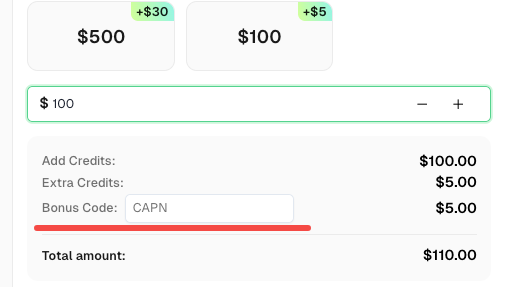
Don’t miss the chance to further optimize your operations! Use the bonus code CAPN when topping up your CapSolver account and receive an extra 5% bonus on each recharge, with no limits. Visit the CapSolver to redeem your bonus now!
With capsolver, you can mitigate the annoyance of repeated captcha prompts and focus on your online tasks.
For users or developers looking to improve website rankings through SEO, understanding Google's anti-crawling mechanism is crucial.
| Strategy Dimension | Goal | Implementation Key Points |
|---|---|---|
| Content Completeness | Increase the article's authority and depth, attracting long-tail keyword traffic. | Ensure the article covers all aspects: "Causes," "Solutions," "Prevention," and "Professional Tools." |
| Keyword Placement | Optimize the density and position of core keywords (e.g., "Google Unusual Traffic," "reCAPTCHA Solution"). | Naturally integrate keywords into the title, H2/H3 tags, introduction, and conclusion. |
| User Experience (UX) | Reduce bounce rate and increase time on page. | Use clear formatting, tables, and segmentation to help users quickly find the information they need. |
| Internal Linking | Guide users to other related articles on the site, building website authority. | Add links within the article pointing to other relevant technical articles or product pages. |
💡 Conclusion and Outlook
While Google's protection measures are essential for safeguarding the integrity of search results, they can sometimes hinder the user experience. By following the steps mentioned above and using CAPSOLVER, you can effectively manage and overcome the "Unusual traffic from your computer network" barrier.
The key to solving Google's "unusual traffic" problem lies in understanding the security logic behind it. For regular users, cleaning up devices and adjusting network settings should suffice; however, for professionals relying on automation tools, choosing a specialized service like CapSolver is an efficient solution to ensure uninterrupted workflow. With the comprehensive guide provided in this article, you can not only resolve the current Captcha annoyance but also better optimize your network behavior to avoid triggering Google's security mechanism in the future.

